
To view bandwidth usage in Webuzo, you can access the information through the Admin Panel to see all users or the User Panel for specific account details.
View Bandwidth Usage from the Admin Panel
The Admin Panel provides a complete overview of the bandwidth used by all domains hosted on the server.
Steps:
1. Log in to the Webuzo Admin Panel.
2. Navigate to Home > Users > View Bandwidth Usage.
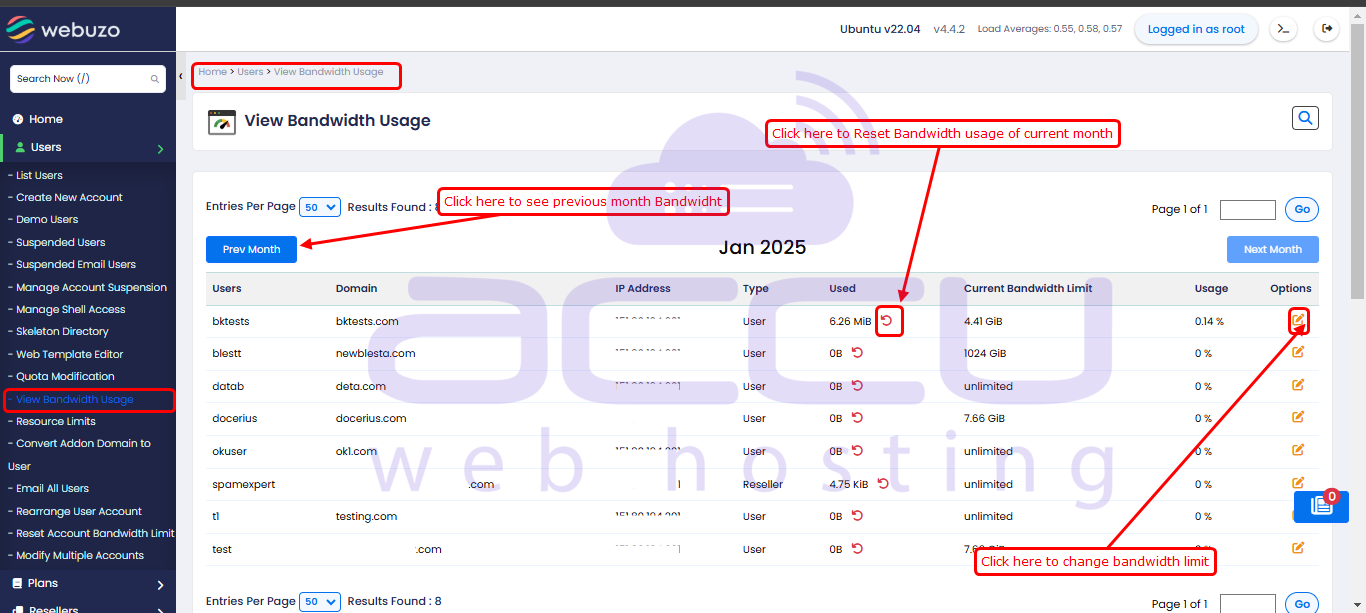
3. The View Bandwidth Usage page will display the bandwidth details for all user accounts.
Bandwidth Information Displayed:
The following information is available on the page:
-
User – The username associated with each domain.
-
Used – The amount of bandwidth currently consumed.
-
Limit – The maximum bandwidth limit assigned to the account.
-
Usage (%) – The percentage of the allocated bandwidth that has been used.
You can use this information to monitor bandwidth consumption across all hosted accounts and identify users who are approaching their assigned bandwidth limits.


