Sometimes we may need to reboot the server for installation or configuration. So, in such a situation, we must know how to reboot our server from the WHM.
In this quick tutorial, we will show you how you can reboot the server from WHM.
Step 1: Log in to your WHM.
Step 2: Navigate to the search bar and search for System Reboot.
By searching System Reboot, you will see the following option to reboot the server. You can choose any option as per your requirement, but Graceful Server Reboot is recommended.
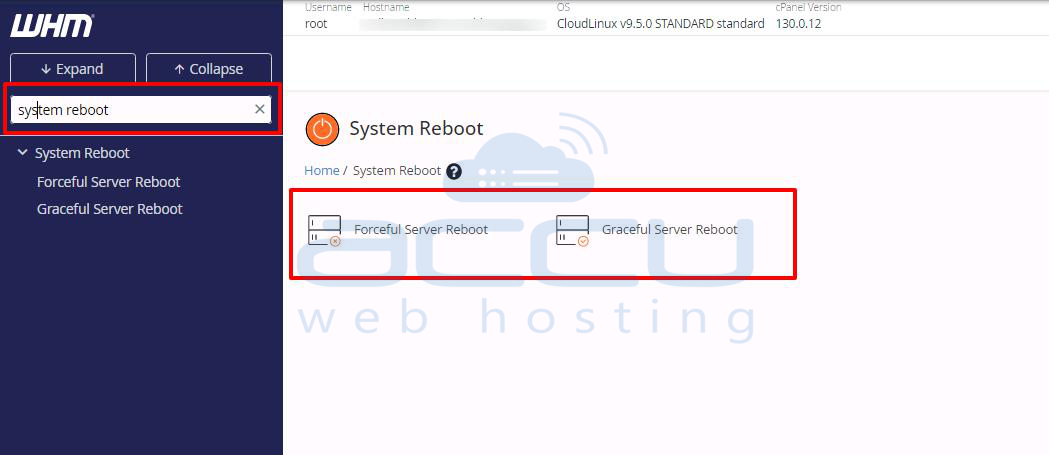
- Forceful Server Reboot -It will forcefully reboot your server and can cause data loss.
- Graceful Server Reboot - It will reboot the system without data loss, as the reboot will be queued. All the services will be stopped, normally allowing current operations to finish.
As we have mentioned, a graceful server reboot is recommended. In case of high load on the server, it might not be sufficient. Use the Forceful Server Reboot option only if the Graceful Reboot does not work.
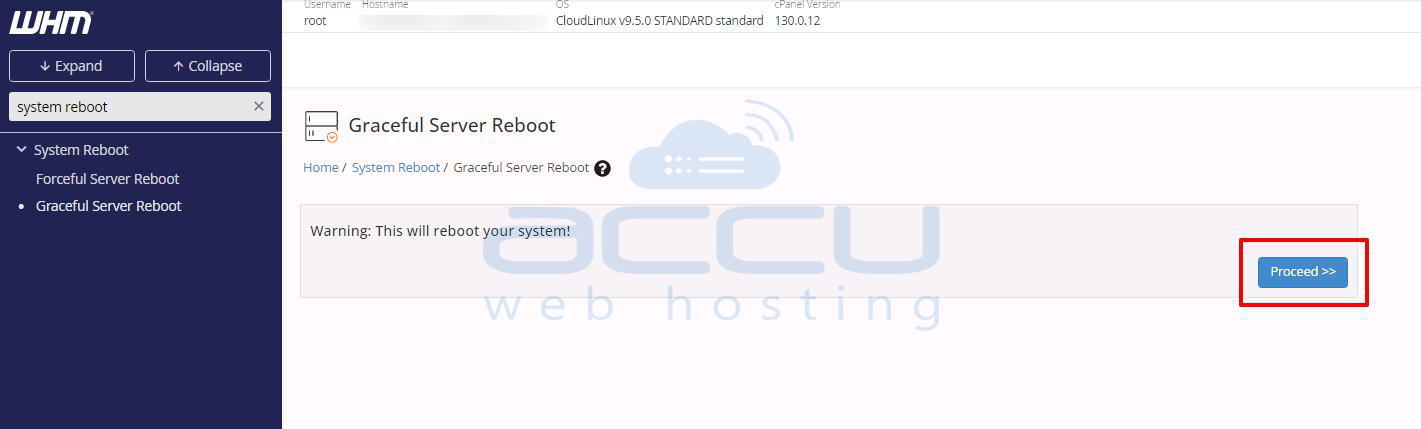
Step 3: By selecting the Graceful Server Reboot, you will be redirected to the page below. Click on Proceed, and that’s it, your server got rebooted.