
The WHM control panel allows individual users to reset their cPanel password without logging into their cPanel. This option is more useful when your customer (cPanel account user) forgets the cPanel password, and you don't want him/her to contact you for a password reset.
For security reasons, we keep this Tweak Setting disabled by default. If you want to facilitate your cPanel users with a cPanel password reset link, you can enable an option called Reset Password For cPanel Accounts from WHM as follows.
Note that, by enabling this option, you are allowing anyone to request a cPanel password reset. This is pretty much a security issue, and we recommend that you disable it.
Step 1: Log in to your WHM panel.
Step 2: In the left side menu panel, search for Tweak Settings. You will see the Tweak Settings option appearing; just click on it.
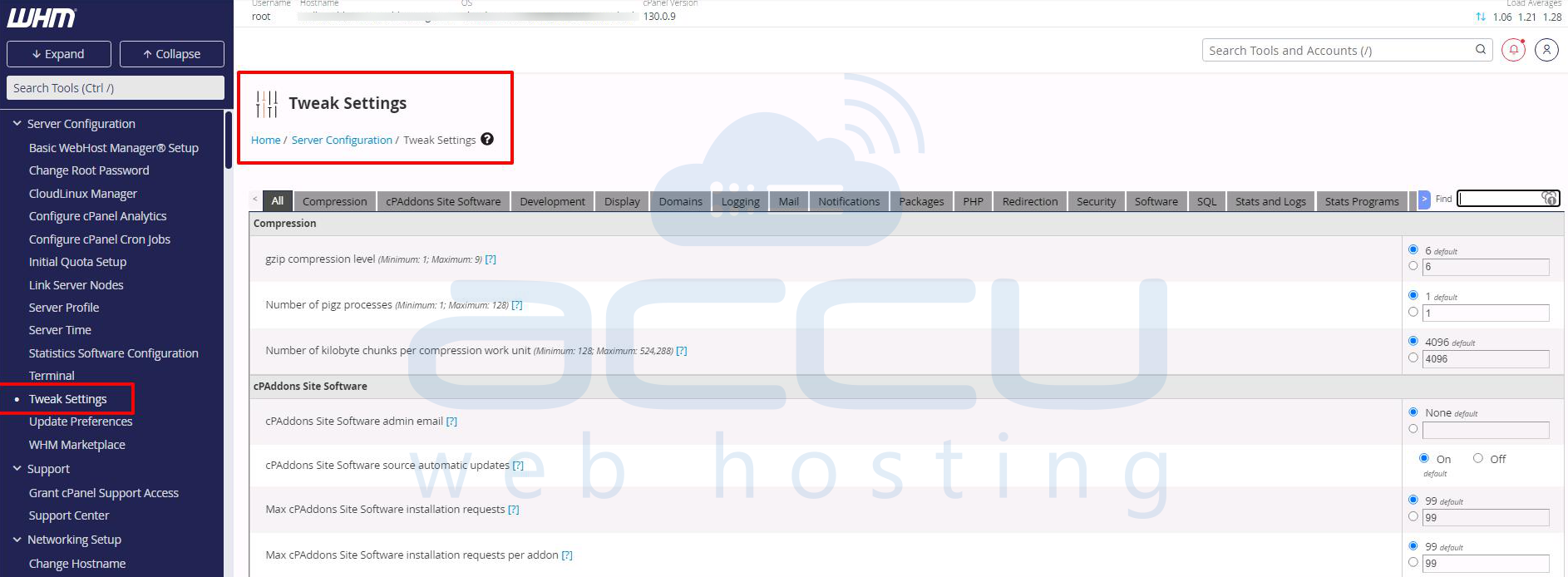
Step 3: On the next screen, type Reset Password for cPanel accounts in the Find box.
On the next screen, you will see an option Reset Password for cPanel accounts. By default, it will be set to Off. Select On and Save the settings.

Step 3: Now browse the cPanel URL https://Server-IP-Address:2083, you will see the Reset Password option appearing at the bottom of the login box.
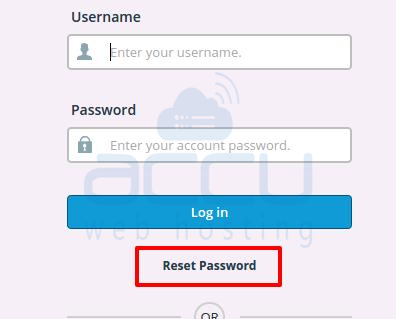
To reset the cPanel password, you just have to specify the cPanel username and click on the Reset Password button, and WHM will send the new password to the contact email address of that cPanel account.


