
Imagick is one of the most commonly required PHP extensions for websites that handle image processing. It provides powerful tools for creating, editing, and converting images directly from PHP scripts. Many CMS platforms and applications (such as WordPress, Magento, and Drupal) rely on Imagick to support advanced image manipulation features.
If you’re managing a cPanel/WHM server, enabling Imagick is straightforward. This guide explains the requirements, step-by-step installation, and verification process.
Why Use Imagick?
Imagick is a PHP extension that leverages the ImageMagick library. It allows developers and applications to:
- Resize, crop, and rotate images dynamically.
- Convert images between formats (e.g., JPEG to PNG).
- Apply filters, effects, and watermarks.
- Optimize images for web use.
Because of its capabilities, many modern PHP applications won’t function properly without Imagick installed.
Steps to Install Imagick in WHM/cPanel
Follow these steps to install Imagick via the cPanel interface:
Step 1: Log in to WHM
Access WHM using your root credentials: https://your-server-ip:2087
Step 2: Navigate to Module Installers
In the left-hand menu, go to: Software > Module Installers > PHP Pecl
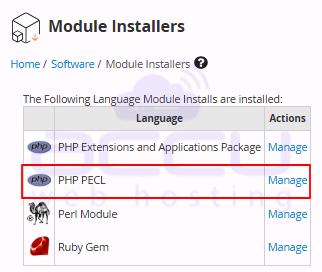
Step 3: Select the PHP PECL Module Installer
Click on the Manage button next to PHP Pecl.
Step 4: Search for Imagick
In the search bar, type Imagick. Click Go to display the module.
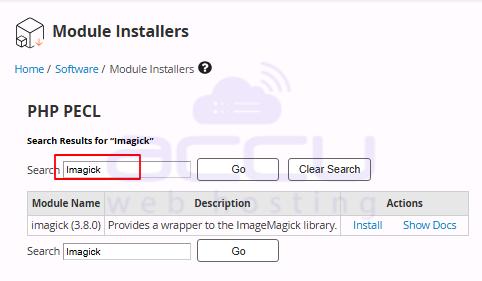
Step 5: Install Imagick
Click on the Install button. WHM will automatically download and install the Imagick extension.
Once the process completes, you’ll see a confirmation message showing that Imagick is installed.
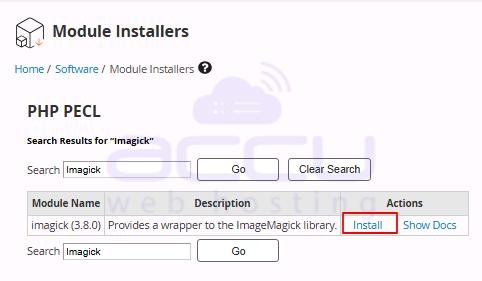
How to Verify Imagick Installation
To confirm that Imagick is working correctly:
Step 1: Log in to cPanel for one of your domains.
Step 2: Open the Select PHP Version tool (under Software).
Step 3: Check the list of installed extensions — Imagick should appear.
Alternatively, create a phpinfo.php file with the following code:
<?php

phpinfo();

?>
Open the file in your browser (yourdomain.com/phpinfo.php) and search for Imagick. If installed, you’ll see detailed information about the extension.
Conclusion:
Installing Imagick on WHM/cPanel is a quick process, but it’s an essential step for websites that require advanced image processing. By enabling this extension, you ensure compatibility with popular CMS platforms and unlock a wide range of image manipulation features.
If you face issues during installation, check PHP version compatibility, confirm extension settings in WHM, or consult your hosting provider for assistance.


