
Modern websites and web applications are constantly targeted by cyberattacks such as SQL Injection, Cross-Site Scripting (XSS), brute-force attacks, bot traffic, and DDoS attempts. Traditional network firewalls protect servers at the network layer, but they cannot fully secure web applications from application-level attacks.
This is where a Web Application Firewall (WAF) becomes essential. A WAF acts as a security layer between website visitors and the web server. It analyzes incoming HTTP/HTTPS requests, filters malicious traffic, and blocks suspicious activities before they reach the application.
What is a WAF?
A Web Application Firewall (WAF) is a security solution designed specifically to protect web applications and websites from cyber threats. Unlike traditional firewalls that monitor ports and protocols, a WAF inspects HTTP requests, HTTPS traffic, Cookies, URL parameters, Form submissions, API requests, User agents, and File uploads. The WAF identifies malicious patterns and blocks harmful requests in real time.
How Does WAF Protection Work?
The WAF sits between the client and the web server.
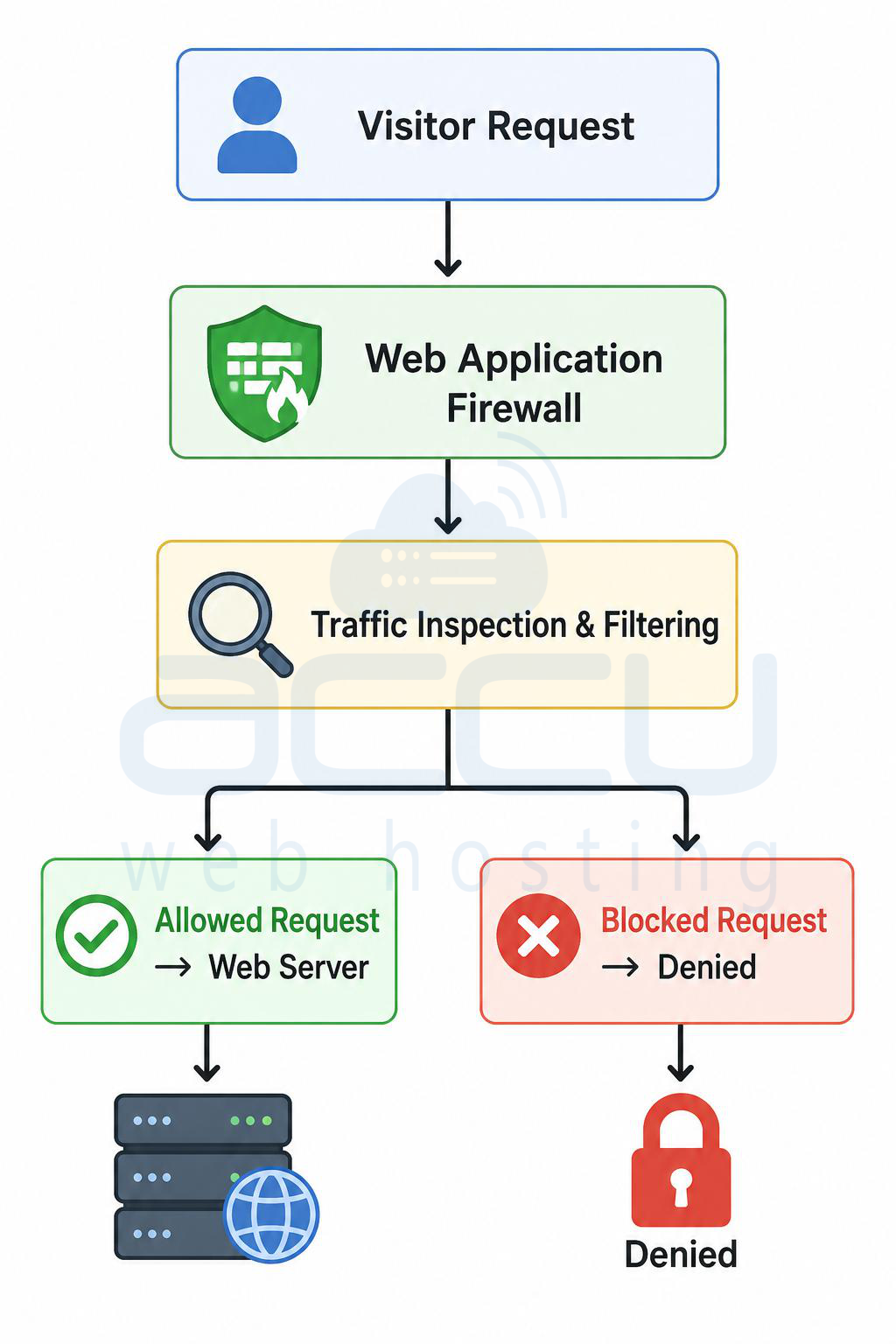
The firewall continuously analyzes requests using predefined security rules and threat intelligence databases.
Main Functions of a WAF
1. Traffic Inspection: The WAF examines all incoming traffic before it reaches the hosting server. It checks for Suspicious payloads, Malicious scripts, Injection attempts, Abnormal request behavior and Known attack signatures.
2. Rule-Based Filtering: WAF uses security rules to identify malicious requests.
Example:
If a URL contains:
' OR 1=1 --
The WAF recognizes it as a potential SQL injection attack and blocks it immediately.
3. Behavioral Analysis: Modern WAFs also analyze user behavior. Examples, Too many login attempts, Rapid requests from one IP, Bot-like browsing patterns and Suspicious geographic locations.
This helps stop automated attacks and abusive traffic.
4. Real-Time Threat Blocking: When malicious activity is detected, the WAF can Block the IP address, Challenge users with CAPTCHA, Rate-limit requests, Deny access temporarily and Log attack details.
Types of Attacks Blocked by WAF
SQL Injection (SQLi): Attackers try to manipulate database queries.
Example:
SELECT * FROM users WHERE username='admin' OR '1'='1';
The WAF detects malicious SQL syntax and blocks the request.
Cross-Site Scripting (XSS): Attackers inject malicious JavaScript into web pages.
Example:
The WAF filters harmful scripts before execution.
Remote File Inclusion (RFI): Attackers attempt to load malicious external files onto the server.
The WAF blocks unauthorized file inclusion attempts.
Local File Inclusion (LFI): Prevents attackers from accessing sensitive system files like: /etc/passwd
or Windows files such as: C:\Windows\System32\
Brute Force Attacks: The WAF detects repeated login attempts and blocks abusive IP addresses.
DDoS and Bot Attacks: WAF solutions help reduce:
- HTTP flood attacks
- Bot traffic
- Spam requests
- Scraping activities
WAF Protection in Linux Hosting?
Linux hosting environments commonly use Apache, NGINX and LiteSpeed. WAF integration is highly popular in Linux hosting because of open-source security tools.
Common WAF Solutions for Linux Hosting
ModSecurity: ModSecurity is the most widely used WAF module for Linux servers. Supported with Apache, NGINX and LiteSpeed.
Features
- Real-time traffic filtering
- OWASP Core Rule Set support
- Custom security rules
- IP reputation blocking
- Request body inspection
OWASP Core Rule Set (CRS): OWASP provides predefined security rules for ModSecurity.
These rules detect SQL injection, XSS, RFI/LFI, Protocol violations and Malicious bots.
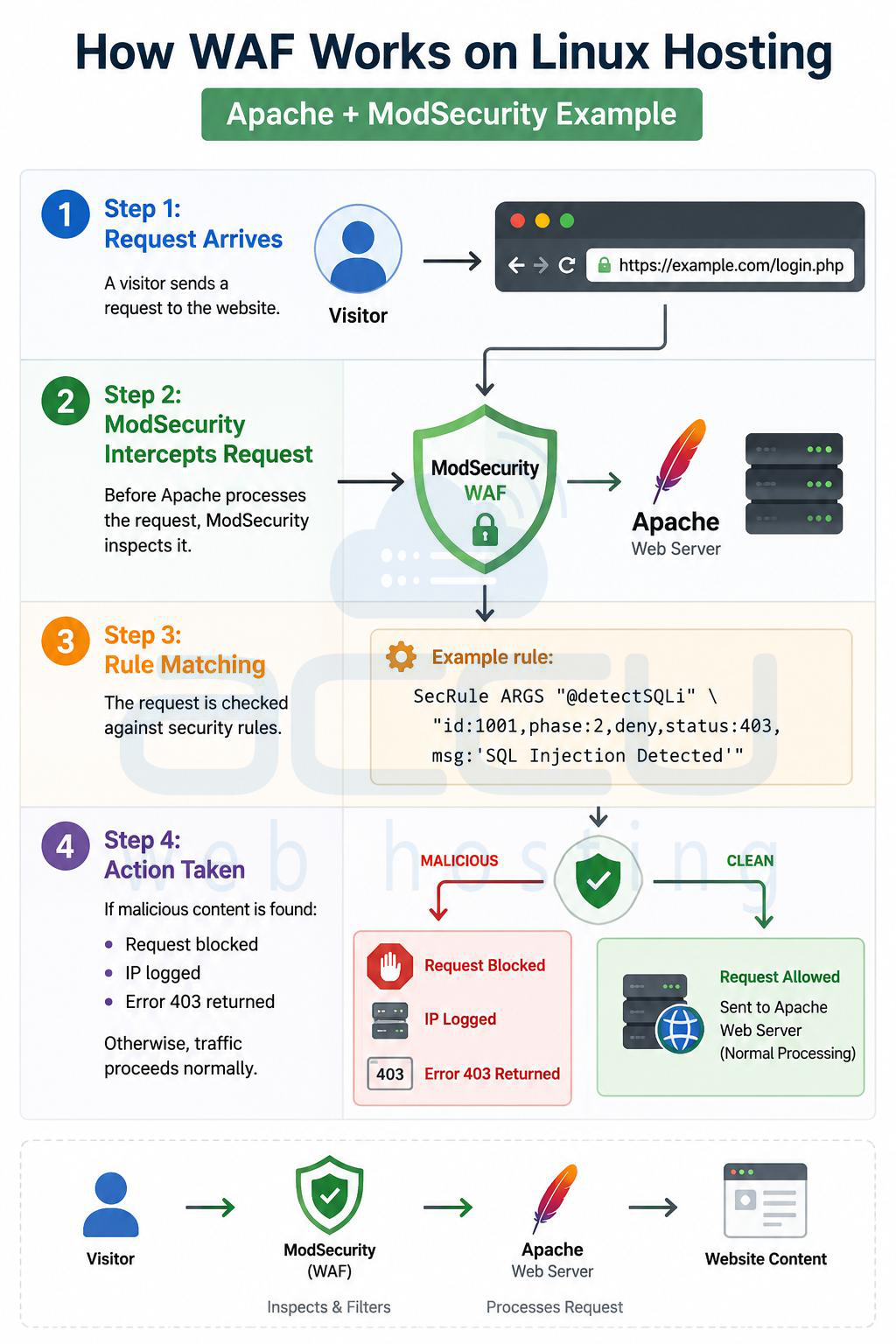
How WAF Works on Linux Hosting?
Apache + ModSecurity Example
Step 1: Request Arrives. A visitor sends a request to the website. https://example.com/login.php
Step 2: ModSecurity Intercepts Request. Before Apache processes the request, ModSecurity inspects it.
Step 3: Rule Matching. The request is checked against security rules.
Example rule: SecRule ARGS "@detectSQLi" \ "id:1001,phase:2,deny,status:403,msg:'SQL Injection Detected'"
Step 4: Action Taken. If malicious content is found Request blocked, IP logged or Error 403 returned. Otherwise, traffic proceeds normally.
WAF Protection in Windows Hosting
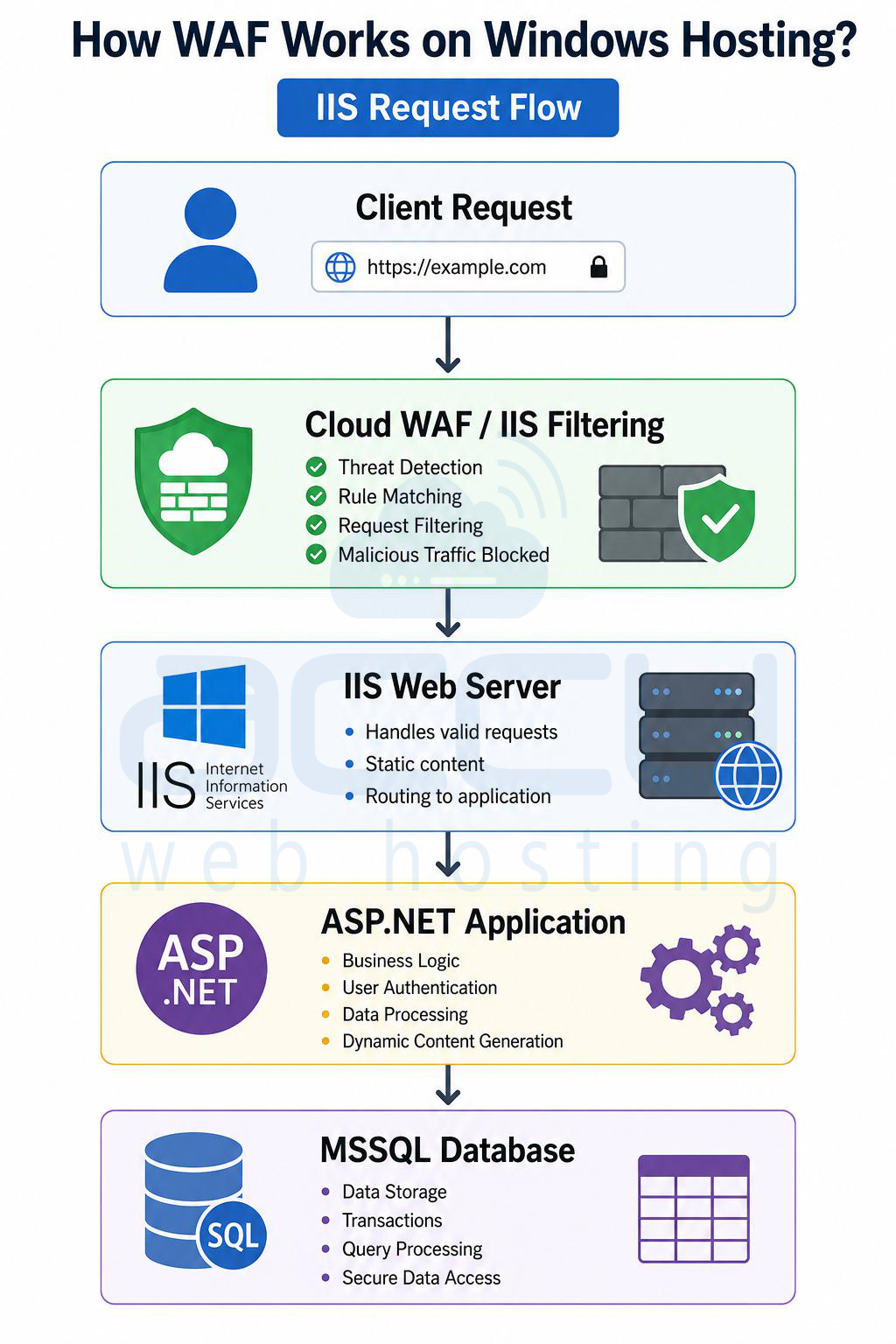
Windows hosting commonly uses IIS (Internet Information Services), ASP.NET applications and MSSQL databases. WAF implementation differs slightly from Linux environments.
Common WAF Solutions for Windows Hosting
IIS Request Filtering: Internet Information Services includes built-in request filtering features.
It helps block Dangerous URLs, Double escaping attacks, Long query strings and Malicious extensions.
ModSecurity for IIS: Although less common, ModSecurity can also integrate with IIS servers.
Cloud-Based WAF Services: Windows hosting environments often use external WAF providers such as Cloudflare, Sucuri, Imperva, and Akamai Technologies.
These services sit in front of IIS servers and filter traffic globally.
How WAF Works on Windows Hosting?
Advanced Protection in Windows Hosting
- ASP.NET Protection: WAF helps secure ASP.NET forms, APIs, Session handling and Authentication endpoints.
- MSSQL Injection Prevention: The firewall filters suspicious SQL keywords before they reach MSSQL databases.
- Bot and Rate Limiting: Cloud-based WAFs protect Windows hosting from Login abuse, API scraping and Credential stuffing.
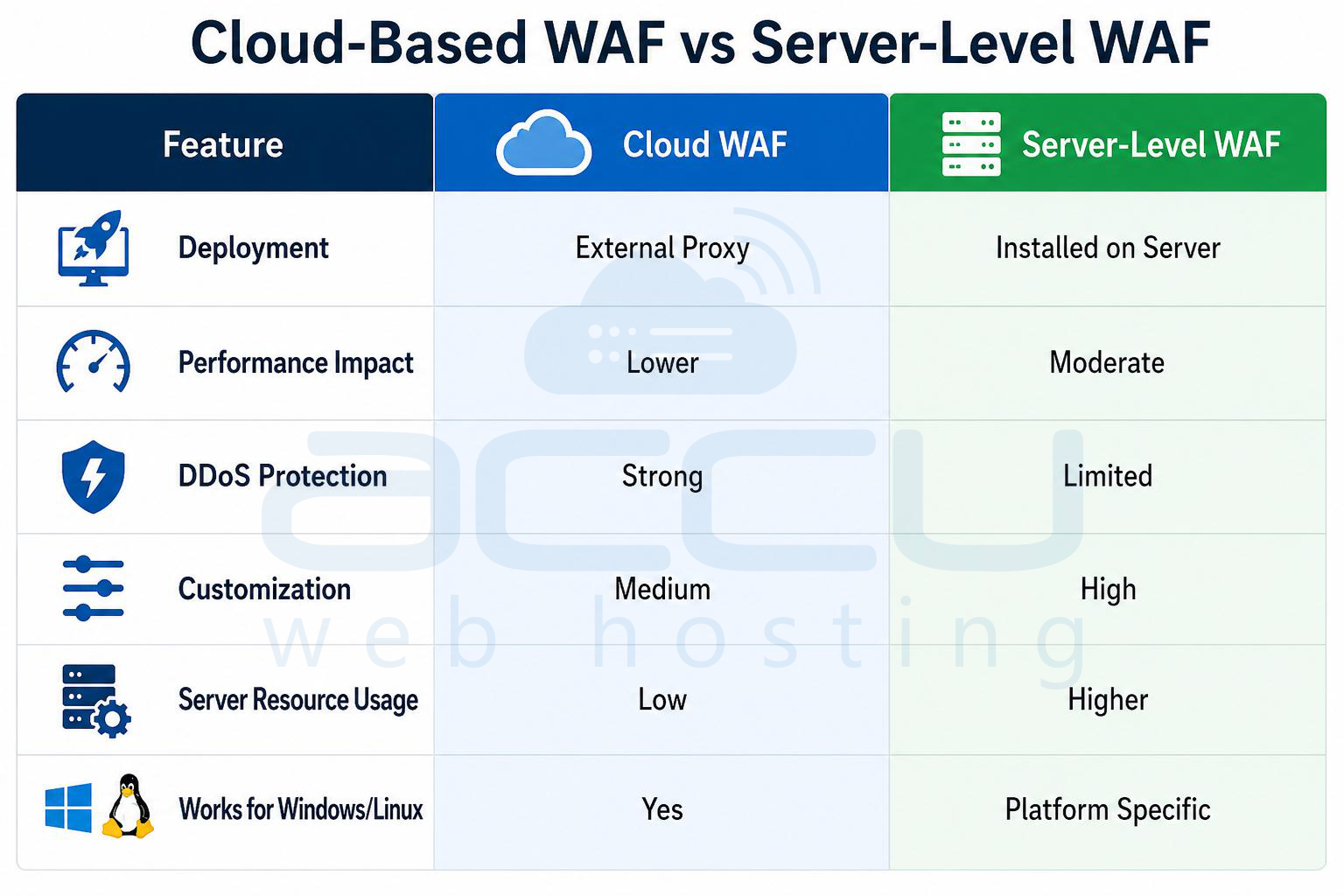
Cloud-Based WAF vs Server-Level WAF
Key Benefits of Using WAF
Improved Website Security: Protects against modern web threats.
- Compliance Support: Helps meet security standards such as PCI-DSS, GDPR and HIPAA.
- Reduced Server Load: Malicious traffic is blocked before reaching the application.
- Zero-Day Attack Mitigation: Virtual patching helps protect vulnerable applications before official fixes are applied.
- Better Uptime: Prevents attacks that could crash websites or overload servers.
Best Practices for WAF Protection
- Keep Rules Updated: Always use updated rule sets to detect new attack methods.
- Enable Logging and Monitoring: Monitor Blocked IPs, Attack patterns, False positives and Traffic anomalies.
- Combine WAF with Other Security Layers: WAF should work alongside Antivirus, Server firewall, IDS/IPS, Malware scanners and Secure coding practices.
- Use HTTPS Everywhere: Encrypted traffic ensures secure inspection and data transmission.
Common Limitations of WAF
Although highly effective, WAF is not a complete security solution. Limitations include: False positives, Advanced zero-day bypass techniques, Encrypted payload challenges and Application logic vulnerabilities. Proper server hardening and secure development remain essential.
Conclusion
A Web Application Firewall (WAF) is one of the most important security layers for modern hosting environments. In Linux hosting, WAF solutions like ModSecurity and OWASP CRS provide powerful open-source protection for Apache, NGINX, and LiteSpeed servers.
In Windows hosting, IIS request filtering and cloud-based WAF providers help secure ASP.NET applications and MSSQL databases from malicious traffic. Whether using Linux or Windows hosting, implementing a properly configured WAF significantly improves website security, stability, and uptime.


