
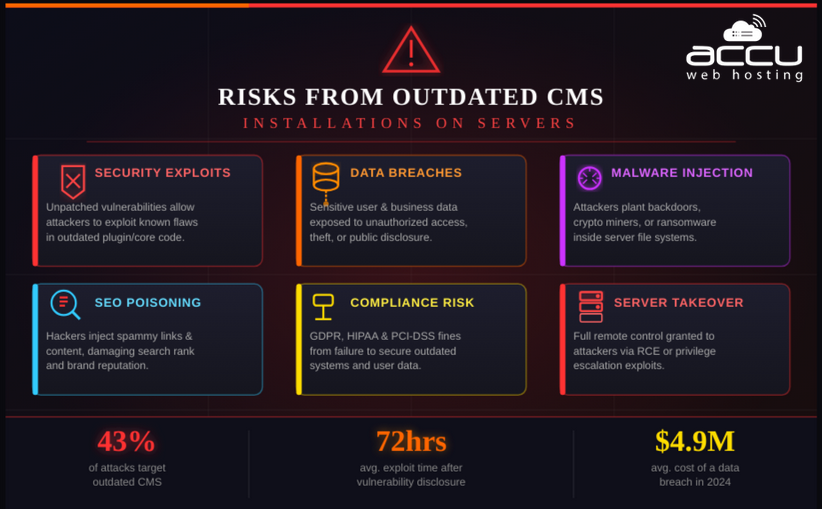
Risks Arise from Outdated CMS Installations on Servers
A Content Management System (CMS) is the core application that powers most modern websites. Platforms such as WordPress, Joomla, and Drupal allow organizations to publish and manage digital content without extensive programming knowledge. However, when a CMS installation is outdated, it becomes a critical security liability. Many security incidents on web servers occur not because of advanced hacking techniques, but because administrators fail to apply routine updates.
This article explains the security and operational risks of outdated CMS installations, how attackers exploit vulnerable CMS versions, business and compliance impacts, a structured remediation and prevention strategy.
Understanding CMS Architecture
A Content Management System (CMS) is a software platform that enables users to create, manage, and modify digital content on websites without requiring deep technical knowledge.
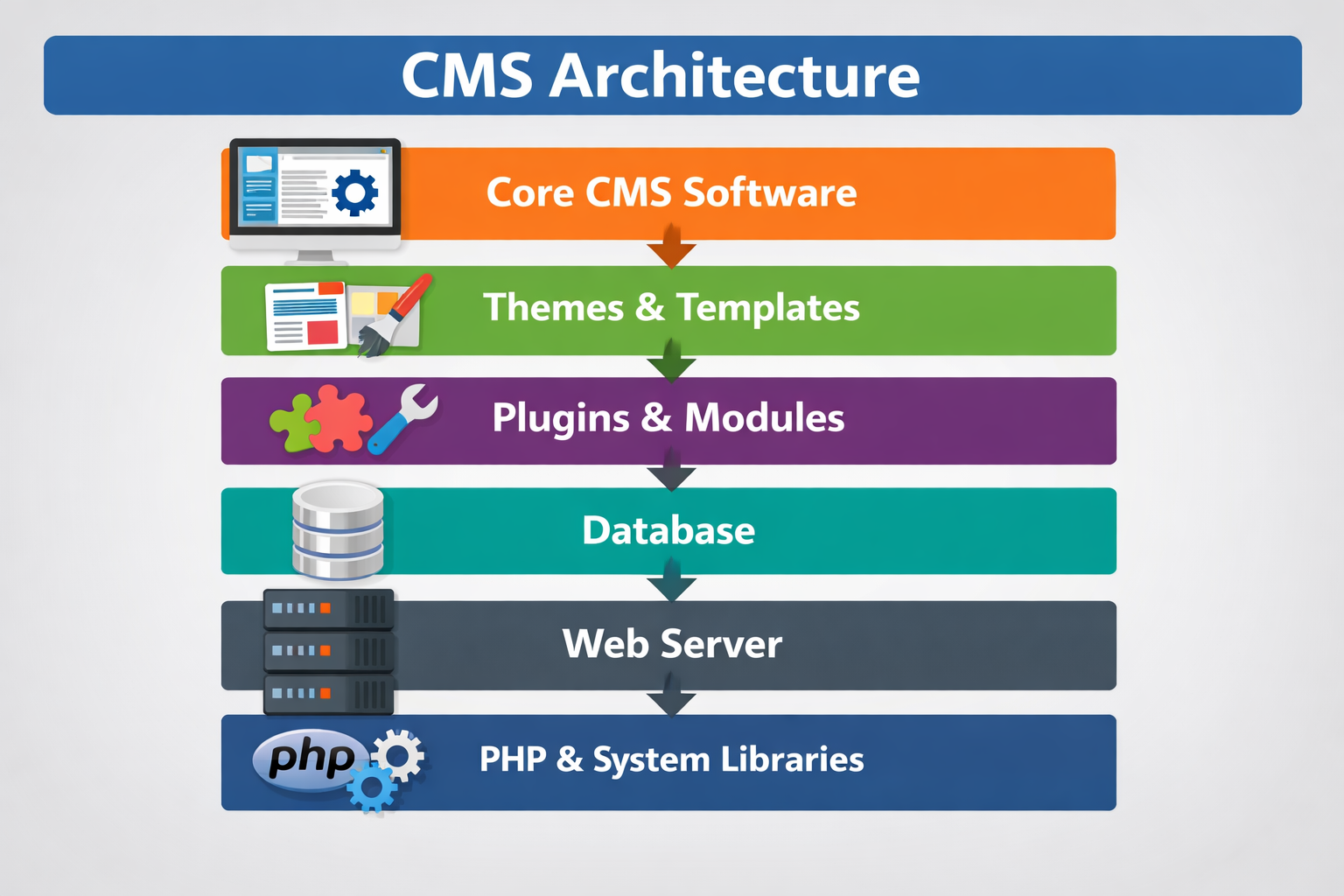
A typical CMS environment consists of several interdependent components:
1. Core CMS Software:
The core provides the basic functionality of the CMS, such as content creation, user management, and the rendering of pages. Examples include WordPress, Drupal, and Joomla. The core is frequently updated to patch security vulnerabilities and add new features.
2. Themes or Templates:
Themes control the visual presentation of a website. They define layout, styling, and front-end elements. Vulnerabilities in themes, such as insecure scripts or outdated frameworks, can serve as entry points for attackers.
3. Plugins or Modules:
Plugins extend the CMS’s functionality (e.g., SEO optimization, e-commerce features, or security enhancements). Each plugin may introduce additional code, and outdated or poorly coded plugins can be exploited independently of the CMS core.
4. Database:
CMS platforms rely on databases, such as MySQL, PostgreSQL, or MariaDB, to store content, user information, and configuration data. Vulnerabilities in the database layer, such as weak access controls or outdated versions, can lead to data breaches.
5. Web Server:
Popular web servers include Apache and Nginx, which handle HTTP requests and serve website content. Misconfigurations or outdated web server software can expose the site to attacks like directory traversal or buffer overflows.
6. PHP Runtime and System Libraries:
Most CMS platforms are built on PHP. The runtime, along with underlying system libraries, must be kept updated. Outdated versions can be exploited via known vulnerabilities, such as arbitrary code execution.
Security Note: Attackers do not need to compromise the entire CMS stack. A single outdated or misconfigured component can serve as a gateway to the rest of the system.
Security Risks of Outdated CMS Installations
Failing to update CMS components exposes websites to multiple, often severe, security risks.
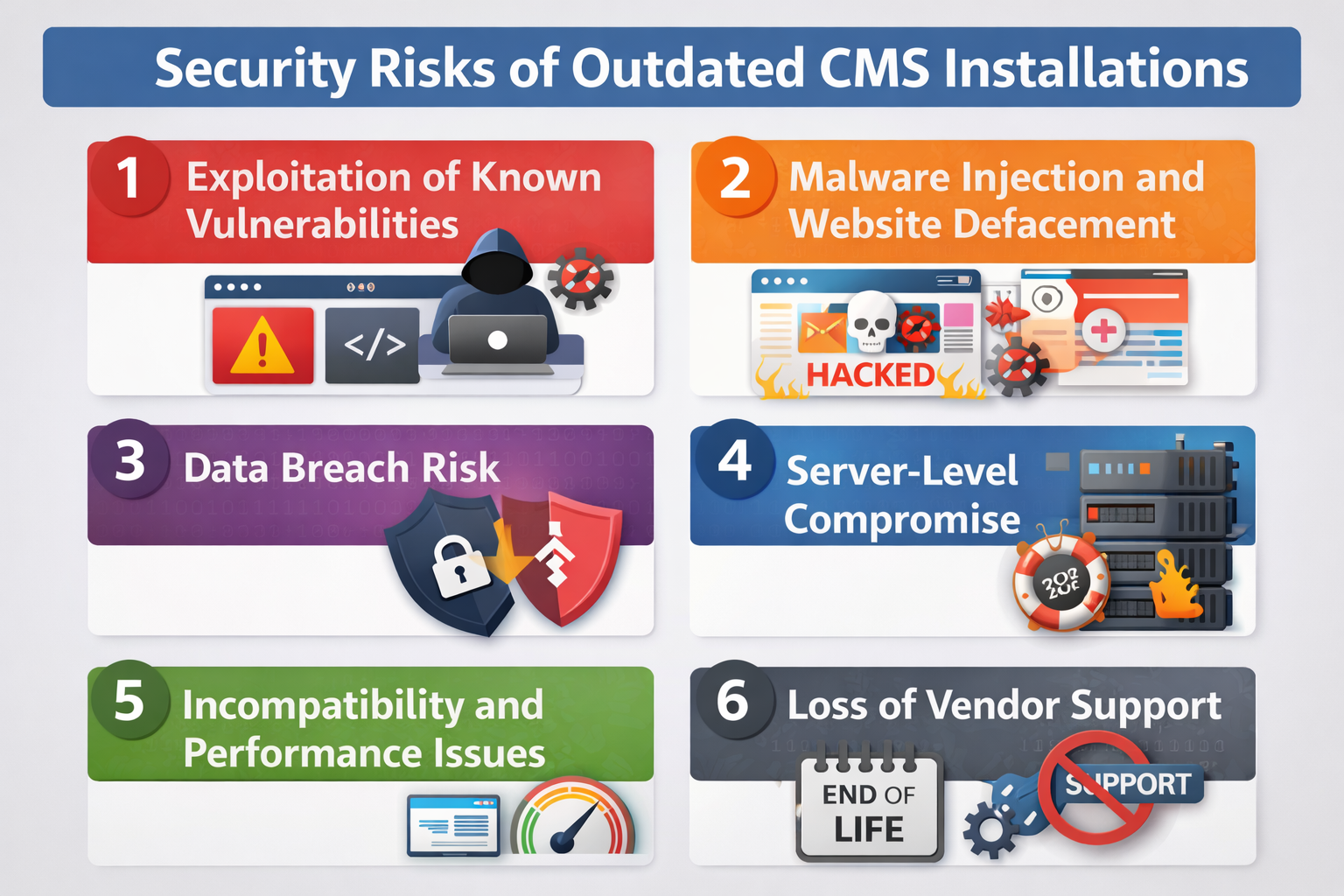
1 Exploitation of Known Vulnerabilities:
CMS vendors release security patches to mitigate vulnerabilities such as:
-
Remote Code Execution (RCE): Allows attackers to execute arbitrary code on the server.
-
SQL Injection: Manipulates the database via malicious queries.
-
Cross-Site Scripting (XSS): Injects scripts into web pages viewed by users.
-
Authentication Bypass: Allows unauthorized users to log in or access restricted pages.
-
Privilege Escalation: Enables attackers to gain higher-level permissions than intended.
Impact due to exploitation of Known Vulnerabilities including full server compromise, website defacement, theft of sensitive data and Injection of malware. Many of these attacks are automated, meaning even non-technical attackers can exploit unpatched systems using publicly available exploit scripts.
2 Malware Injection and Website Defacement:
Outdated CMS instances are common targets for malicious code injection, including:
-
Malicious JavaScript for phishing or browser exploits
-
SEO spam content to manipulate search rankings
-
Crypto-mining scripts that hijack server resources
-
Redirect scripts that lead visitors to malicious sites
Attackers often modify core CMS files or inject code into themes and plugins to maintain persistence.
Impact Malware Injection and Website Defacement including loss of customer trust, blacklisting by search engines and significant brand damage.
3 Data Breach Risk:
A compromised CMS can expose sensitive data, including customer personal information, login credentials, payment or financial data and admin account access
Websites handling personal or financial data may face regulatory consequences.
Compliance Impact:
-
Violations of GDPR (European Union)
-
Non-compliance with PCI-DSS (payment card industry standards)
-
Legal liability and financial penalties
4 Server-Level Compromise:
In severe scenarios, attackers may escalate a CMS compromise to gain full control over the server:
-
Root access on the server
-
Installation of backdoors for persistent access
-
Lateral movement to other systems within the network
-
Enrollment in botnets for malicious campaigns
Risk factors include: CMS running with excessive file permissions, lack of isolation between multiple websites on the same server, An outdated server operating system
5 Incompatibility and Performance Issues:
Running an outdated CMS can also lead to functional and operational problems including Incompatibility with new PHP versions or database engines, failure to work with modern security modules or APIs and broken site features, slow performance, or even complete website crashes. This affects user experience and can increase business losses over time.
6 Loss of Vendor Support:
Once a CMS version reaches End of Life (EOL) No security patches are released, No bug fixes or performance improvements are provided and Community support decreases or disappears. Operating EOL software is a high-risk decision, as it leaves websites entirely exposed to attacks.
The architecture of a CMS is modular, and each component, core, themes, plugins, database, server software, and runtime needs to be maintained and updated. Outdated installations introduce critical security vulnerabilities, performance issues, and compliance risks. Regular updates, monitoring, and security best practices are essential to protect a CMS-based website from exploitation.
How Attackers Exploit Outdated CMS?
Attackers follow a structured and often automated process to compromise outdated CMS installations. Modern attacks require minimal manual effort due to scanning bots and pre-built exploit frameworks.
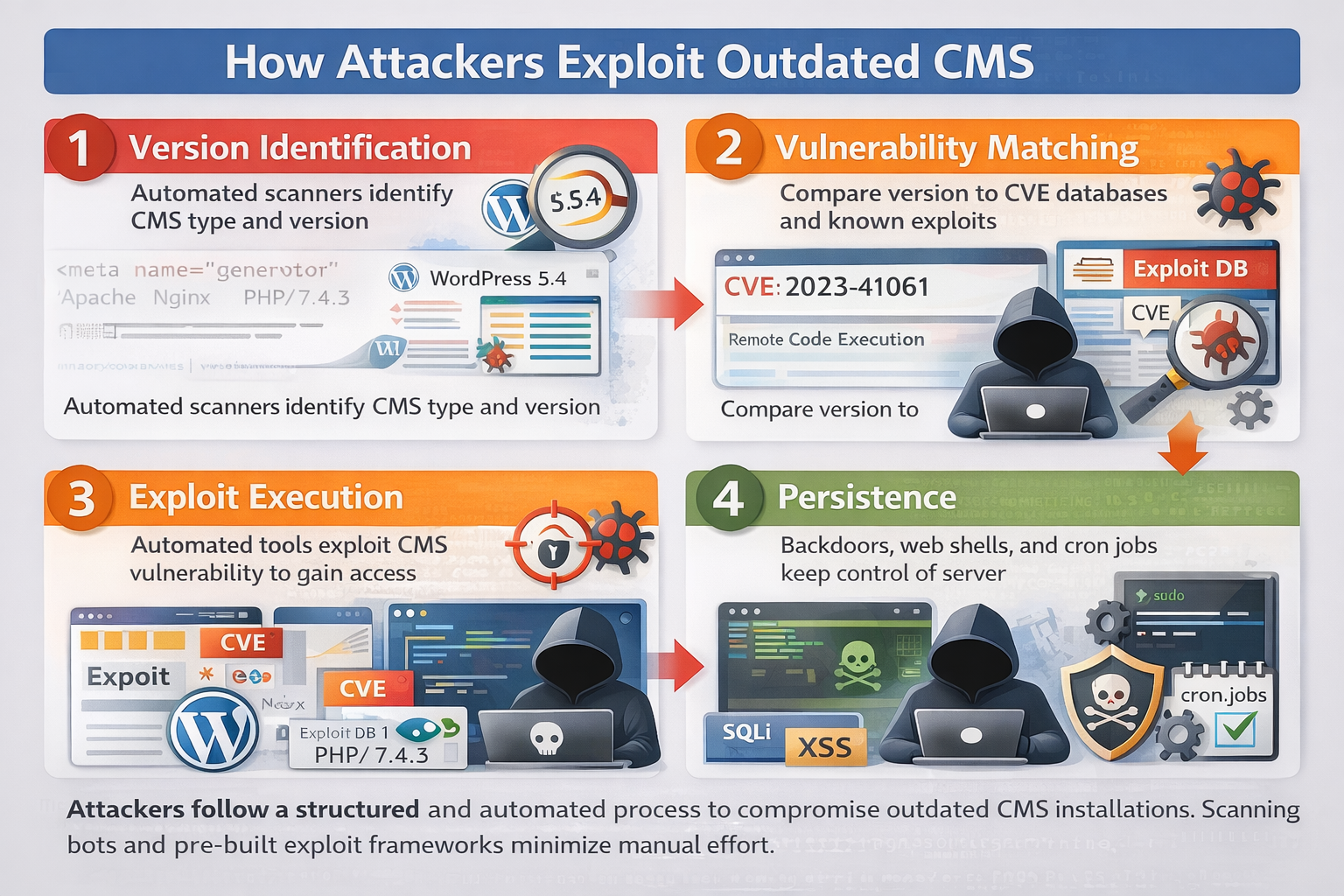
Step 1: The first step is reconnaissance. Attackers use automated scanners to detect CMS type (e.g., WordPress, Drupal, Joomla), exact version number, installed plugins or themes, server software (e.g., Apache, Nginx) and PHP version.
Version information can often be extracted from page source code, meta tags, publicly accessible files (e.g., readme files), HTTP response headers and REST API endpoints. Even if version numbers are hidden, fingerprinting techniques can identify the CMS based on file structures and behavior patterns. This phase is usually performed by bots continuously scanning thousands of websites.
Step 2: Once the CMS version is identified, attackers compare it against known vulnerability databases such as public CVE repositories, Exploit databases and Security advisories published by vendors.
If the site is running an outdated version with a known vulnerability (e.g., an unpatched Remote Code Execution flaw), attackers already have ready-made exploit scripts available. Because vulnerabilities are publicly documented after patches are released, unpatched systems become easy targets.
Step 3: After identifying a matching vulnerability, attackers deploy automated exploit kits to gain access. Common attack methods include:
-
Injection attacks (SQL Injection, XSS)
-
File upload exploits (uploading malicious PHP files disguised as images)
-
Authentication bypass
-
Privilege escalation
In many cases, exploitation takes only seconds once a vulnerable endpoint is found. Outcomes may include Admin dashboard access, Arbitrary code execution, Database extraction or Full file system access. Since these attacks are automated, even small or low-traffic websites are frequently targeted.
Step 4: After gaining access, attackers aim to maintain long-term control over the system. Common persistence mechanisms include:
-
Web shells (e.g., small PHP backdoor scripts hidden in theme files)
-
Creation of hidden administrator accounts
-
Injection of malicious code into core CMS files
-
Cron-based backdoors that reinstate malware if removed
-
Modifying .htaccess or configuration files
These backdoors allow attackers to regain access even if the visible malware is cleaned. The entire compromise process, from scanning to persistence, can occur within minutes.
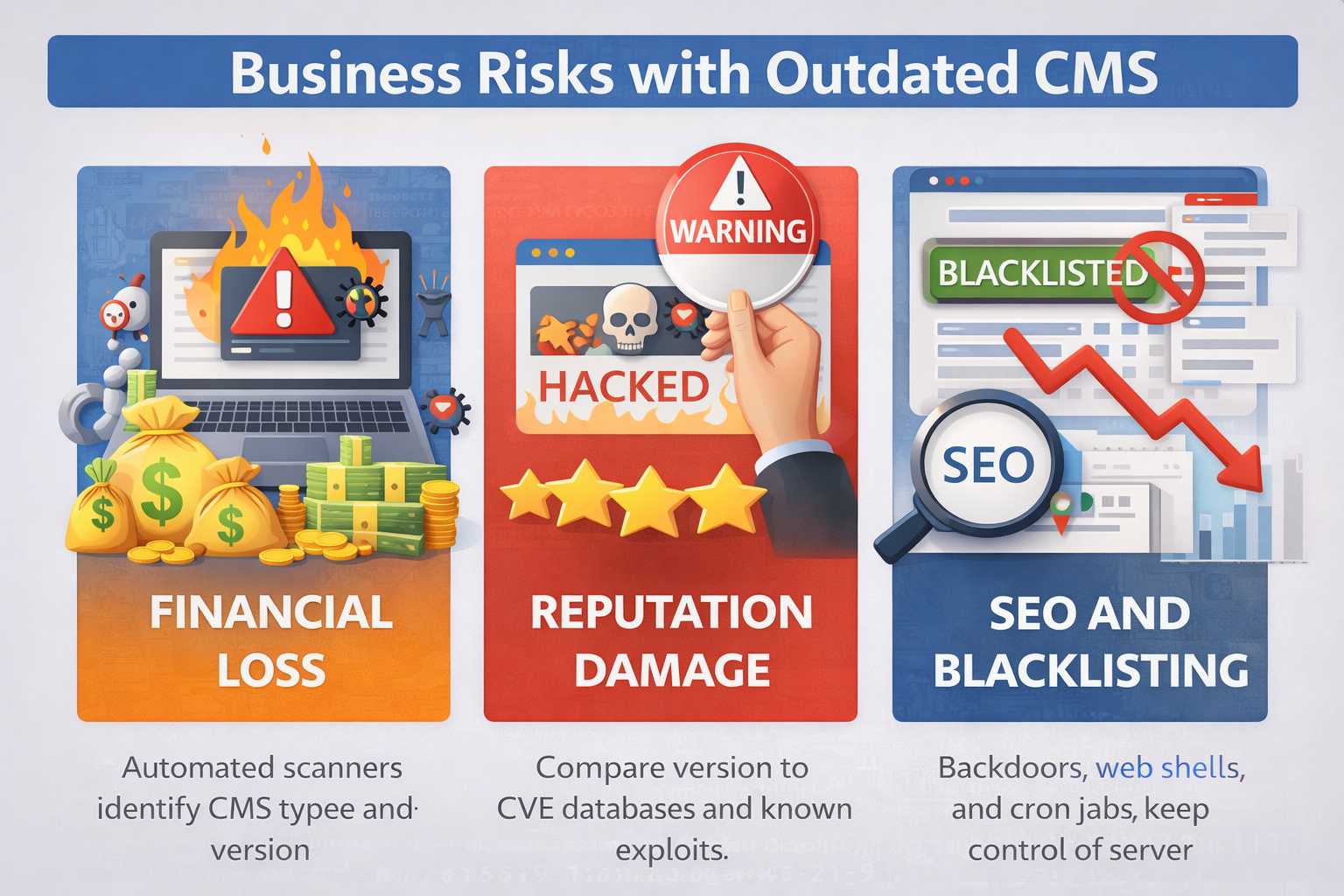
Business Risks with Outdated CMS
Outdated CMS installations are not only technical risks but also serious business risks.
1 Financial Loss:
A CMS compromise can lead to significant direct and indirect financial costs Incident response expenses, Hiring cybersecurity specialists, Forensic investigation to determine breach scope, Website rebuild or restoration, Infrastructure cleanup, Legal consultation, Revenue loss due to downtime and compensation or regulatory fines (if data is breached). For e-commerce businesses, even a few hours of downtime can result in major revenue losses.
2 Reputation Damage:
Trust is critical in digital business. When a website is compromised customers may fear identity theft, payment data exposure damages credibility and returning visitors may avoid the site. Rebuilding trust can take months or even years, especially if the breach becomes public. Brand reputation damage often exceeds the direct financial loss.
3 SEO and Blacklisting:
Search engines and security vendors actively monitor compromised websites. If malware is detected, browsers may display “This site may be hacked” warnings, the website can be flagged as unsafe, search engines may remove it from search results and hosting providers may suspend the account. Recovery from blacklisting involves complete malware cleanup, submitting reconsideration requests and waiting for re-evaluation. This process can take weeks, significantly affecting traffic and revenue.
How to Fix Outdated CMS Installations?
Outdated CMS installations are one of the most common causes of website compromise. Fixing and securing them requires a structured remediation plan, addressing both the software and the server environment.
Step 1: Before making changes, you must know exactly what is running on your website. Identify CMS core version (e.g., WordPress, Joomla, Drupal), Identify all plugins, modules, and theme versions, Check PHP runtime and database versions and Scan for existing malware or suspicious code.
Step 2: Before applying any updates or fixes, it is essential to create a complete backup, as changes can sometimes disrupt website functionality. A proper backup should include all website files (including media, themes, and core code), a full database backup containing content and user data, and copies of important configuration files such as the CMS configuration file, `.htaccess`, and `wp-config.php`.
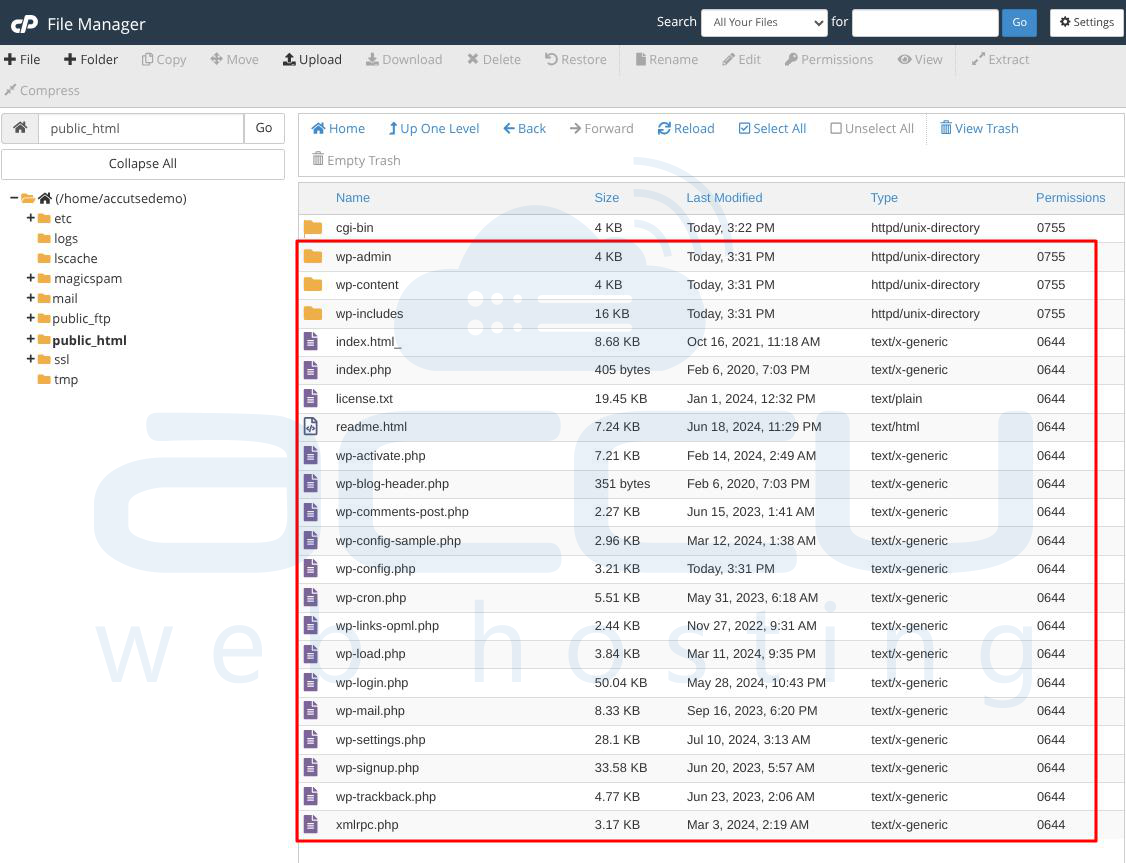
As a best practice, backups should be stored securely outside the web root and preferably in an offsite or cloud location to ensure they remain accessible even if the primary server is compromised.
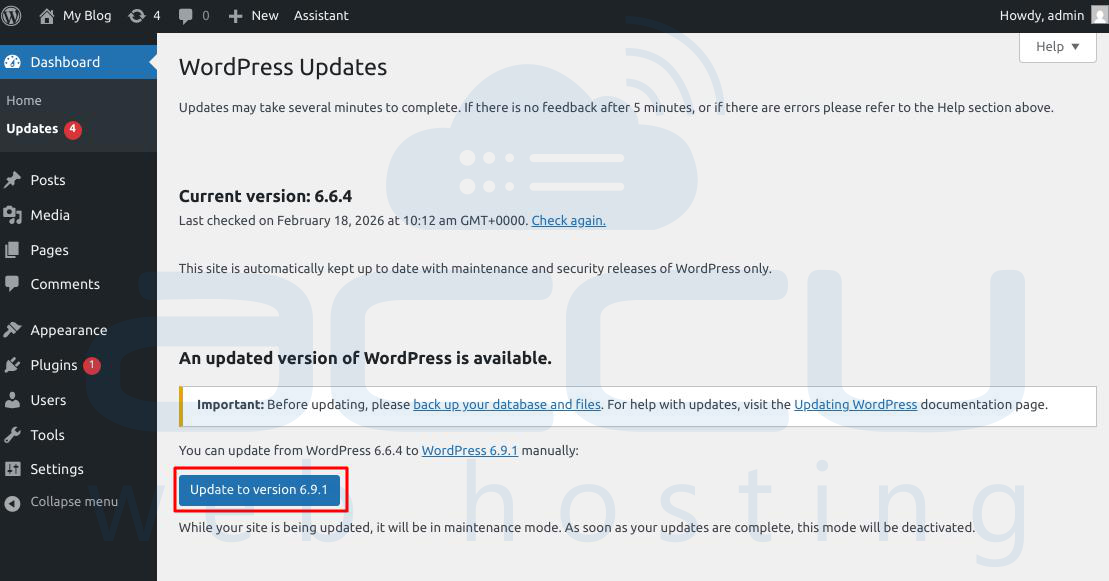
Step 3: Updating the CMS core is the most critical step. Upgrade to the latest stable release of your CMS and apply security patches immediately after release. Test updates in a staging environment before applying to production. Verify compatibility with plugins and themes before doing it.
Step 4: Outdated plugins and themes are the most common attack vectors. Remove unused plugins and themes, Replace unsupported or abandoned plugins and Update active plugins and themes to the latest versions.
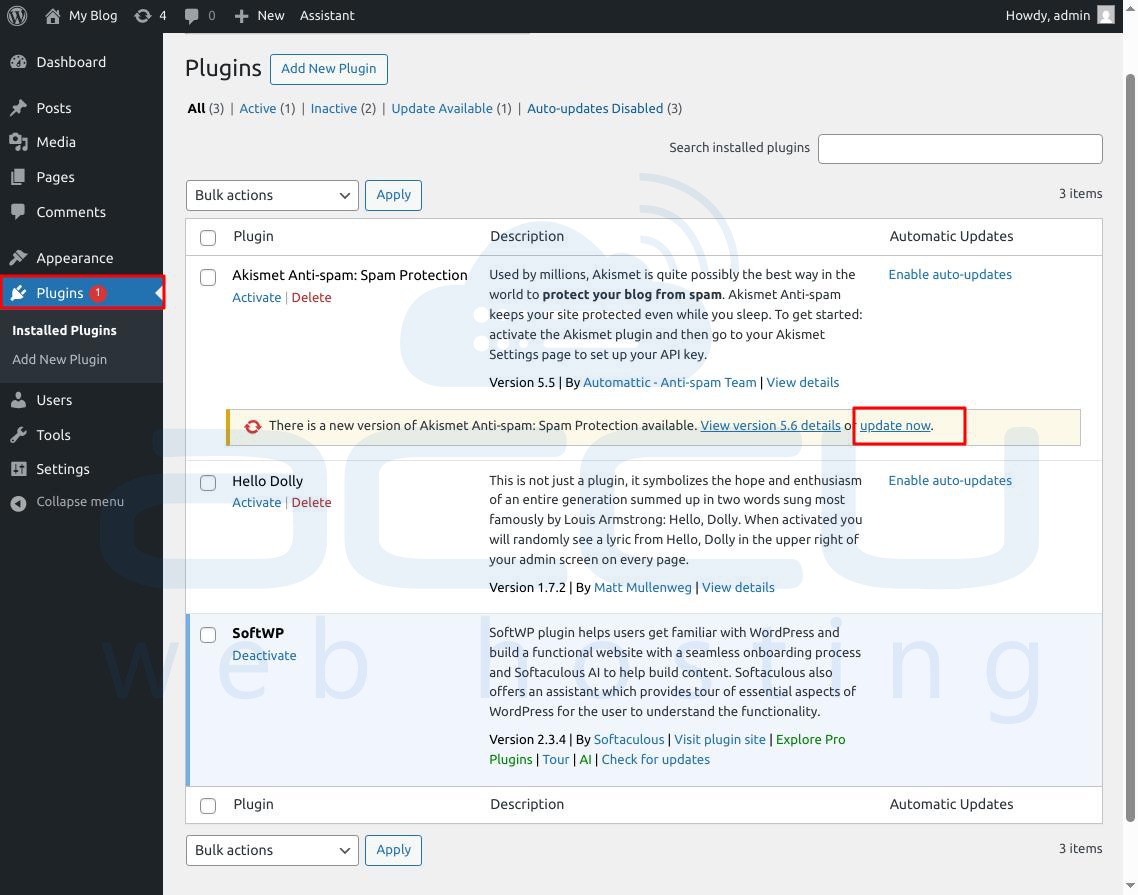
Never leave inactive plugins installed, they can still be exploited. Ensure theme updates don’t overwrite custom modifications (use child themes where possible).
Step 5: Some plugins and modules may be inherently unsafe if they are abandoned. Remove plugin if no longer maintained by the developer, known unresolved vulnerabilities and not updated for several years. Replace these with secure, actively maintained alternatives.
Step 6: Even a fully updated CMS can be compromised if the server environment is insecure.
Hardening Measures:
-
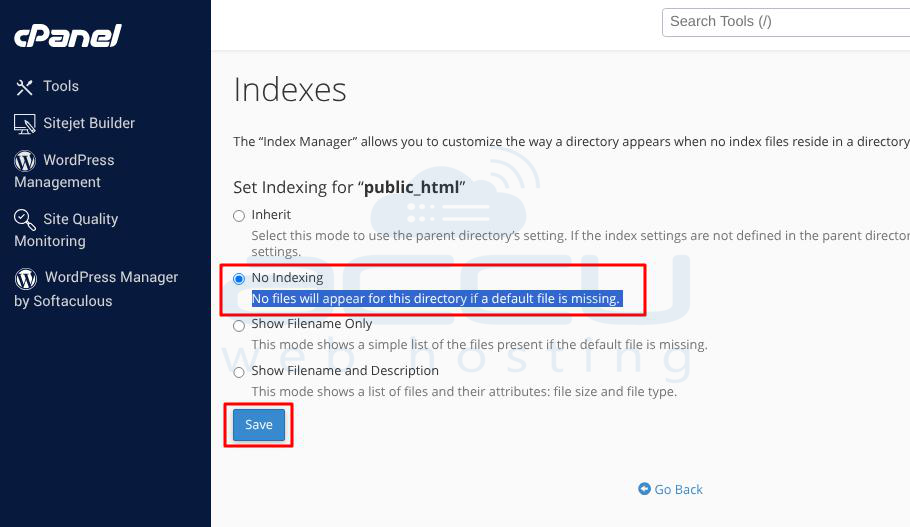
Disable directory listing to prevent file enumeration
-
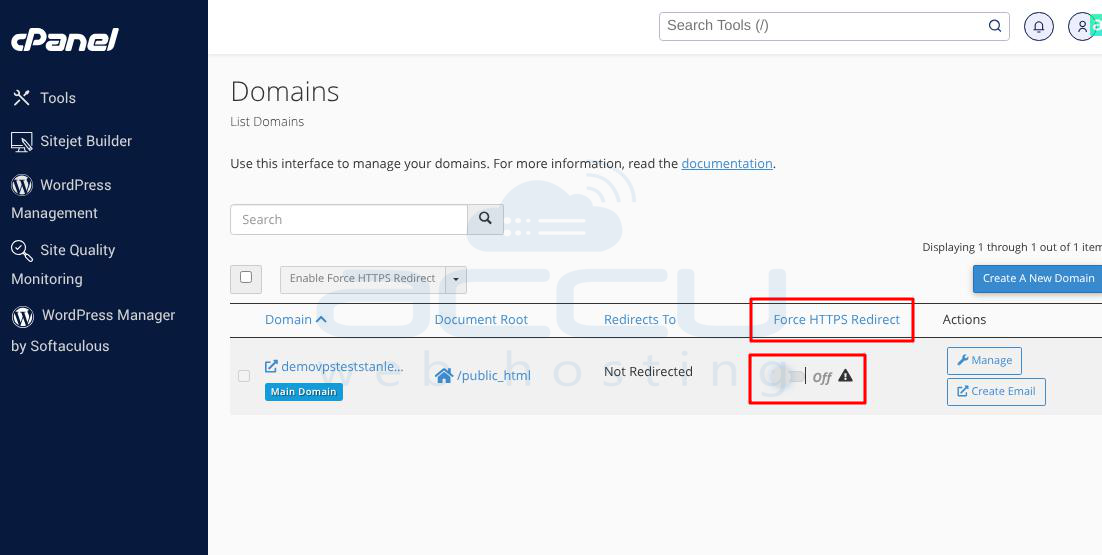
Enforce HTTPS
-
Implement a Web Application Firewall (WAF)
-
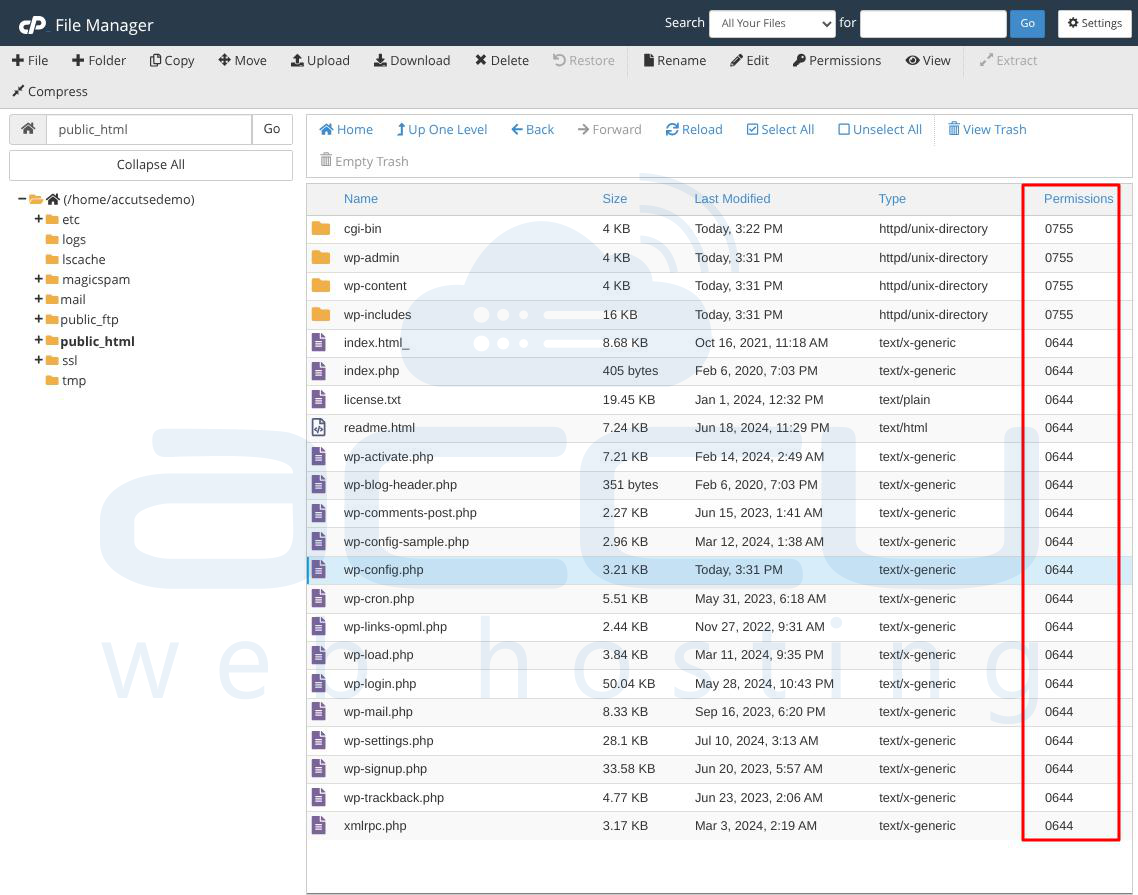
Restrict file permissions to limit unauthorized access
-
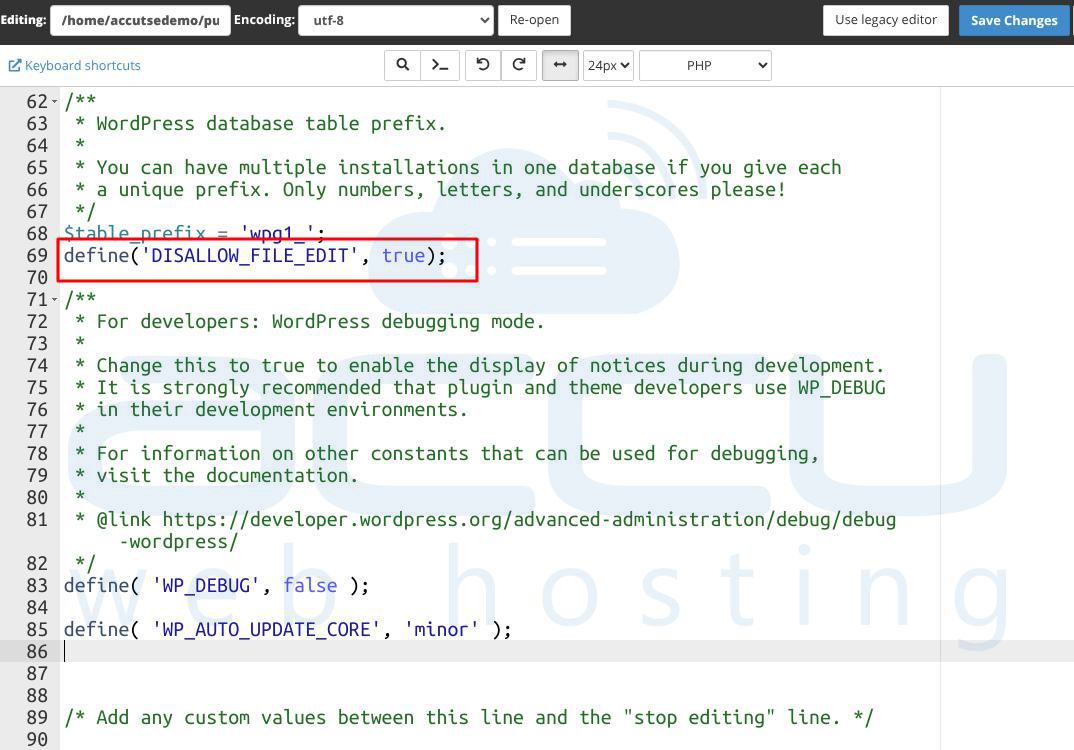
Disable file editing from the CMS dashboard
File Permission Examples: Directories: 755 & Files: 644
These measures reduce attack surfaces and prevent exploits from escalating.
Step 7: A secure CMS environment depends on a fully updated server stack. This includes regularly updating the operating system with the latest security patches, keeping the web server software such as Apache or Nginx up to date, maintaining a supported and secure PHP runtime version, and ensuring the database server (such as MySQL, MariaDB, or PostgreSQL) is patched and properly maintained.
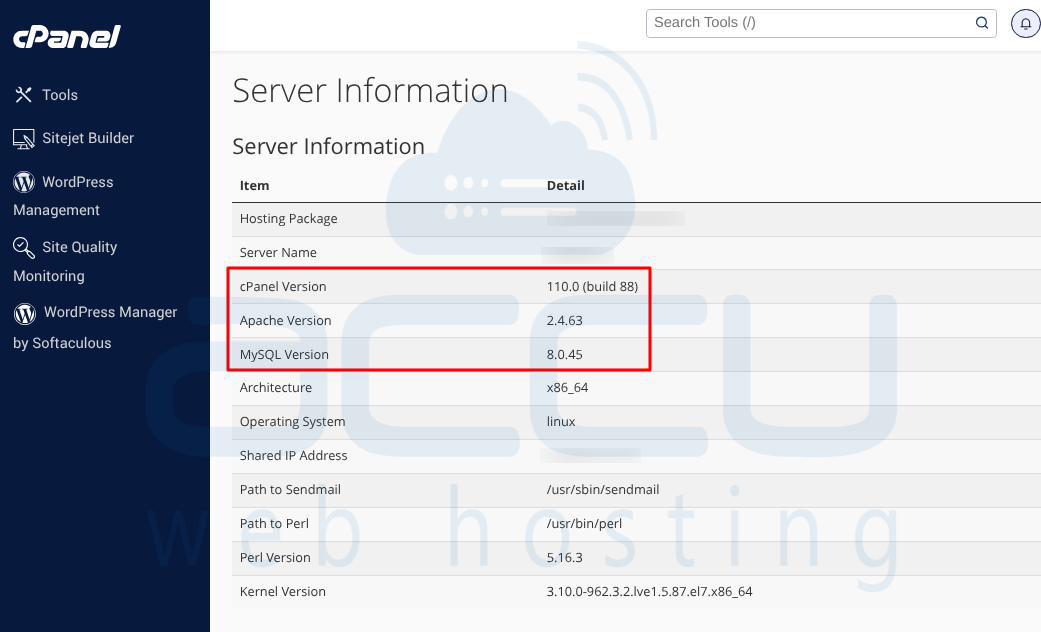
Running outdated components at any layer of the server stack increases the risk of vulnerabilities, even if the CMS itself is fully updated.
Step 8: Continuous monitoring is essential for detecting and responding to security threats at an early stage. Early detection significantly reduces the impact of attacks and prevents long-term or persistent compromises.
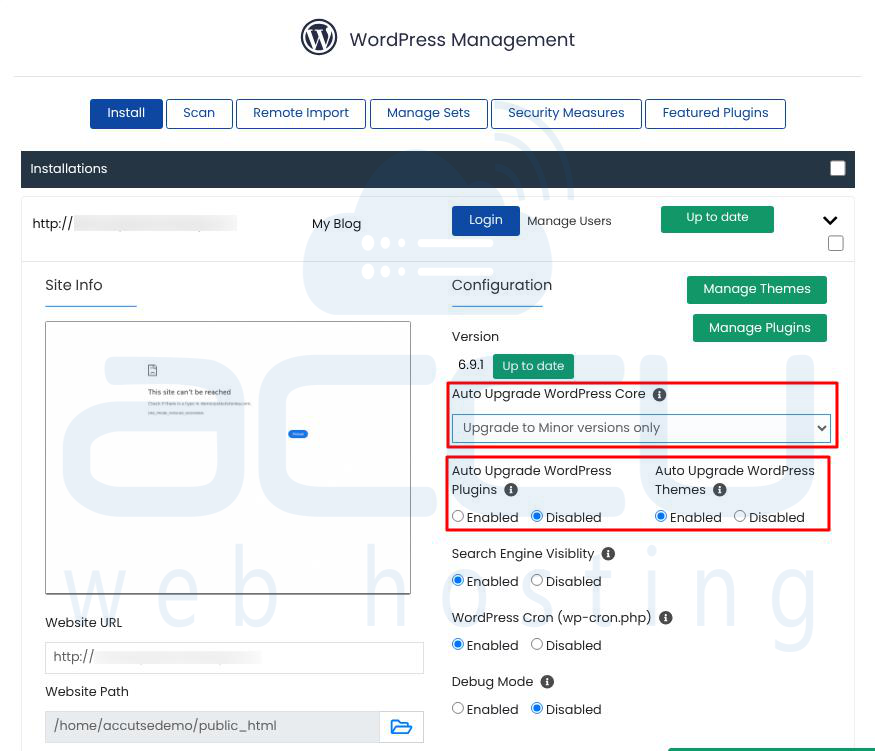
Step 9: Many CMS platforms support automatic updates. With this, automatically apply minor security patches and Keep plugins up-to-date without manual intervention. Automatic updates are a balance between convenience and risk management.
Fixing outdated CMS installations is a multi-step process involving assessment of all components, secure backups, updating CMS core, plugins, and themes, removing vulnerable extensions, hardening the server environment and monitoring and establishing update policies.
A disciplined approach ensures that your website remains secure, operational, and compliant with industry standards.
Incident Response If Already Compromised
If a CMS compromise is suspected, a structured response is essential:
1. Take the website offline to prevent further damage to visitors or the server.
2. Preserve logs (access logs, error logs, CMS logs) for forensic analysis.
3. Identify the entry point and determine whether the breach occurred via CMS core, plugin, theme, or server vulnerability.
4. Remove malicious files including injected code, web shells, and backdoors.
5. Change all passwords associated with the CMS, database, FTP/SFTP, and hosting accounts.
6. Update all software: CMS core, plugins, themes, PHP, database, and server software.
7. Conduct a full security audit to confirm that all traces of compromise are removed.
Important: Never simply “clean and ignore.” Investigating the root cause is critical to prevent reinfection.
Conclusion
Outdated CMS installations represent one of the most common and preventable security weaknesses in web environments. The solution is not complex but requires discipline. It includes keep CMS core updated, maintain plugins and themes, harden server configuration, Implement monitoring and establish patch management processes. Regular maintenance significantly reduces security exposure and ensures stable website operation. Organizations that treat CMS updates as optional eventually face higher costs in recovery, downtime, and reputation damage. Proactive maintenance is always more efficient than reactive incident response.


