
Writing website content can take time, particularly when you're attempting to craft interesting and professional content. Sitejet's AI Text Generator streamlines this by producing good-quality text in a short time for your requirements. That’s where the Sitejet Builder, now integrated with cPanel, comes into play with its built-in AI Text Generator.
In this article, we’ll explore how Sitejet’s AI tool helps speed up the content creation process and why it’s a valuable addition for cPanel users.
Overview of Sitejet Builder
Sitejet Builder is a modern website builder that includes cPanel version 116 and above. It allows users — from beginners to experienced designers — to build websites using a drag-and-drop editor without writing any code.
Some key features include:
- 140+ pre-designed templates
- Free stock photos and videos
- AI-powered tools, including the AI Text Generator
The Role of the AI Text Generator
One of the most impressive aspects of Sitejet Builder is the AI Text Generator, which helps users write website content quickly. Rather than beginning from scratch, users can generate text suggestions for different sections of the site, such as:
- Hero headlines
- Service descriptions
- About Us pages
- Contact information text
- Blog introductions
This is especially helpful for users who struggle with writing or want to save time during the website creation.
Key Features of AI Writer
AI Writer offers several features that make it an indispensable tool for website content creation:
Integrated Platform Access: Unlike standalone AI tools like ChatGPT, AI Writer is embedded directly within the Sitejet platform. Users can access it through the toolbar without needing separate accounts or subscriptions.
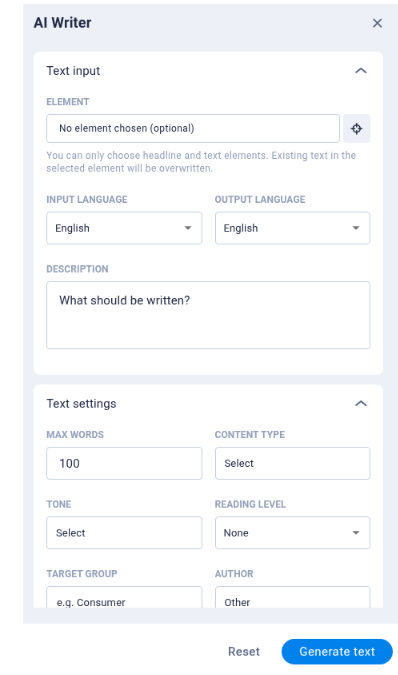
Customizable Content Options: The tool simplifies prompt creation with customizable options such as language preferences, tone of voice, reading age level, target audience, and author perspective. These settings ensure tailored content that aligns with branding requirements while saving time.
Error-Free Content: The AI-generated text is mostly accurate in grammar, spelling, and punctuation. This eliminates the need for extensive proofreading and ensures professional-quality content.
Dynamic Editing Shortcuts: Users can easily modify prompts or settings to regenerate text. Additionally, shortcuts allow quick adjustments like shortening text to fit page designs or improve clarity.
How It Speeds Up Content Creation?
Here’s how Sitejet’s AI Text Generator helps speed things up:
1. Instant Draft Suggestions
The AI provides instant draft content that you can use as-is or edit to match your brand’s voice. This removes the initial hurdle of writing from a blank screen.
2. Context-Aware Suggestions
The AI can generate relevant content based on the section you're editing, such as a call to action or product description.
3. No External Tools Required
With content generation built right into the Sitejet Builder, you don’t need to switch between tabs or rely on third-party writing tools. Everything is available within your cPanel dashboard.
4. Faster Website Delivery for Agencies
If you’re an agency managing multiple client sites, the AI tool can help you meet deadlines faster by cutting down the time spent on writing repetitive or placeholder text.
Getting Started with Sitejet in cPanel
To use Sitejet’s AI Text Generator:
1. Log into your cPanel account.
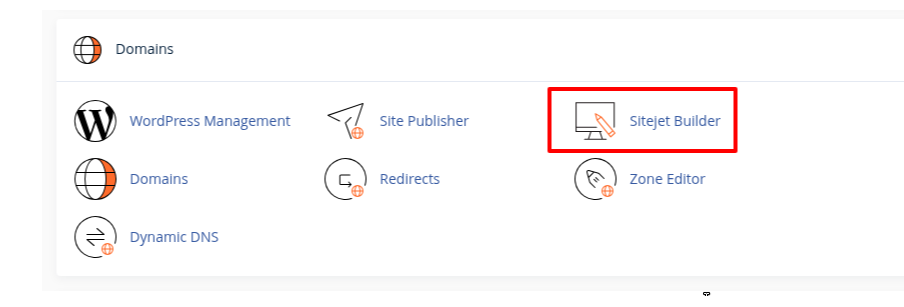
2. Locate and click on Sitejet Builder under the Domains section.
3. Then, you can see a list of your domains. Select the desired domain on which you use Sitejet.
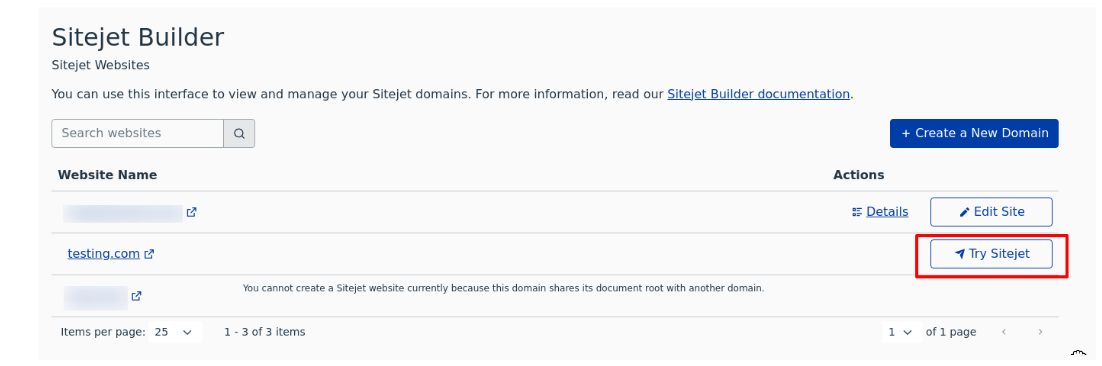
4. You’ll now access a range of templates, which you can preview and apply to your new site.
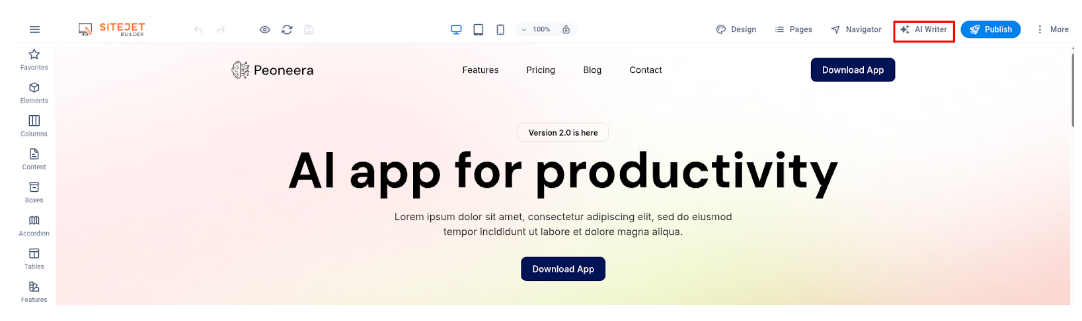
5. In the top right corner of the page, you will find an option for the AI writer.
6. You’ll now see multiple settings, such as language, tone, content type, and more. Customize these options as needed, then click Generate text. Once the text is created, you can easily edit it to fit your style.
Sitejet’s AI Text Generator, built into cPanel, makes website content creation faster and easier. It’s a valuable tool for anyone looking to build professional websites with less time spent on writing.


