
Social engineering is a sneaky method in which attackers mislead people into getting sensitive information. Instead of hacking into systems, they use trust, hurry, and curiosity to trick people. In this article, we will observe the kinds of attackers and how to avoid them.
What is Social Engineering?
Social engineering is a type of manipulation where attackers take advantage of a person's trust or lack of awareness to trick them into giving up sensitive information and gaining unauthorized access to systems, data, or physical locations. It involves a broad range of malicious activities through human interactions rather than technical vulnerabilities. Attackers trick people into trusting them, feeling urgency, or acting without thinking, which leads to security mistakes.
It's called psychological manipulation. Unlike traditional hacking, which exploits software flaws, social engineering targets human weaknesses, fooling individuals into sharing sensitive information, performing specific actions, or granting access to restricted areas.
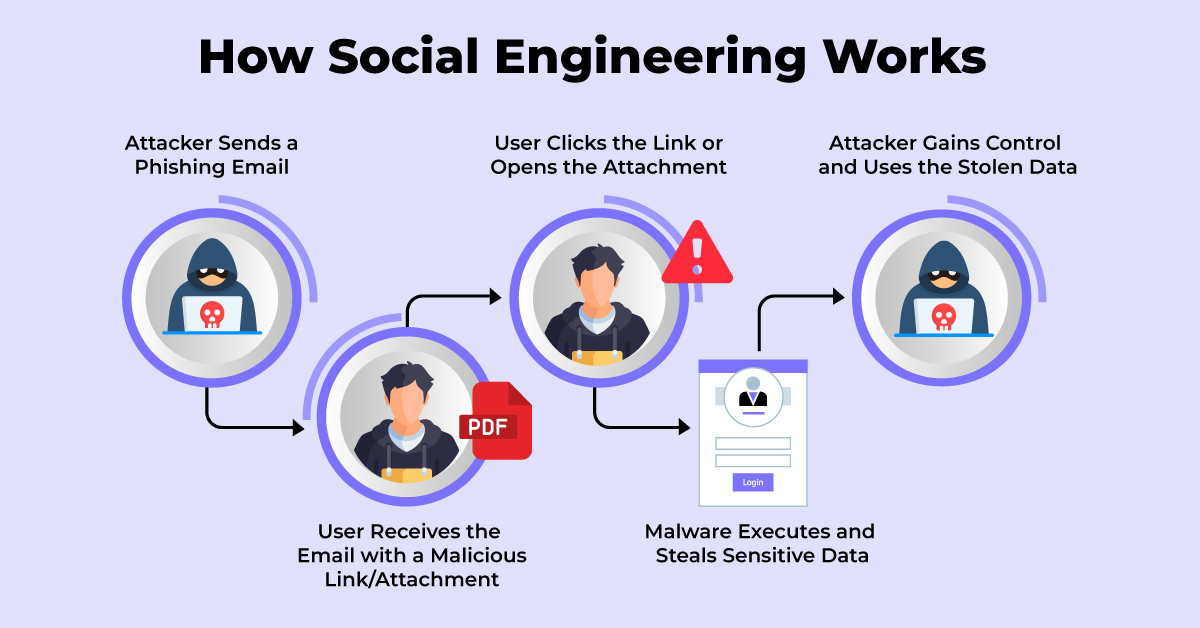
Social Engineering Attack Techniques
1. Phishing:
Phishing is one of the most common social engineering attacks, where attackers send fraudulent emails, messages, or websites that appear to come from trusted sources like banks, online services, or even coworkers.
The goal is to trick individuals into clicking on malicious links or downloading attachments that can steal personal information, like usernames, passwords, or credit card details.
Example: A hacker sends an email that looks like it's from a bank, asking the recipient to "verify" their account by entering their login details on a fake website that looks almost identical to the bank's real site.
2. Pretexting:
Pretexting involves an attacker creating a fake scenario (pretext) to trick someone into revealing confidential information. The attacker pretends to be a trusted person, such as a coworker, IT support, or bank representative, and uses a believable story to gain the victim’s trust.
Example: A hacker calls an employee, claiming to be from your company’s IT department. They say there is an issue with your work email and ask you to confirm your login details so they can "fix" it. In reality, this person is an attacker trying to steal your credentials.
3. Baiting:
Baiting involves offering something enticing, such as free software, prizes, or downloads, to lure victims into providing personal information or installing malware. Attackers play on the victim's curiosity or desire for something valuable.
Example: An attacker may offer a free download of a popular game, but once the victim downloads it, the malware secretly installs on their computer, giving the attacker access to sensitive information.
4. Impersonation:
The attacker pretends to be a specific real person, such as a CEO, IT staff, or law enforcement officer, to gain the victim’s trust. This attack often takes place in real time through face-to-face interactions, phone calls, or emails.
Example: A scammer calls an employee, pretending to be the CEO, and urgently requests a money transfer for an important deal.
5. Tailgating:
Tailgating is a social engineering attack where an attacker sneaks into a secure area by following someone who has proper access. The attacker takes advantage of the person’s kindness or trust to get inside without needing a key or pass.
Example: An attacker waits near the entrance of an office and quickly follows an employee inside when they open the door, expecting them to hold it open out of politeness.
6. Scareware:
Scareware tricks victims into believing their computer is infected or at risk, pressuring them to take immediate action—like downloading fake security software that actually installs malware.
Example: A user sees a pop-up warning, "Your computer is infected! Download antivirus now!" Clicking the link installs malware instead of real protection.
7. Spear Phishing:
Unlike regular phishing, spear phishing targets a specific person or organization, using personal details to make the attack more convincing.
Example: A hacker researches an employee’s LinkedIn profile and sends a personalized email appearing to be from their boss, requesting a "confidential" document.
How to Prevent Social Engineering Attacks?
1. Be Cautious with Emails & Messages
- Avoid clicking on suspicious links or downloading unexpected attachments.
- Verify sender details before responding to urgent requests.
2. Use Strong & Unique Passwords
- Enable multi-factor authentication (MFA) for added security.
- Regularly update passwords and avoid reusing them across platforms.
3. Verify Requests for Sensitive Information
- Double-check requests for confidential data, especially financial transactions.
- Contact the requester through official channels to confirm authenticity.
4. Stay Alert to Impersonation Attempts
- Don't easily trust unexpected calls or emails from "IT support," "bank officials," or "company executives
- Never share login credentials or security codes over the phone or email.
5. Keep Your Software Updated
- Regularly update operating systems, antivirus software, and applications.
- Install security patches to fix vulnerabilities.
6. Educate & Train Employees
- Conduct regular cybersecurity awareness training.
- Teach employees how to recognize phishing and other social engineering tactics.
7. Limit Personal Information Sharing
- Avoid oversharing on social media, as attackers can use this information for targeted attacks.
- Use privacy settings to restrict access to your personal data.
8. Secure Physical Access
- Don’t let unauthorized individuals tailgate into secure areas.
- Always lock devices and use security badges where required.
How to Secure Your Website from Social Engineering Attacks?
Social engineering attacks can target websites by tricking administrators or users into revealing sensitive information. There are some steps that you can take to secure your website. One of them is choosing a secure hosting provider. AccuWeb Hosting provides protection with security features like DDoS protection, SSL certificates, and frequent security updates, protecting your site from such attacks.
Moreover, you can implement multi-factor authentication (MFA) on all admin accounts to avoid unauthorized login, even in case of stolen login credentials. Also, use strong and distinctive passwords and regularly change them to minimize security threats.
A Web Application Firewall (WAF) can help block malicious requests, phishing attempts, and impersonation attacks. To minimize the risk of manipulation, regularly monitor website activity and educate your team on security best practices.
Conclusion
Social engineering makes people disclose sensitive details through the manipulation of trust and emotions. Attackers deceive victims instead of hacking technology. Being conscious of such strategies and being careful with unsolicited requests can avoid becoming a victim. Good security culture and consciousness are crucial to safeguarding personal and organizational information.


