
To make a .html file process as a . PHP file, We will have to make adjustments by adding a handler to the .htaccess file.
Create a .htaccess file at the root of the website and add this line:
AddHandler application/x-httpd-php74 .php .php5 .html .htm
Now the HTML file will be processed like a PHP file. Finally, embed PHP codes in the HTML file to verify that we successfully made the changes.
Follow the steps below to make a .html file process as a . PHP file.
Step1: Login in Cpanel.
Step2: Open File Manager from the Files section.

Step3: Click on Settings at the top-right corner, and then enable Show Hidden Files (dotfiles):
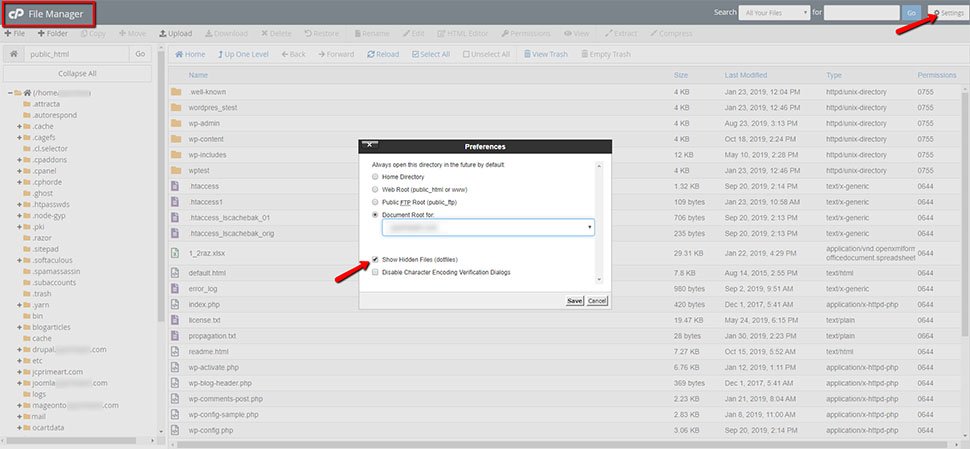
Step4: Locate the .htaccess file. If there is no such file, create it;

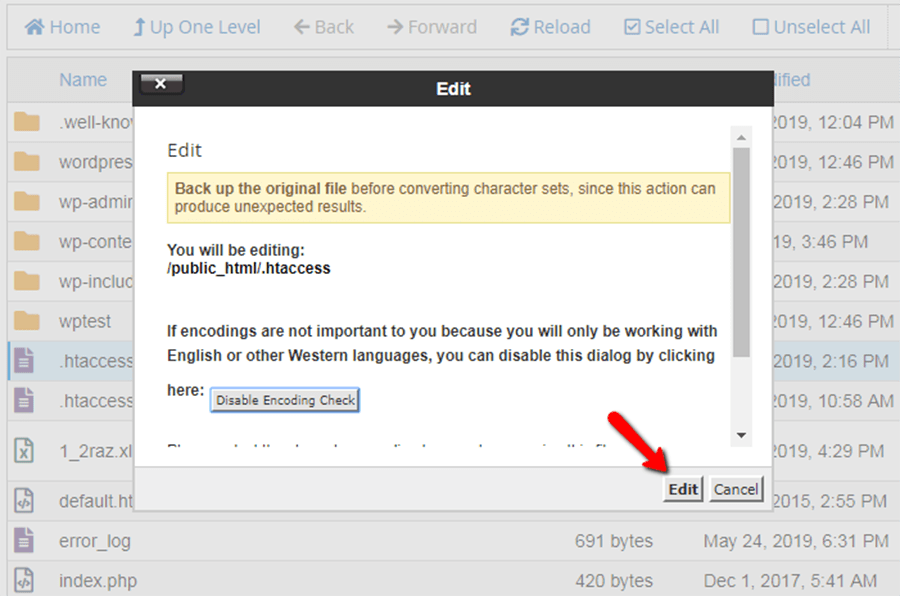
Step5: Select the .htaccess file, and click the right mouse button over it. Select Edit, and after you get a pop-up window, click on the button Edit again to confirm:
Step6: Add the following line inside the .htaccess file and save the file.
AddHandler application/x-httpd-php74 .php .php5 .html .htm
We are using PHP version 7.4 for the website; you should change the PHP version accordingly.


