
If your website is hosted on the Plesk Panel, you may find the following error in the web browser.
HTTP Error 500.0 - Internal Server Error
C:\Program Files (x86)\Plesk\Additional\PleskPHP56\php-cgi.exe
- The FastCGI process exceeded configured request timeout
or HTTP Error 500.0 - Internal Server Error
C:\Program Files (x86)\Parallels\Plesk\Additional\PleskPHP56\php-cgi.exe
- The FastCGI process exceeded configured activity timeout
When you try to install a WordPress plugin via the WordPress Admin Dashboard, the operation may fail with the following error.
Installation failed: 500 Internal Server Error.
The server encountered an internal error or misconfiguration and was unable to complete your request.
Please contact the server administrator to get the error.
The FastCGI process exceeded the configured activity timeout.
What is the cause of this issue?
Activity timeout or request timeout for FastCGI is insufficient.
Resolution of this error
Step 1: Log in to your Plesk Panel.
Step 2: Go to your domain. Example.com >> PHP Settings
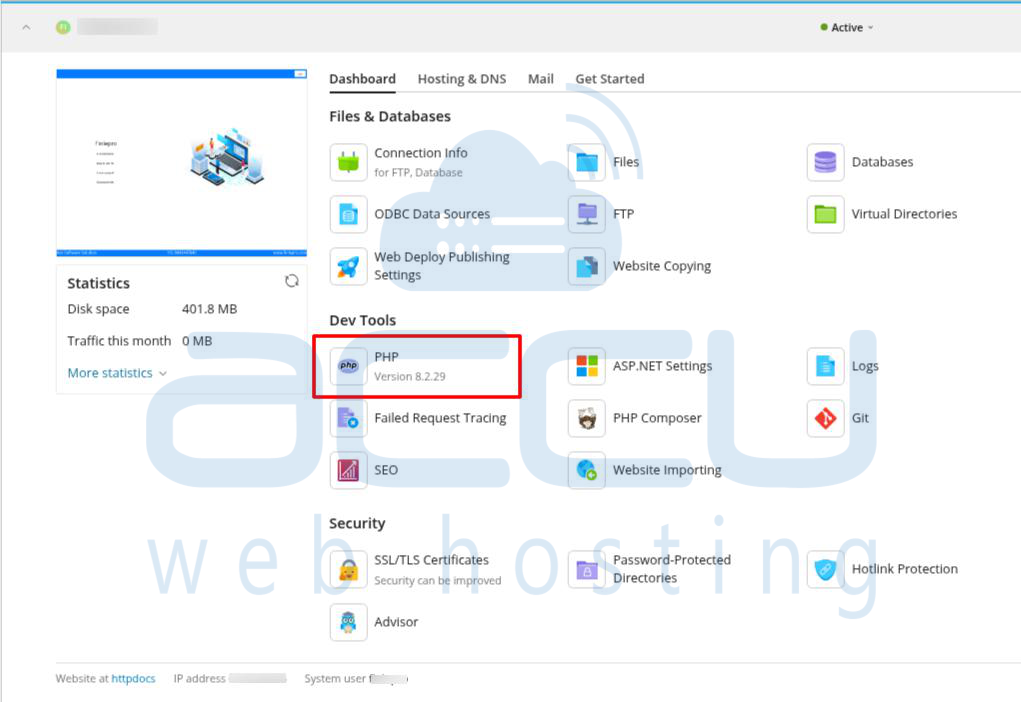
Step 3: At the bottom, find FastCGI settings and make sure it is enabled.
Step 4: Changed the activity timeout to 200 and the request timeout to 200
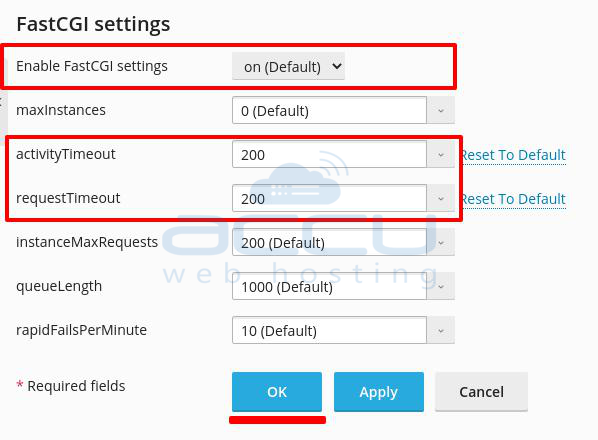
Step 5: Click on the OK button. Now, the error should be gone, and you should be able to upload the plugin without any issue.


