
This article will assist you in generating MySQL (backup) dump from the Command line in the Windows VPS.
Mysqldump is an easy and quick tool to create a backup of MySQL databases. It creates a dump file of MySQL databases containing SQL commands to recreate the database at the destination MySQL server. It allows you to back up a single database and multiple databases as well.
It is a part of the MySQL relational database package that allows you to "dump" a database, or a collection of databases, for backup or transfer to another SQL server.
How to use the mysqldump utility to create a backup of your database?
- Open a Windows command prompt from your VPS.
- Click Start -> Run.
- Enter “cmd” into the dialog box and click the “OK” button.
- Change the directory to the following to access the mysqldump utility.
cd C:\Program Files\MySQL\MySQL Server 5.5\bin - Create a dump of your current MySQL database.
- Run the mysqldump.exe program using the following arguments:
mysqldump.exe –e –u[username] -p[password] -h[hostname] [database name] > C:\[filename].sql
If you supply all the arguments correctly, it will connect to your current MySQL server and create a dump of your whole database in the directory you specified. Here is an example of the command line syntax: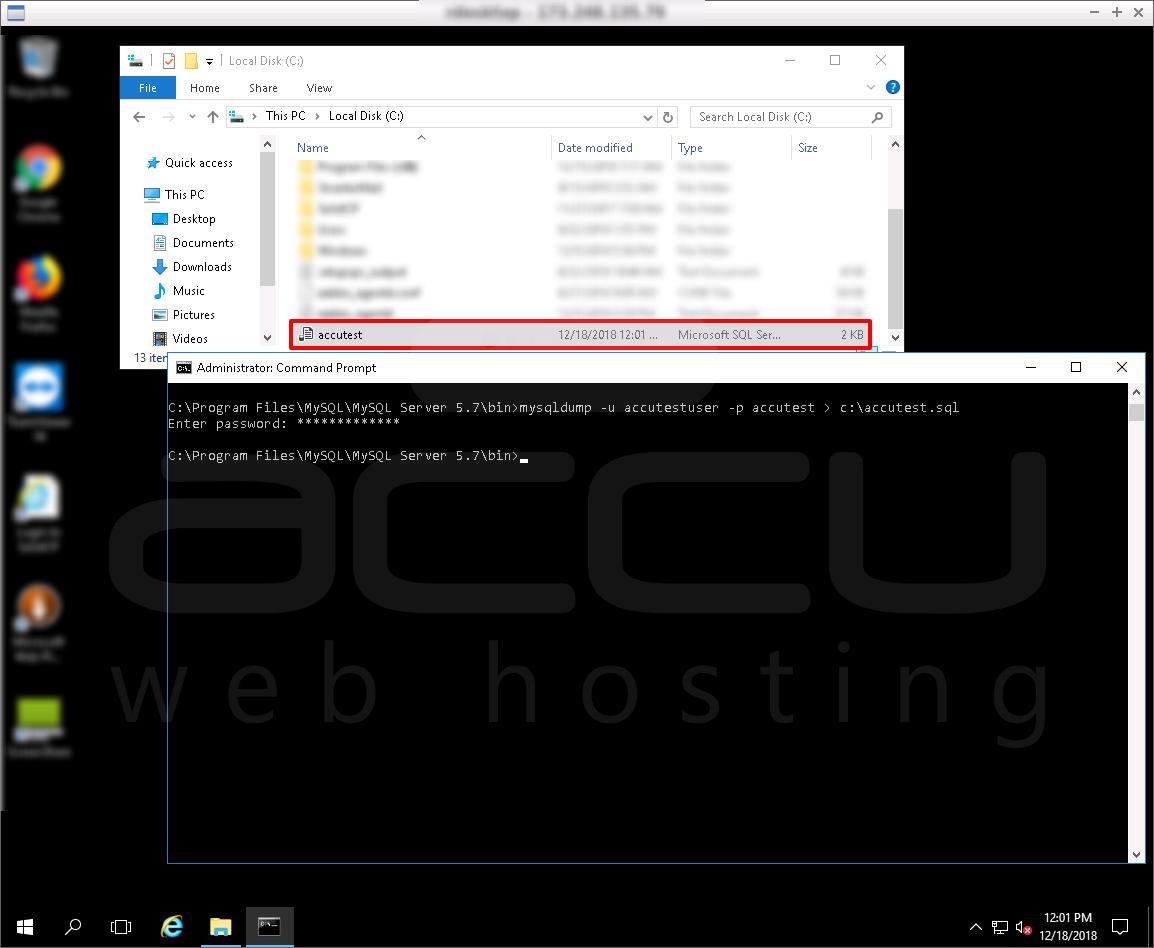
- Command syntax: mysqldump -u accutestuser accutest > c:\accutest.sql


