
You've probably experienced hotlinking when someone links directly to one of your images on their own website. Hotlinking is when a site links to an image or other file on another site instead of hosting the image on its server.
Hotlinking can be a problem for a few reasons. First, it can put a strain on the server where the image is hosted. If a lot of sites are hotlinking to the same image, that server can become overloaded and slow down. Additionally, hotlinking can result in your bandwidth being used up by other people's websites. If you're on a limited bandwidth plan, this can cause your site to go over its allotted bandwidth and incur additional charges.

One way to protect against hotlinking is to use hotlink protection. Hotlink protection is a feature that allows you to specify which sites are allowed to link to your images. Sites not on the allowed list will not be able to access the website's content.
If you're unfamiliar with Cloudflare, it's a service that provides security and performance benefits for websites. One of the features it offers is Hotlink Protection, which can help to prevent other websites from directly linking to images on your site.
Here's how it works: when someone tries to load an image from your site on another site, Cloudflare checks to see if they're allowed to do so. If they're not, the request is blocked, and the image doesn't load.
This can be a useful way to prevent other sites from using up your bandwidth or leeching off your content. It can also help to protect your site from malicious code that might be injected into an image.
To enable Hotlink Protection, log into your Cloudflare account, Select your website and go to the Scrape Sheild. Then, enable Hotlink Protection.
Several methods exist for setting up hotlink protection, but the most commonly used is the .htaccess file. You can add the following code to your .htaccess file to prevent hotlinking:
RewriteEngine on
RewriteCond %{HTTP_REFERER} !^$
RewriteCond %{HTTP_REFERER} !^http(s)?://(www\.)?yourdomain.com [NC]
RewriteRule \.(jpg|jpeg|png|gif)$ - [NC,F,L]
This code will redirect any requests for images from other websites to a blank page. You can also change the last line to redirect to a specific image.
RewriteRule \.(jpg|jpeg|png|gif|bmp) https://example.com/blocked.png [R,L].
If you're running a website in a WHM/cPanel server, hotlink protection is a must be enabled. Here's how you can enable it:
Fortunately, hotlink protection is easy to set up from cPanel. Most web hosts offer it as an option, and there are also a number of WordPress plugins that can handle it for you.
Steps to set up Hotlink protection from cPanel:
Step 1. Log in to cPanel.
Step 2. Click on Hotlink Protection under the Security section.
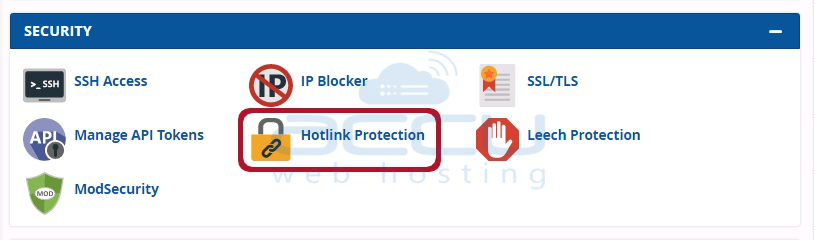
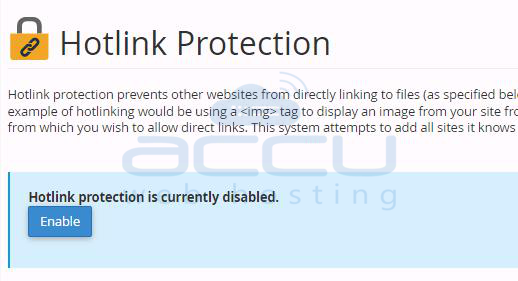
Step 3. Click the Enable button to activate hotlink protection.
Step 4. To protect a domain, make sure it's listed in the URLs to allow access section.
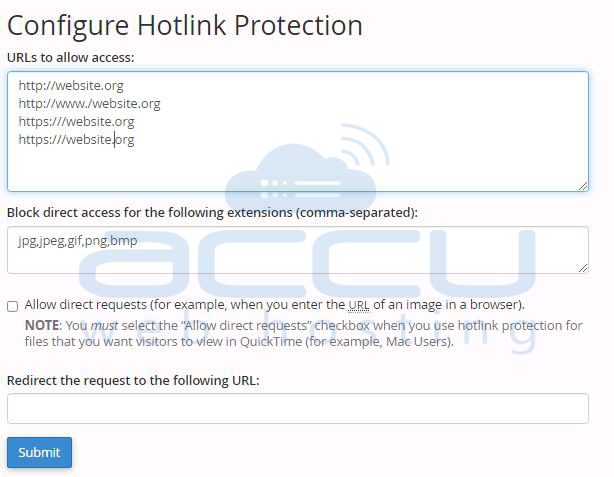
Step 5. Take a look at the blocked file types list. In order to better protect your media, the most popular image types are already blocked by default, but you can add other file extensions.
Step 6. Check the Allow direct requests box to enable direct requests (via a specific URL).
Step 7. The last step is to enter a URL if you want to redirect hotlink requests.
Step 8. Click on the Submit button.
Conclusion:
If you're running a website, you want to make sure that your images are safe from being hotlink. Hotlinking is when someone embeds an image from your website on their own site. This can result in a lot of unwanted traffic to your site, which can slow it down or even crash it.
Hotlink protection prevents people from hotlinking to your images. It allows you to specify which sites are allowed to embed your images. This can help keep your site running smoothly and protect your images from being used without your permission. Simply put, hotlink protection is a must for any website. It will save you money and secure your website's content.


