
Introduction
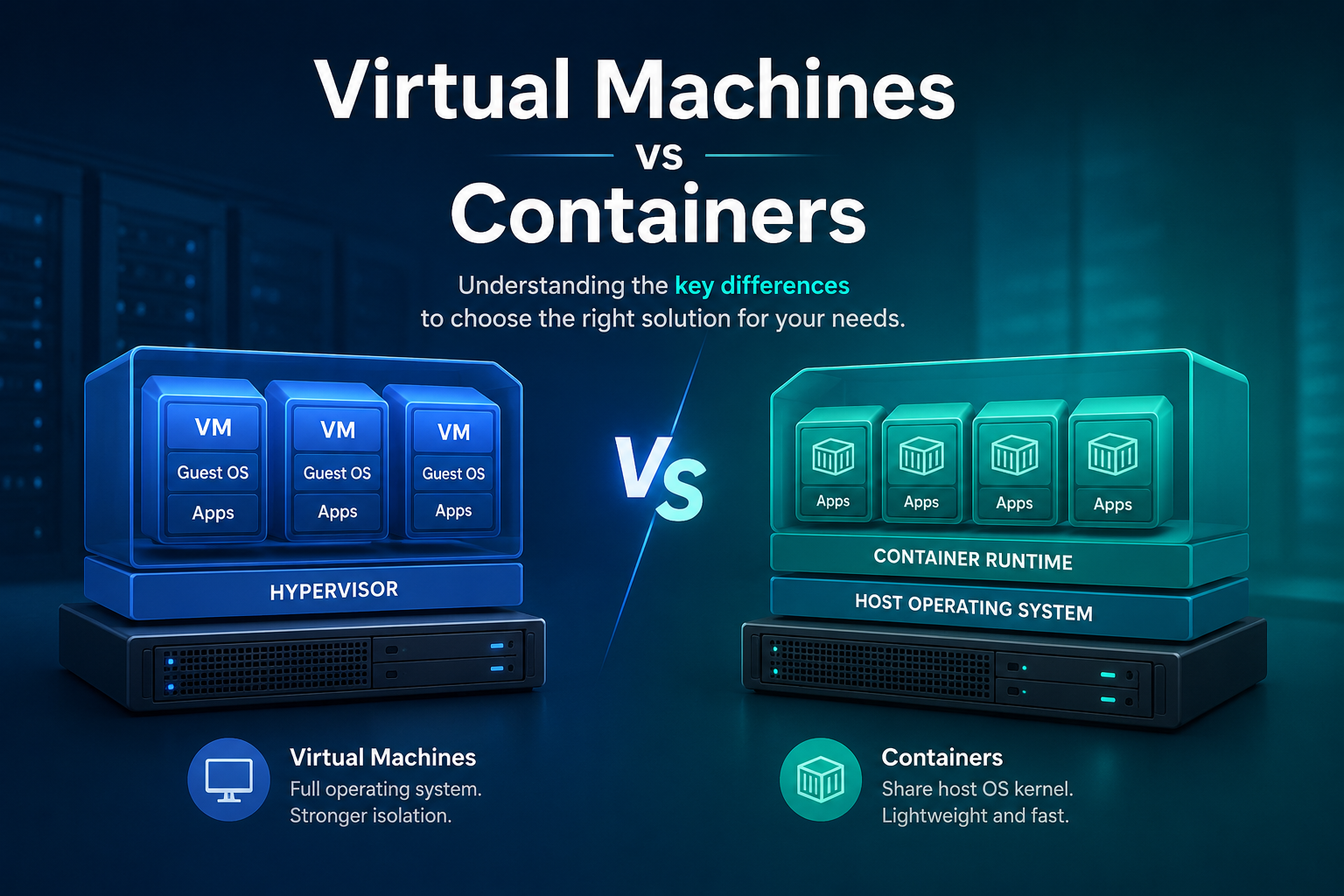
Modern applications and websites need reliable, scalable, and efficient environments to run. Two of the most common technologies used for this purpose are Virtual Machines (VMs) and Containers. While both allow applications to run in isolated environments, they work differently and are designed for different use cases.
Although both technologies allow applications to run in isolated environments, they operate differently and offer distinct advantages. Virtual machines provide complete operating system isolation, making them suitable for a wide range of workloads, while containers offer a lightweight and efficient approach by sharing the host operating system kernel.
In this article, we will explain what virtual machines and containers are, how they work, their key differences, and the scenarios in which each technology is most commonly used.
What Is a Virtual Machine?
A virtual machine is a software-based emulation of a real computer. It runs on top of your actual physical machine (called the host) using a special piece of software known as a hypervisor. The hypervisor is responsible for managing and allocating the physical resources CPU, memory, disk, and network) across one or more virtual machines (called guests).
Types of Hypervisors:
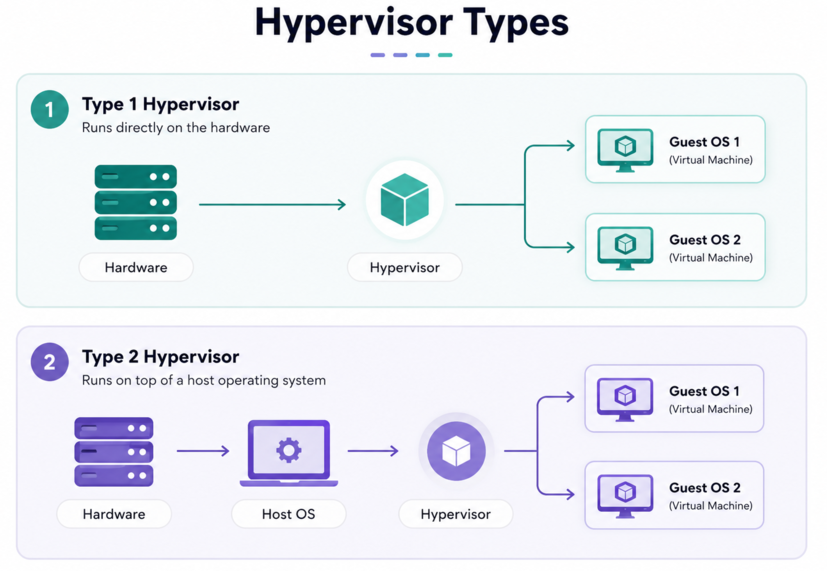
There are two main types of hypervisors:
Type 1 (Bare-metal): Runs directly on the physical hardware. Examples include VMware ESXi, Microsoft Hyper-V, and Xen. These are commonly used in enterprise data centers.
Type 2 (Hosted): Runs on top of an existing operating system, just like a regular application. Examples include VirtualBox and VMware Workstation. These are popular for personal use and development.
What's Inside a Virtual Machine?
Every VM includes:
- A full Guest Operating System (e.g., Windows, Ubuntu, CentOS)
- Virtualized hardware (virtual CPU, memory, network card, etc.)
- Applications and their dependencies
Because each VM carries its own OS, it tends to be quite large, often several gigabytes in size, and can take minutes to start up.
How Do Virtual Machines Work?
A physical server runs a hypervisor, which creates and manages multiple virtual machines. Each VM includes:
A complete guest operating system
Virtual CPU (vCPU)
Virtual memory (RAM)
Virtual storage
Network interfaces
Applications and services
Because each VM has its own operating system, it functions independently from other VMs on the same host.
Example:
A single physical server may host:
VM 1: Windows Server running IIS websites
VM 2: Ubuntu Server running Apache
VM 3: CentOS running a database server
Each virtual machine operates as if it were a separate physical computer.
Advantages of Virtual Machines:
Strong Isolation:
Each VM is fully isolated from others, improving security and stability.
Operating System Flexibility:
Different operating systems can run simultaneously on the same physical server.
Easy Backup and Migration:
VM snapshots and migration tools simplify disaster recovery and server maintenance.
Legacy Application Support:
Older applications that require specific operating systems can continue running inside dedicated VMs.
Limitations of Virtual Machines:
-
Higher resource consumption
-
Larger storage requirements
-
Slower startup times
-
Additional operating system maintenance
What Is a Container?
A container is a lightweight, portable, and isolated environment that packages an application and everything it needs to run its code, libraries, configuration files, and dependencies into a single bundle.
Unlike virtual machines, containers do not include a full operating system. Instead, they share the host operating system's kernel (the core part of the OS), making them far more efficient and faster to start.
Containers rely on features built into the Linux kernel, primarily namespaces (for isolation) and cgroups (for resource control), to create isolated environments for applications.
The most widely used container platform today is Docker, though others like Podman and containerd are also popular. For managing large numbers of containers across many machines, Kubernetes is the leading orchestration tool.
How Do Containers Work?
A container typically includes:
Application code
Runtime environment
Required libraries
Configuration files
Dependencies
All containers running on the same host share the host operating system kernel.
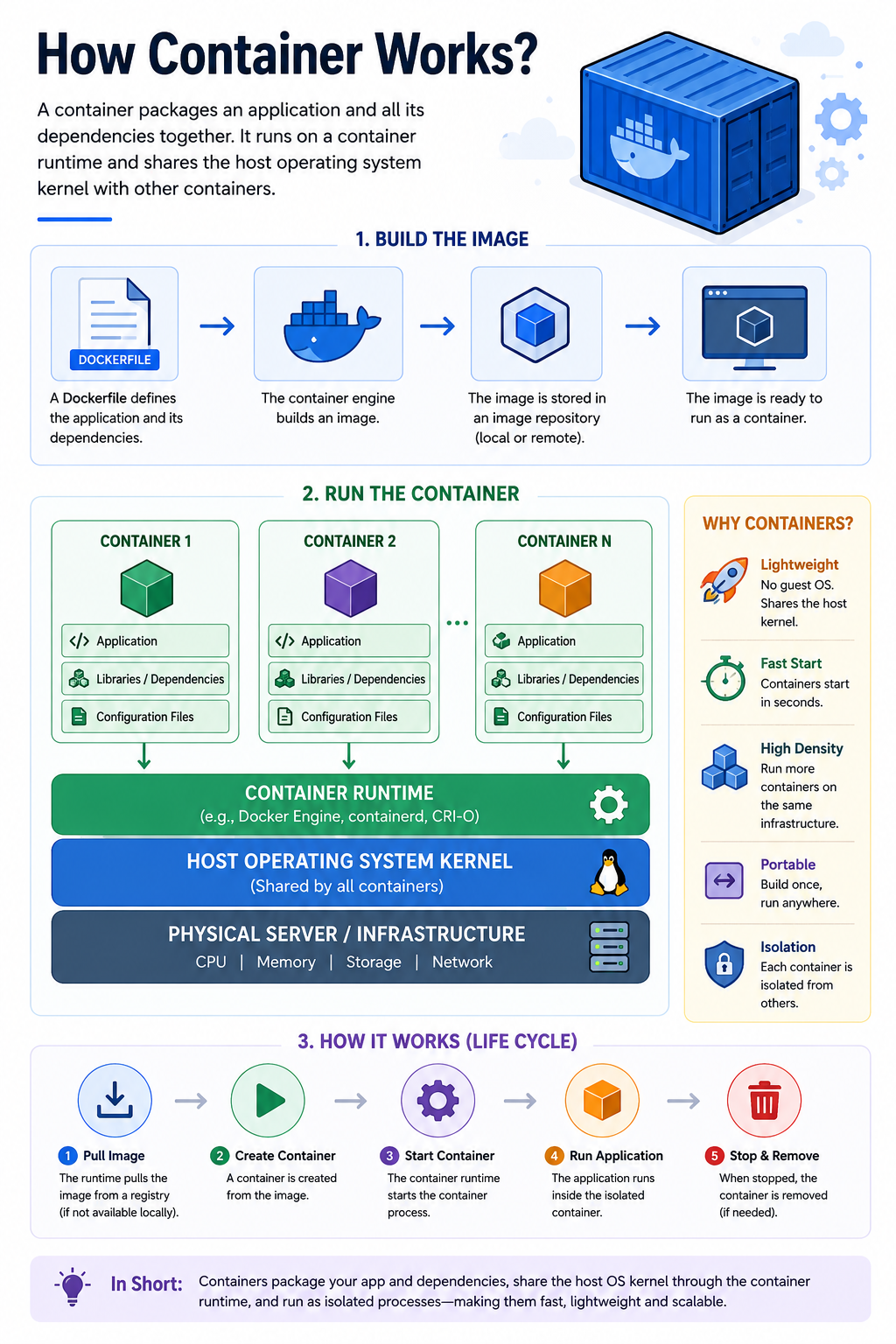
Example:
A Linux server may run:
Container 1: Nginx web server
Container 2: PHP application
Container 3: MySQL database
Container 4: Redis cache
Each container operates independently while sharing the same underlying operating system.
Advantages of Containers:
Lightweight:
Containers require significantly fewer resources than virtual machines.
Fast Startup:
Containers can start within seconds or even milliseconds.
Portability:
Applications can run consistently across development, testing, and production environments.
Efficient Resource Usage:
More containers can run on a single server compared to virtual machines.
Ideal for Modern Applications
Containers are widely used for microservices, DevOps, and cloud-native applications.
Limitations of Containers:
-
Weaker isolation compared to virtual machines
-
Dependence on the host operating system kernel
-
More complex orchestration in large environments
-
Some legacy applications may not work well in containers
Virtual Machines vs. Containers: The Detailed Differences:
1. Architecture
|
Aspect |
Virtual Machine (VM) |
Container |
|
OS |
Each VM has its own full operating system |
Containers share the host OS kernel |
|
Hypervisor |
Requires a hypervisor layer |
No hypervisor needed |
|
Isolation |
Hardware-level isolation |
Process-level isolation |
2. Size and Resource Usage
Virtual machines are heavyweight by nature. Each VM must carry a full operating system, which can easily be several gigabytes in size. Running many VMs on a single host requires substantial memory and storage.
Containers, on the other hand, are extremely lightweight. Since they share the host OS, a container image might only be a few megabytes to hundreds of megabytes. You can run many more containers on the same hardware compared to VMs.
3. Startup Time
Because a VM has to boot an entire operating system, it can take anywhere from 30 seconds to several minutes to start up, just as a real computer would.
Containers start almost instantly, typically in milliseconds to a few seconds, because there's no OS to boot. The application simply starts as a process on an already-running system.
4. Isolation and Security
VMs offer stronger isolation. Since each VM has its own OS and virtualized hardware, a security breach or crash in one VM is very unlikely to affect others on the same host. This makes VMs the preferred choice in security-sensitive environments.
Containers offer lighter isolation. Since they share the host kernel, a vulnerability in the kernel could potentially affect all containers on the host. However, modern container security practices (using tools like AppArmor, Seccomp, and rootless containers) have significantly reduced these risks.
5. Portability
Both VMs and containers offer portability, but in different ways.
VMs can be moved between hosts using formats like OVA/OVF files, but they tend to be bulky and slower to transfer due to their size.
Containers shine in portability. A container image can be built once and run consistently on any machine that supports the container runtime, whether it's a developer's laptop, a staging server, or a production cloud environment. This is the origin of the popular phrase in software development: "It works on my machine," and with containers, it works everywhere.
6. Performance
VMs introduce some performance overhead due to the hypervisor layer, although modern hypervisors have minimized this significantly.
Containers run with near-native performance because they are just processes running directly on the host OS, with no virtualization layer in between.
7. Use Cases
|
Virtual Machines are ideal for... |
Containers are ideal for... |
|
Running different operating systems on the same host |
Microservices and distributed applications |
|
Strong security and compliance requirements |
Rapid development and deployment (CI/CD pipelines) |
|
Legacy applications that need a full OS environment |
Scaling applications quickly in the cloud |
|
Long-running, stateful workloads |
Stateless, ephemeral workloads |
|
Desktop virtualization |
DevOps and cloud-native applications |
8. Management and Orchestration
Managing a handful of VMs is straightforward, but at scale, tools like VMware vSphere, Microsoft Azure, or AWS EC2 are used.
For containers, Kubernetes has become the industry standard for orchestrating thousands of containers across clusters of machines, handling deployment, scaling, health checks, and more.
Key Differences Between Virtual Machines and Containers:
|
Feature |
Virtual Machines |
Containers |
|
Operating System |
Each VM has its own OS |
Share the host OS kernel |
|
Resource Usage |
Higher |
Lower |
|
Startup Time |
Minutes |
Seconds or less |
|
Storage Requirements |
Large |
Small |
|
Performance |
Slight overhead due to virtualization |
Near-native performance |
|
Isolation |
Strong isolation |
Process-level isolation |
|
Portability |
Moderate |
Very high |
|
Density |
Fewer instances per server |
More instances per server |
|
Maintenance |
OS updates required for each VM |
Simpler management |
|
Best Use Case |
Running multiple operating systems |
Deploying applications efficiently |
Can They Work Together?
Absolutely, and in fact, they often do! Many organizations run containers inside virtual machines. For example, a cloud provider might use VMs to provide strong isolation between different customers, and within each VM, a customer might run many containers for their applications.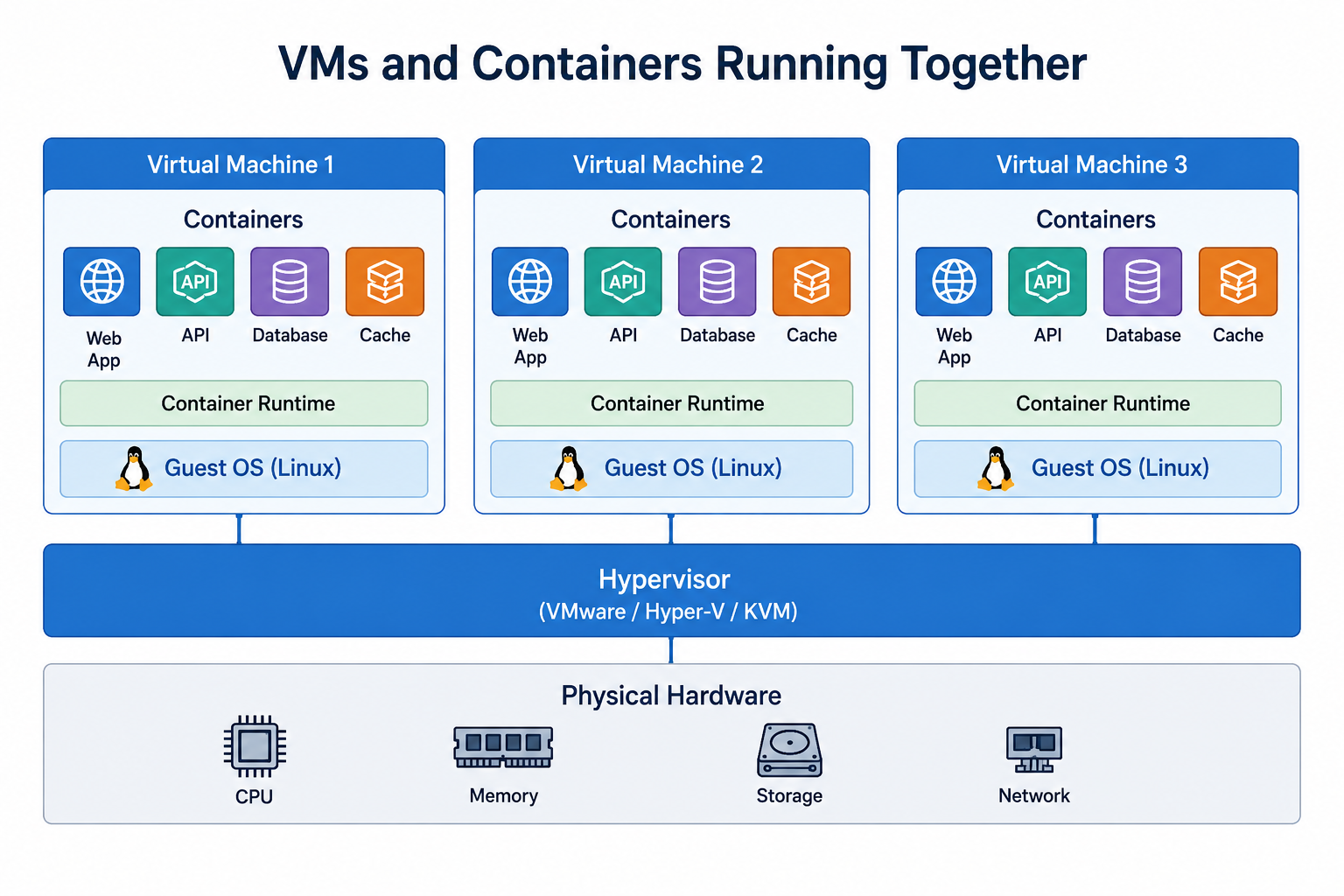
This hybrid approach combines the strong security isolation of VMs with the lightweight, fast, and portable nature of containers, giving you the best of both worlds.
Conclusion:
Virtual machines and containers are both powerful technologies that enable efficient application deployment and resource utilization. Virtual machines provide complete operating system isolation and are well suited for traditional workloads and legacy applications. Containers, on the other hand, are lightweight, fast, and highly portable, making them ideal for modern cloud-native environments.
Choosing between them (or using both) depends on your specific needs. If you need strong security boundaries or need to run a different OS entirely, VMs are the way to go. If you're building scalable, modern applications and value speed and efficiency, containers are your best friend.
Understanding the differences between virtual machines and containers helps organizations choose the right solution for their infrastructure, performance requirements, and operational goals. In many cases, combining both technologies provides the best balance of security, flexibility, and scalability.


