
What Is the Apache AH00526 Error?
The Apache AH00526: Syntax error occurs when Apache encounters an invalid or incorrect directive while reading its configuration files. This usually happens due to a typo, a missing quotation mark, an incorrect path, or an invalid configuration setting in one of the Apache configuration files.
This is a general error message, meaning the exact cause can vary depending on what Apache finds wrong in the configuration. When this error occurs, Apache fails to start or reload.
You can identify this error by running the apachectl configtest or httpd -t command before loading a new configuration. The error may also appear when checking the Apache service status using systemctl or journalctl. In all cases, Apache will refuse to start until the configuration issue is fixed.
How Apache Reports the Error
When Apache detects a syntax error, it usually provides helpful information, including:
- The configuration file that contains the error
- The line number where the error occurred
- A brief description of what Apache considers invalid
Example Error Message
AH00526: Syntax error on line 124 of /etc/httpd/conf/httpd.conf:
DocumentRoot '/var/www/html' is not a directory, or is not readable
This message clearly indicates that the issue is related to the DocumentRoot directive and that Apache cannot access or validate the specified directory.
Step-by-Step Solutions
1. Check Apache’s Syntax Using Built-In Tools
Before restarting Apache, always test the configuration syntax.
-
CentOS / RHEL / AlmaLinux
sudo httpd -t -
Ubuntu / Debian
sudo apache2ctl configtest
If the configuration is valid, Apache will return:
Syntax OKIf there is an error, Apache will display the AH00526 message along with the file name and line number where the issue exists.
2. Fix Simple Typos and Common Mistakes
Many AH00526 errors are caused by small mistakes, such as typos in directive names.
Example
Incorrect directive:
SSSLCertificateFileCorrect directive:
SSLCertificateFileAfter correcting the typo, re-run the syntax test to confirm the fix.
3. Understanding a Common DocumentRoot Error
Apache may fail to start with an error like:
AH00526: Syntax error on line 124 of /etc/httpd/conf/httpd.conf:
DocumentRoot '/var/www/html"' is not a directory, or is not readable
This indicates:
- A syntax error exists in an Apache configuration file
- The problem is specifically related to the
DocumentRootdirective
Common causes include:
- Corrupted configuration lines
- Invalid or incorrect directory paths
- Missing or misplaced quotation marks
- Incorrect permissions
- The directory does not exist
4. Identify the Exact Configuration File
Run Apache’s configuration test to confirm the exact file and line number:
sudo httpd -t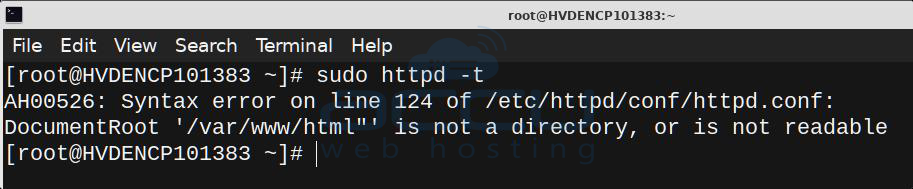
Example output:
AH00526: Syntax error on line 124 of /etc/httpd/conf/httpd.conf:
DocumentRoot '/var/www/html"' is not a directory, or is not readable
Make a note of the file path and line number shown in the output.
5. Open the File and Navigate to the Error Line
Edit the configuration file reported in the error:
sudo vi /etc/httpd/conf/httpd.confNavigate to the specified line number.
You may encounter one of the following issues:
❌ Broken or truncated directive
DocumentRoot '/var/www/html' is n>❌ Missing quotation marks
DocumentRoot /var/www/html❌ Invalid directory path
DocumentRoot '/var/www/htm'6. Fix the DocumentRoot Directive
Ensure the directive is written correctly.
Correct format:
DocumentRoot "/var/www/html"The path must be valid, properly quoted, and point to an existing directory.
7. Verify That the Directory Exists
Check whether the directory exists:
ls -ld /var/www/html
If the Directory Does Not Exist
Create it:
sudo mkdir -p /var/www/htmlSet proper ownership and permissions:
sudo chown -R apache:apache /var/www
sudo chmod -R 755 /var/www
8. Re-Test Apache Configuration
After making changes, always test the configuration again:
sudo httpd -tYou should see:
Syntax OK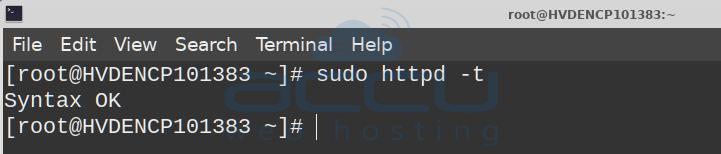
9. Start Apache
Once the syntax check passes, start the Apache service:
sudo systemctl start httpdVerify the service status:
sudo systemctl status httpd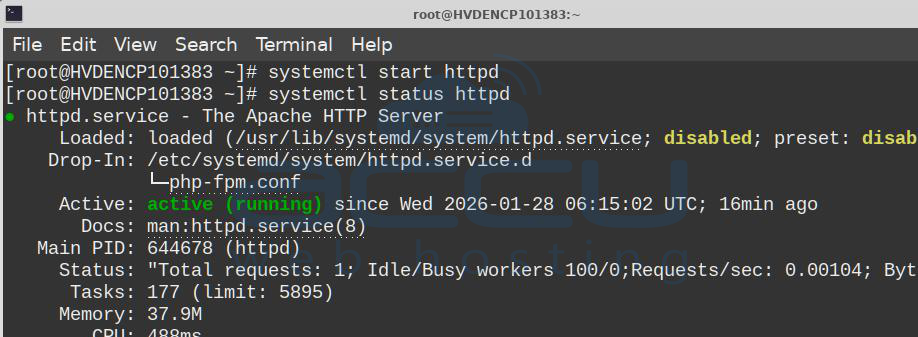
If Apache starts successfully, the AH00526 error has been resolved.
Conclusion
The AH00526: Syntax error is a common Apache startup issue caused by invalid configuration entries. By carefully reviewing the file and line number reported, correcting syntax errors, verifying directory paths, and testing the configuration before restarting Apache, this issue can usually be resolved quickly and safely.
You can contact us via chat or by submitting a support ticket if you are unable to fix the issue and require assistance. Our support team will investigate the issue and help you resolve the error.
