
What is chmod?
chmod stands for change mode. It's a Linux/Unix command-line utility used to modify file and directory permissions. By adjusting these permissions, you control who can read, write, or execute a file, a critical part of system security and functionality.
Understanding File Permissions
There are three primary permission types in Linux:
r – Read: View the contents of the file.
w – Write: Modify the contents of the file.
x – Execute: Run the file as a program or script.
Permissions can be assigned to three categories of users:
| Class | Description |
|---|---|
| u (user) | The owner of the file |
| g (group) | Other users in the file’s group |
| o (others) | All other system users |
Viewing Current File Permissions
To check the existing permissions of files in a directory, use:
# ls -la
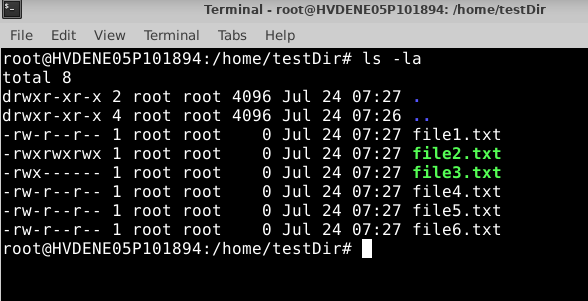
File Breakdown:
| File Name | Permissions | Owner | Group | Notes |
|---|---|---|---|---|
| file1.txt | rw-r--r-- | root | root | The user can read/write; others read-only |
| file2.txt | rwxrwxrwx | root | root | Full access for everyone (not recommended) |
| file3.txt | rwx------ | root | root | Only the root (user) can read/write/execute |
| file4.txt | rw-r--r-- | root | root | Same as file1.txt |
| file5.txt | rw-r--r-- | root | root | Same as file1.txt |
| file6.txt | rw-r--r-- | root | root | Same as file1.txt |
Common Examples
1. Add execute permission for the user on file1:
# chmod u+x file1.txt
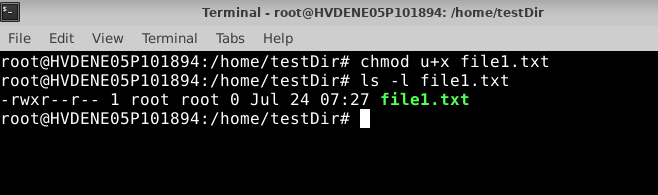
rwx for user (you just added x, so it’s now read, write, and execute).
r-- for group.
r-- for others.
2. Remove write permission for others on file2:
# chmod o-w file2
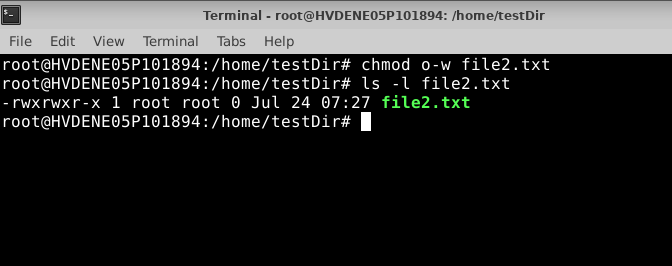
rwx for user (owner)
rwx for group
rwx for others
3. Set exact permissions (read & execute only) for all on file3:
# chmod a=rx file3
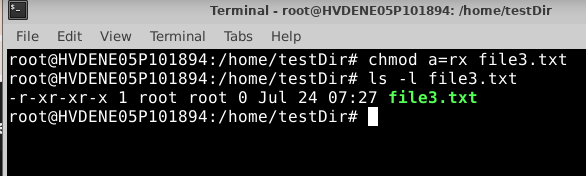
r-x for user (owner) → Can read and execute, but not write
r-x for group → Can read and execute, but not write
r-x for others → Can read and execute, but not write
Conclusion:
Mastering the chmod command is essential for anyone managing a Linux- or Unix-based system. By understanding how file permissions work—and how to modify them precisely—you gain full control over who can read, write, or execute your files.
Whether you're securing scripts, restricting access, or fixing misconfigured permissions, chmod gives you the flexibility and power to enforce proper file-level security. With simple commands like chmod u+x, chmod o-w, or chmod a=rx, you can fine-tune permissions for individual files or entire directories.


