
Forex VPS server ensures a fast-trading execution speed, and it comes with all the technical features needed for a seamless trading experience. You can run multiple MT4/ MT5 accounts that are supported by the highly optimized CPU, RAM size, disc capacity, etc. so that each trading transaction can be fast because even a slight time variation translates to a high degree in Forex trade. Therefore, you need to be highly cautious regarding latency.
Forex VPS ensures that meta-trading accounts keep running 24/7, and you may be able to efficiently manage deposits and withdrawals for a smooth trade.
A Forex VPS (Virtual Private Server) is a remote server hosted in a data center that allows traders to run trading platforms (like MT4 or MT5, or other platforms) 24/7 with minimal latency. It's especially beneficial for those using automated trading strategies, Expert Advisors (EAs), or trading multiple accounts.
Unlike your local computer, a Forex VPS ensures:
- Low latency with fast trade execution,
- High availability (24/7 uptime),
- Security against local PC crashes, power failures, or disconnections,
- Accessibility from anywhere via Remote Desktop.
In addition, our dedicated and latency-optimized Forex VPS servers are significantly beneficial to Forex traders. Some of the notable advantages that a VPS service has over a home PC or local computer include –
Better Latency
When using automated trading systems, latency is very important for quick order execution. Hosting trading applications near brokers, financial institutions, or account managers is truly necessary. A Forex trader can thus benefit from low latency, which translates to faster trading and quicker order execution (lower slippage), both of which are necessary for large profits. This is made possible by a VPS service that is hosted in or close to the trading locations.
Accessibility
Several VPS hosting options provide remote desktop RDP services, which are handy to use since they let you connect to a trading platform from any location or device without the need for further configuration or setup. It will also ensure that the trading platform remains online 24/7 despite reboots or even disconnections that your local/personal computer may experience. Furthermore, numerous platforms can be set up with a VPS service, allowing multiple users to access the desktop simultaneously from various places.
Security
Even if you are using the standard MetaTrader platform or a more sophisticated one that is provided by your broker, security and privacy are essential components for a Forex trader. A VPS service specifically gives a Forex trader the ability to achieve this. It guarantees that the trader won't encounter any type of serious malfunction or security hole that could be exploited by hackers. Due to increased social media usage, viruses are more easily spread to home computers. Combining personal and trading activities can occasionally result in unnecessary problems, such as PC crashes, limited memory, or priority on trade terminals, and unintentional terminal closing.
Stable Network
Forex VPS provides a specialized network connection that is continuously watched 24/7, 365 days a year. Therefore, you will not have to worry about network failures or any unforeseen events such as power outages that might impair your network. VPS includes numerous connections and a reliable internet connection backup. On the other hand, a local PC, even with an internet connection, is unreliable and has no backup.
In this guide, we’ll walk you through how to connect to your VPS, install trading software, configure EAs, run multiple platforms, and enable email alerts, all with step-by-step instructions.
Step 1: Connect to Your Forex VPS via Remote Desktop
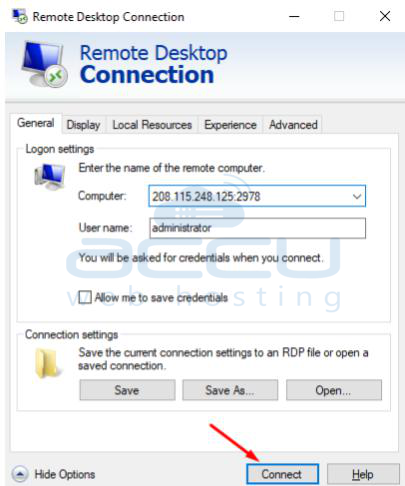
Open “Remote Desktop Connection” from your start menu.
Enter your VPS IP address and click Connect.
Input your username and password provided by your VPS provider.
Step 2: Install MetaTrader (MT4 or MT5)
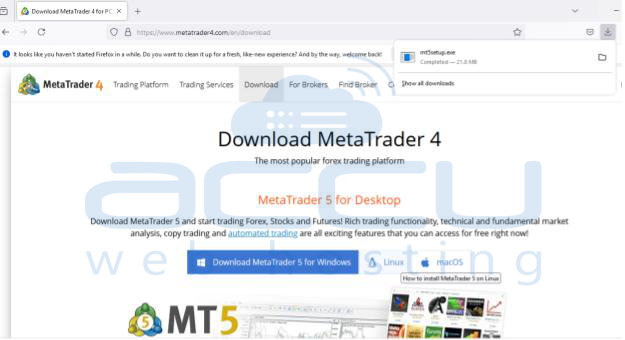
Download MT4/MT5 from your broker’s website or MetaQuotes.
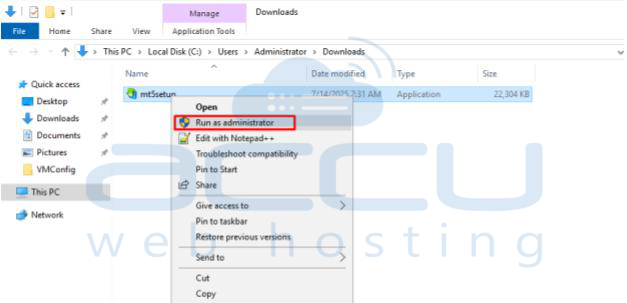
Go to the download folder and open the .exe file as an administrator. Run the installer and follow the steps to install it on the VPS.
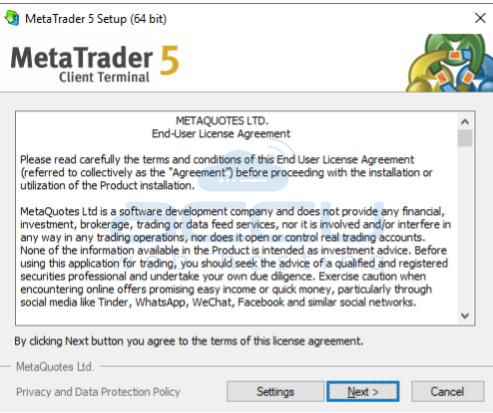
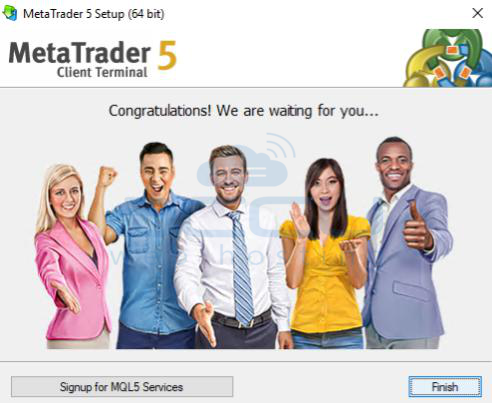
Launch the terminal from the desktop icon, and you will see a pop-up window. Click on next and log in using your trading account credentials, or open a demo account or real account for live trading.
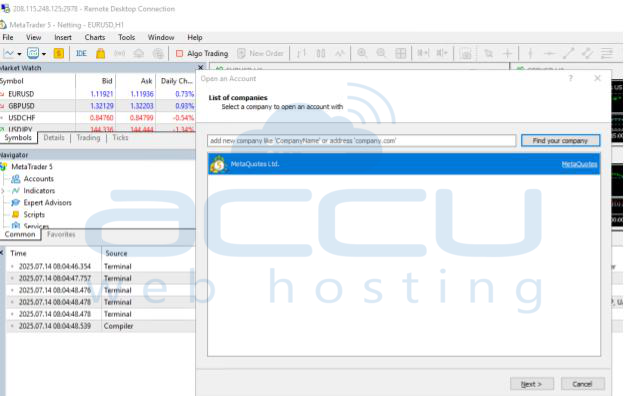
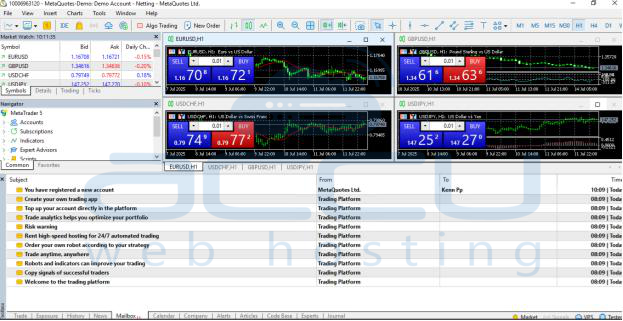
Step 3: Install Expert Advisors (EAs)
Before we move on with the installation process, you need to have an Expert Advisor file. You can either create one yourself or download a pre-made EA from a reputable provider.
Copy the EA file (.ex5 or .mq5) to this folder:
C:\Users\[Your Username]\AppData\Roaming\MetaQuotes\Terminal\[Instance ID]\MQL5\Experts
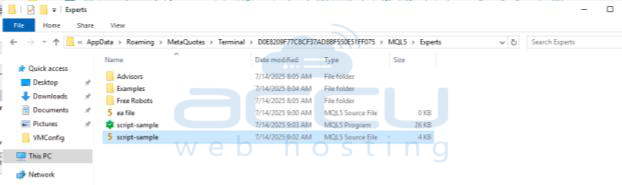
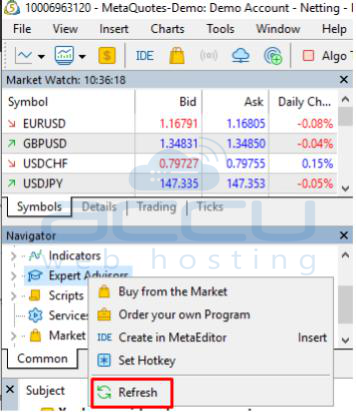
Open MT5 > Navigator Panel > Right-click on Expert Advisors > Click Refresh.
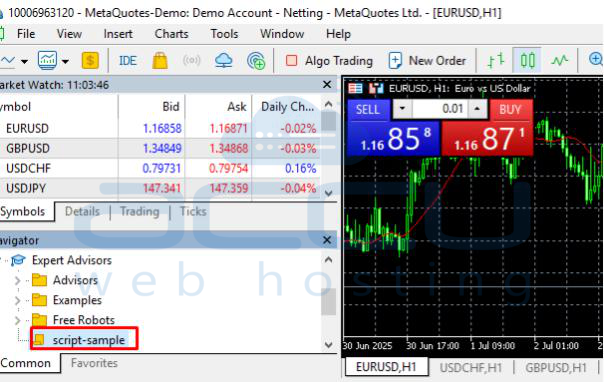
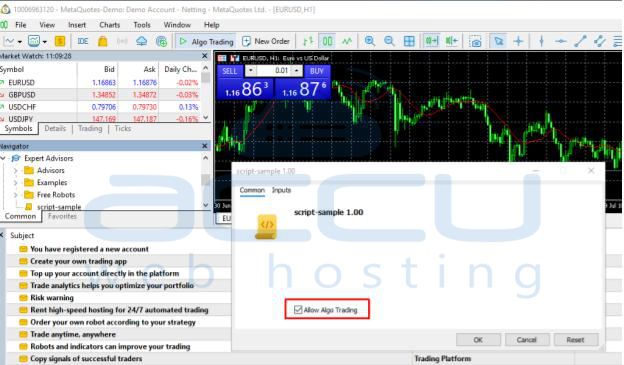
Drag and drop the EA onto a chart. Make sure that Algo Trading is enabled:
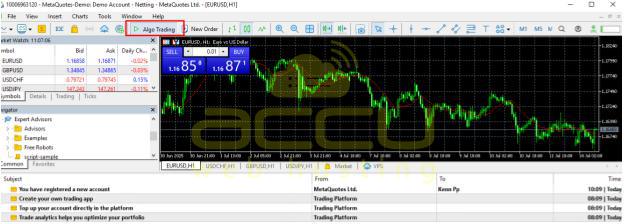
Make sure that Algo Trading is Green; if it’s red, then it’s disabled.
Step 4: Open Multiple MT4/MT5 Terminals
To run multiple accounts:
Copy your MetaTrader 5 installation folder and click on the empty white space, and paste it.
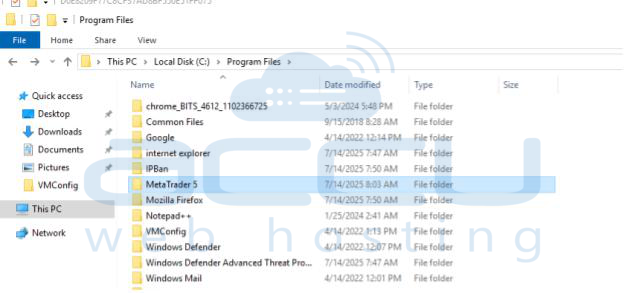
A new folder will be created, MetaTrader 5 -Copy, please rename it as per your choice (e.g., MetaTrader5 - 2nd Terminal)
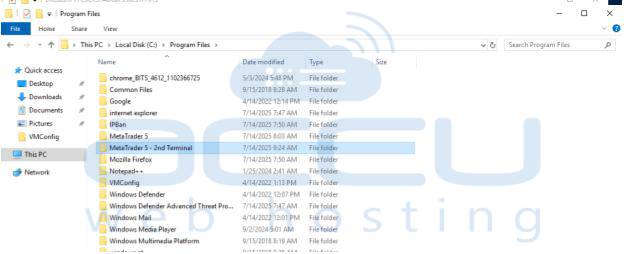
Create a shortcut to each terminal.exe by accessing the respective folder and right-clicking on it, and create desktop shortcuts. Rename the shortcut as per your choice
Launch each terminal and log in to different trading accounts.
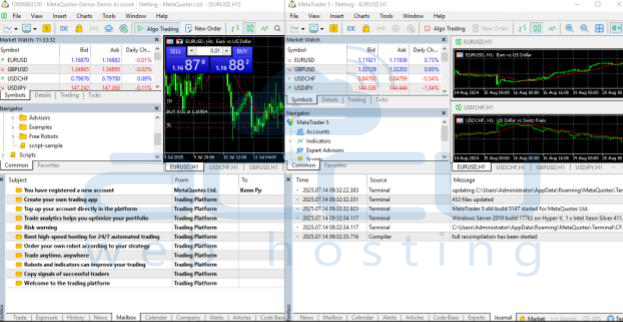
Step 5: Enable Email Notifications in MetaTrader
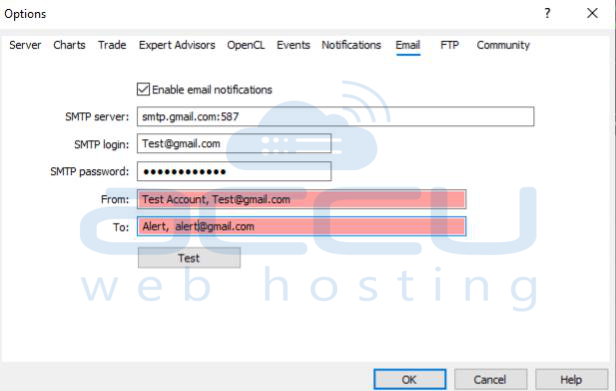
Go to Tools > Options > Email tab.
Check Enable and enter SMTP details:
- SMTP server: smtp.gmail.com:587
- Login: your Gmail address
- Password: App-specific password (not your Gmail password)
- From: your email
- To: where you want to receive alerts
Click Test to verify the setup.
Conclusion:
Using a Forex VPS offers significant advantages to both novice and experienced traders. With it, you can:
- Keep your trading platforms running around the clock
- Execute orders faster with lower latency
- Run multiple accounts and EAs simultaneously
- Secure your trades from crashes, power failures, or interruptions
- Stay in control from any device, anywhere in the world
Whether you trade manually or automatically, a Forex VPS will greatly improve the speed, security, and reliability of your trading setup.


