
GRand Unified Bootloader, commonly known as GRUB, is the default bootloader on Unix OS. One of the security threats in a Linux system is that anyone can log in to a single-user mode and change the system settings. So, to avoid this, we require GRUB to set password protection.
To prevent unauthorized access to the GRUB boot menu, you can protect it with a password. This guide explains how to secure the GRUB bootloader using an MD5-encrypted password on a Linux VPS.
Step 1: Log in with the root user.
Step 2: Generate the MD5 Password Hash
Execute the command given below -
# grub-md5-crypt
password --md5 $1$b7MLm0$UHtg4Ro6v/JrkWk8yBLMK0
You will be prompted to enter and confirm your password. After that, it will generate a hash similar to:

Important Note: Copy and save this hash in a secure location
Step 3: Backup GRUB Configuration File
Open the file /boot/grub/menu.lst or /boot/grub/grub.conf and add the saved MD5 password we generated earlier.
# vi /boot/grub/grub.conf
Important Note: Take a backup of your GRUB file so we can restore it if there is an issue.
Step 4: Edit the GRUB Configuration
Now, add the generated MD5 password to grub.conf file as password –md5.
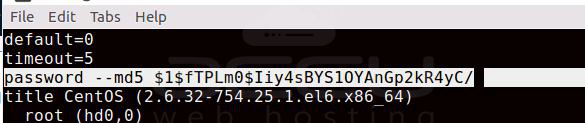
Step 5: Save and Exit the File
Save the file by pressing the Esc key and typing 'wq' to save and exit.
Step 6: Reboot the Server
Step 7: Test the GRUB Password Protection
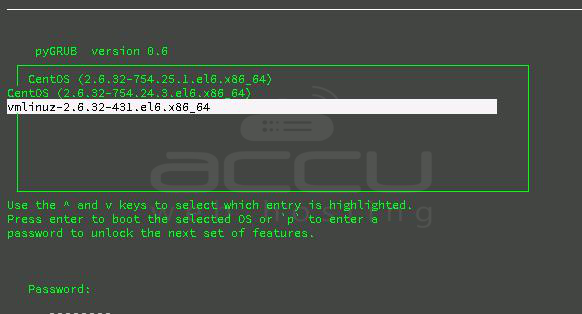
From now onwards, whenever you have to edit the grub menu, you will need to provide the password as per the image shown below:
Conclusion:
Protecting GRUB with a password is a crucial step in securing your Linux VPS, particularly in environments where physical or console-level access is available. It prevents unauthorized users from entering single-user mode or altering kernel boot parameters.
Make sure to store your GRUB password securely, as losing it may result in boot issues requiring recovery via rescue mode.


