
This error indicates that the MySQL daemon (mysqld) is forcibly terminating an active session associated with the user root, typically due to resource constraints or an internal failure, such as exceeding the allowed maximum number of client connections.
Root Cause Analysis
This issue generally arises when the number of concurrent client connections to the MySQL server exceeds the max_connections limit defined in the MySQL configuration. When the server hits this ceiling, any new or unprocessed connection request is either rejected or forcefully closed, especially under high load conditions. This could result in the MySQL daemon becoming unstable or being force-terminated by the system’s watchdog or MySQL’s internal safety mechanism.
Other contributing factors may include:
- A sudden spike in application traffic or poorly optimized queries can cause thread exhaustion.
- Long-running idle connections are not being closed properly.
- A memory bottleneck caused by too many simultaneous connections, especially in systems with limited RAM.
- The default max_connections is often set low (e.g., 100), which might not be sufficient for production environments.
Solution:
To address the issue, increase the max_connections parameter in the MySQL configuration to allow more simultaneous client connections, as follows:
Step 1: Log in to the server where MySQL is installed.
Step 2: Edit the MySQL configuration file. This file is usually located at:
- Linux: /etc/my.cnf or /etc/mysql/my.cnf
- Windows: Inside the MySQL installation directory, typically at C:\ProgramData\MySQL\MySQL Server 5.5\my.ini
Locate the [mysqld] section and find the max_connections directive. If it doesn’t exist, add it:
max_connections = 300
(You may choose a higher value based on expected load. Common values are between 200–1000 in high-concurrency systems.)
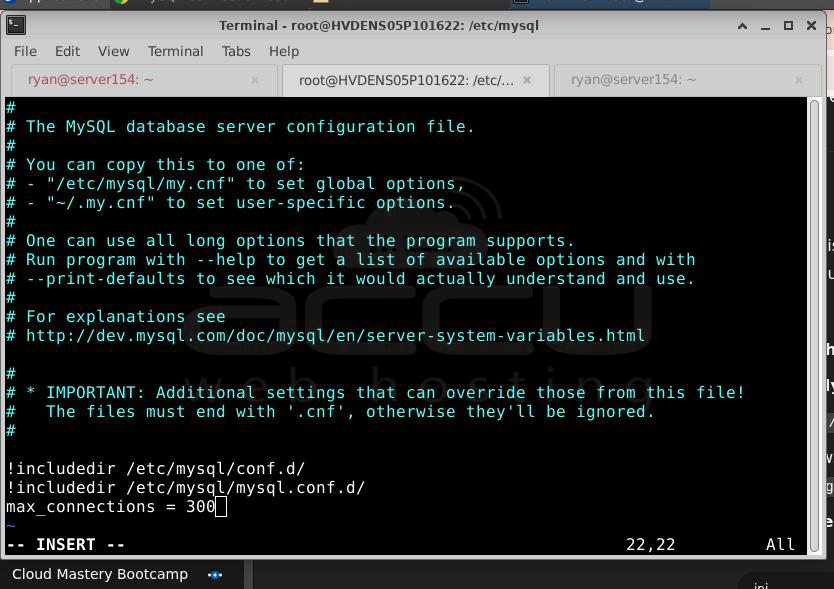
Step 3: Save the file after making changes.
Step 4: Restart the MySQL service for the new configuration to take effect:
sudo systemctl restart mysqld
To prevent recurrence:
Monitor MySQL’s connection usage.
Implement connection pooling in your application to reuse existing connections efficiently.
Set appropriate timeout values (wait_timeout, interactive_timeout) to close idle connections.
Review your server's RAM and performance limits before significantly increasing connection limits.
Conclusion
A higher number of connections consumes more RAM per connection. If memory resources are insufficient, it can degrade performance or even cause crashes due to out-of-memory conditions. Thus, increasing this value must be complemented with appropriate hardware capacity or connection pooling at the application level.


