
Shell Fork Bomb Protection in Webuzo is a security feature that helps protect your server from fork bomb attacks, which can make the server slow or even completely unresponsive.
What is a Fork Bomb?
A fork bomb is a small script or command that repeatedly creates new processes. Each new process creates even more processes, causing the number of running processes to grow very quickly.
As a result:
The server's CPU and memory become overloaded.
Legitimate users and applications may stop responding.
In severe cases, the server may crash or require a reboot.
Think of it like this:
Imagine one person entering a room and immediately inviting two more people. Each of those two invites two more, and the process continues. Very quickly, the room becomes overcrowded, leaving no space for anyone else.
A fork bomb works in a similar way by creating an overwhelming number of processes.
How Does Shell Fork Bomb Protection Help?
When Shell Fork Bomb Protection is enabled, Webuzo limits the number of processes that each user can create.
If a user or script tries to create more processes than the allowed limit:
The additional processes are blocked.
The server remains stable and responsive.
Other users and websites on the server continue to work normally.
Why Should You Enable It?
Enabling this feature provides several benefits:
Protects the server from accidental or malicious fork bomb attacks.
Prevents excessive CPU and memory usage.
Keeps websites and services running smoothly.
Improves overall server stability and reliability.
You can enable Shell Fork Bomb Protection in Webuzo in just a few clicks.
Steps to Enable Shell Fork Bomb Protection:
1. Log in to the Webuzo Admin Panel as the root user.
2. From the left-hand menu, navigate to: Home → Security → Shell Fork Bomb Protection.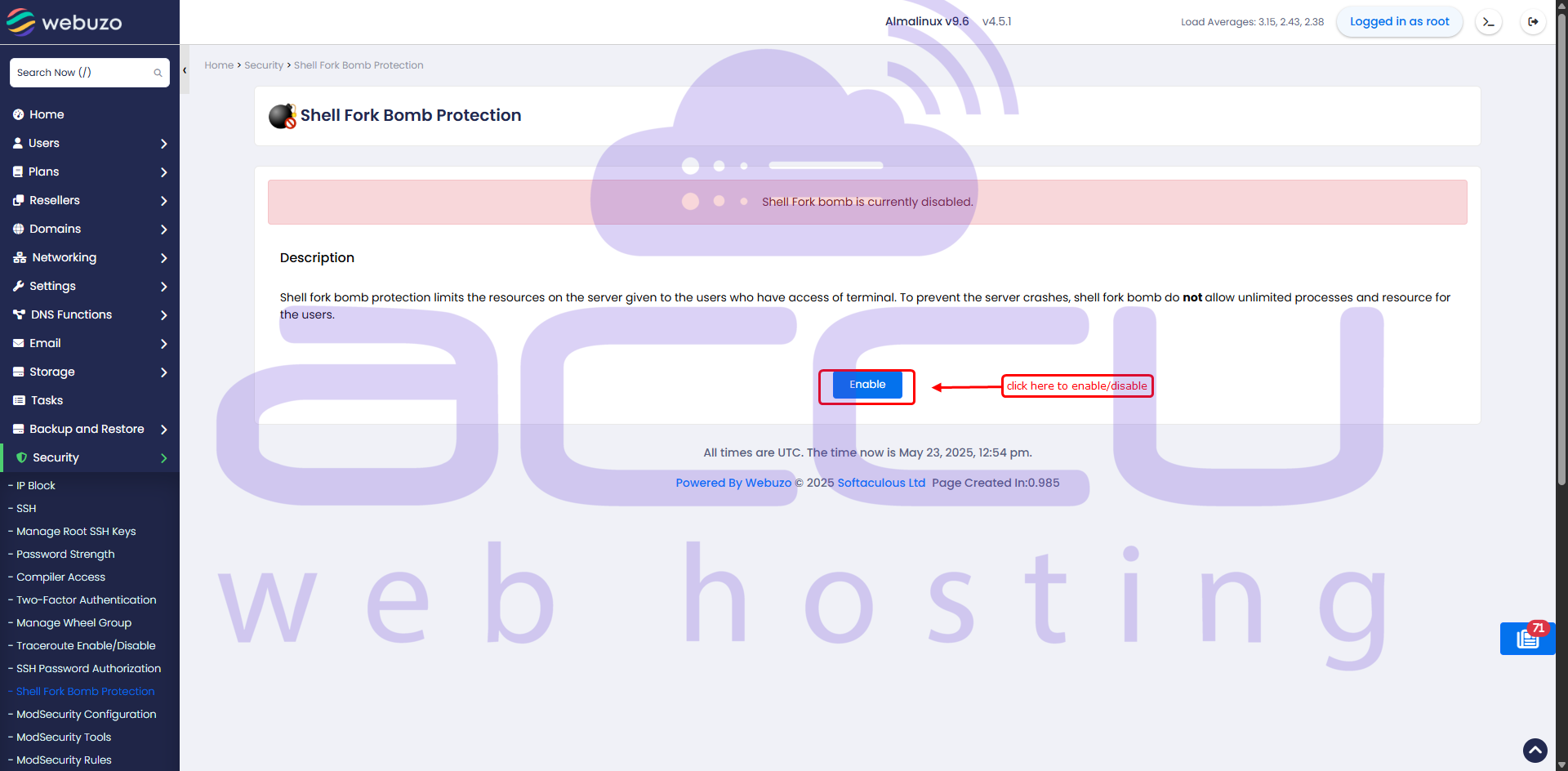
3. On the Shell Fork Bomb Protection page, you will see the current protection status:
4. Enabled – Protection is currently active.
5. Disabled – Protection is currently inactive.
If the protection is disabled, click the Enable button.
Once enabled, the status will change to Enabled, indicating that Shell Fork Bomb Protection is now active.


