
Introduction:
Virtualization is a technology that allows multiple virtual machines (VMs) to run on a single physical server, helping businesses save hardware costs, improve resource usage, and simplify management. It helps improve resource utilization, flexibility, and cost efficiency in IT environments.
Popular virtualization platforms include:
Microsoft Hyper-V
VMware ESXi
KVM (Kernel-based Virtual Machine)
Xen
What Is a Hypervisor?
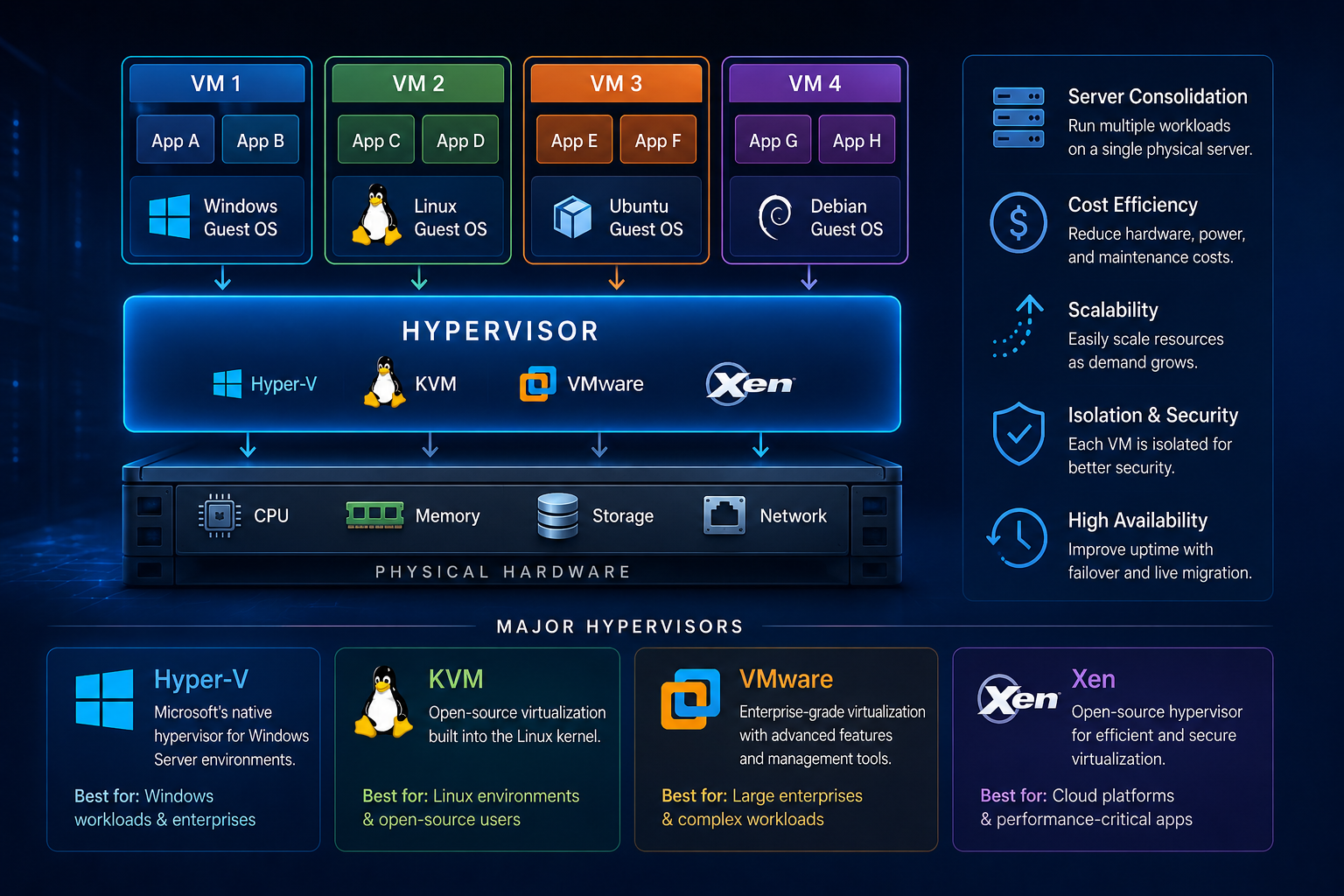
A hypervisor is software that creates and manages virtual machines. It allows multiple operating systems to run independently on the same physical server.
For example, one physical server can run:
-
Linux virtual machines
-
Windows virtual machines
All at the same time.
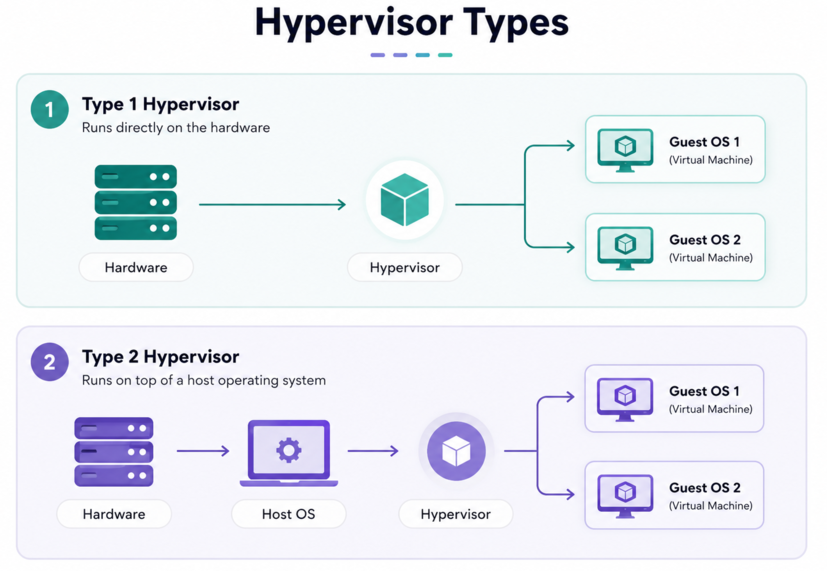
Hypervisors are generally divided into two types:
-
Type 1 (Bare-Metal Hypervisor)
Runs directly on the server hardware. -
Type 2 (Hosted Hypervisor)
Runs on top of an existing operating system.
Microsoft Hyper-V, VMware ESXi, and Xen are mainly Type 1 hypervisors, while KVM is integrated directly into the Linux kernel and behaves like a Type 1 hypervisor.
What Is Hyper-V?
Microsoft Hyper-V is a virtualization platform developed by Microsoft. It is built into Windows Server and some Windows desktop editions.
Hyper-V allows users to create and manage virtual machines using a graphical interface or command-line tools.
Key Features of Hyper-V:
- Integrated with Windows Server
- Easy management through Hyper-V Manager
- Supports Windows and Linux virtual machines
- Live migration support
- Checkpoints and snapshots
- Secure virtualization features
Advantages of Hyper-V:
- Good choice for Windows-based environments
- Easy integration with Active Directory
- Included with Windows Server licensing
- User-friendly for beginners
Disadvantages of Hyper-V:
- Linux support is improving but still less flexible than KVM
- Some advanced enterprise features require additional Microsoft tools
- Less common in Linux-focused hosting environments
Best Use Cases:
Hyper-V is commonly used for:
- Windows server virtualization
- Small and medium business environments
- Microsoft ecosystem deployments
- Development and testing labs
What Is KVM?
KVM stands for Kernel-based Virtual Machine. It is an open-source virtualization technology built directly into the Linux kernel.
KVM turns a Linux server into a powerful hypervisor capable of running multiple virtual machines efficiently.
Many cloud providers and hosting companies use KVM because of its flexibility and performance.
Key Features of KVM:
- Fully open-source
- Integrated into Linux
- Excellent performance
- Supports live migration
- Strong security isolation
- Works with tools like QEMU and libvirt
Advantages of KVM:
- Excellent Linux integration
- Highly customizable
- Very popular in cloud computing
- No expensive licensing fees
- Strong community support
Disadvantages of KVM:
- Can be more complex for beginners
- Management may require Linux knowledge
- GUI tools are less polished compared to VMware
Best Use Cases:
KVM is ideal for:
- Linux VPS hosting
- Cloud platforms
- Enterprise Linux servers
- Open-source infrastructure
- High-performance virtualization
Many virtualization platforms such as Proxmox VE use KVM as their backend hypervisor.
What Is VMware?
VMware ESXi is one of the most well-known enterprise virtualization solutions developed by VMware.
VMware products are widely used in data centers and enterprise environments because of their stability, advanced features, and professional management tools.
Key Features of VMware ESXi:
- Enterprise-grade virtualization
- High availability (HA)
- Distributed resource scheduling
- Live migration with vMotion
- Centralized management through vCenter
- Advanced backup and disaster recovery tools
Advantages of VMware:
- Very stable and mature platform
- Excellent management interface
- Advanced enterprise features
- Strong vendor support
- Large ecosystem and documentation
Disadvantages of VMware:
- Licensing can be expensive
- Advanced features may require additional products
- Less flexible compared to open-source solutions
Best Use Cases:
VMware is commonly used for:
- Enterprise data centers
- Large corporate environments
- Mission-critical workloads
- Advanced virtualization management
What Is Xen?
Xen is an open-source hypervisor originally developed at the University of Cambridge.
Xen was widely used by hosting providers and cloud platforms, including early versions of large public cloud infrastructures.
Key Features of Xen:
- Lightweight hypervisor
- Strong isolation between virtual machines
- Supports paravirtualization
- Good security architecture
- Open-source platform
Advantages of Xen:
- Strong security isolation
- Efficient resource handling
- Stable performance
- Suitable for cloud environments
Disadvantages of Xen:
- More complex management
- Smaller community compared to KVM
- Less common in newer deployments
- Hardware compatibility can sometimes be limited
Best Use Cases:
Xen is suitable for:
- Cloud infrastructure
- Security-focused environments
- Hosting providers
- Specialized enterprise deployments
Which Virtualization Platform Should You Choose?
The best hypervisor depends on your requirements, budget, and technical experience.
Choose Hyper-V If:
- You mainly use Windows servers
- You already use Microsoft products
- You want easy integration with Windows environments
Choose KVM If:
- You prefer Linux servers
- You want an open-source solution
- You need flexibility and strong performance
- You are building cloud infrastructure
Choose VMware If:
- You need enterprise-grade management
- You require advanced virtualization features
- Your organization needs professional vendor support
Choose Xen If:
- You need strong VM isolation
- You prefer lightweight virtualization
- You work with specialized cloud or security-focused environments
Differences Between Hyper-V, KVM, VMware, and Xen:
|
Feature |
Hyper-V |
KVM |
VMware |
Xen |
|
Developer |
Microsoft |
Open-source Linux community |
VMware |
Xen Project |
|
License |
Commercial |
Open-source |
Commercial |
Open-source |
|
Host OS |
Windows |
Linux |
Bare-metal |
Bare-metal |
|
Ease of Use |
Easy |
Moderate |
Very Easy |
Moderate |
|
Performance |
Good |
Excellent |
Excellent |
Excellent |
|
Cost |
Medium |
Low |
High |
Low |
|
Enterprise Features |
Good |
Good |
Excellent |
Good |
|
Linux Support |
Moderate |
Excellent |
Excellent |
Excellent |
|
Windows Support |
Excellent |
Good |
Excellent |
Good |
|
Cloud Usage |
Moderate |
Very High |
High |
Moderate |
Conclusion:
Virtualization platforms such as Microsoft Hyper-V, KVM, VMware ESXi, and Xen each offer unique advantages.
Hyper-V works well in Microsoft environments. KVM is highly popular in Linux and cloud hosting.
While VMware provides powerful enterprise virtualization features. Xen focuses on security and efficient virtualization.
Understanding the differences between these hypervisors can help businesses and system administrators choose the right virtualization solution for their infrastructure, performance needs, and budget.


