
Most people prefer websites that load quickly. Slow websites lose visitors, which means fewer paying customers. Caching systems are needed to make websites faster and improve server performance. Let's discuss some popular caching methods to improve VPS or server hosting a website.
Caching Methods
Caching means temporarily saving website content like images, CSS files, bits of PHP scripts, HTML pages, and database results. Using a caching system is the best way to make servers faster, speed up website loading, and attract more visitors. With caching, visitors don't have to wait for webpages to load because commonly accessed content is saved, reducing delays.
There are various caching methods available. Some cache complex requests, like PHP pages or database queries, while others store fully processed PHP pages and query results.
Best Caching Methods:
Here are some popular and commonly used caching methods:
1. VPS/Server Caching
This method, also known as server-side caching, uses caching software to load website pages faster during high-traffic times. Managed servers have this software installed by hosting providers, but even unmanaged server clients can easily install and use it. Some top caching software includes
Varnish
Varnish is a type of software known as an HTTP accelerator or caching system. In simple terms, Varnish is used to make websites load faster.
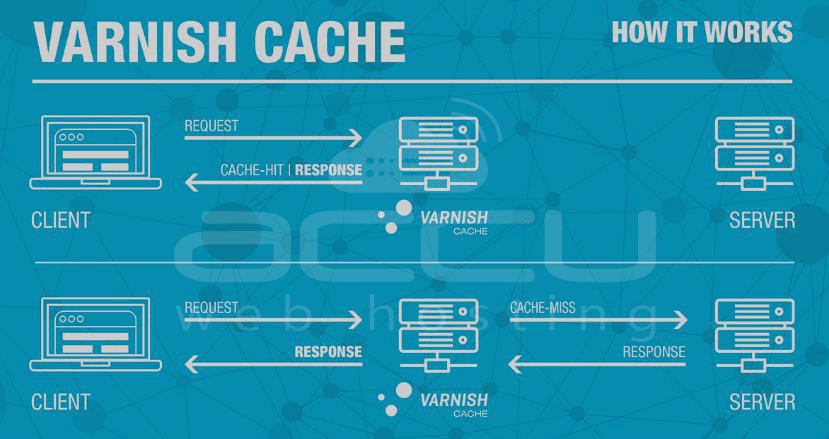
When you visit a website, your browser requests the web server to fetch the content (like images, text, and other elements) needed to display the webpage. With Varnish in place, instead of every request going directly to the web server, Varnish acts as a middleman. It saves a copy of the requested content the first time someone asks for it.
The next time someone requests the same content, Varnish delivers the saved copy instead of asking the web server for it again. This process speeds up the loading time of web pages because the content is readily available without waiting for the server to generate it from scratch.
Memcached with PHP
Memcached with PHP is a combination of two technologies: Memcached and PHP. Let's break it down:
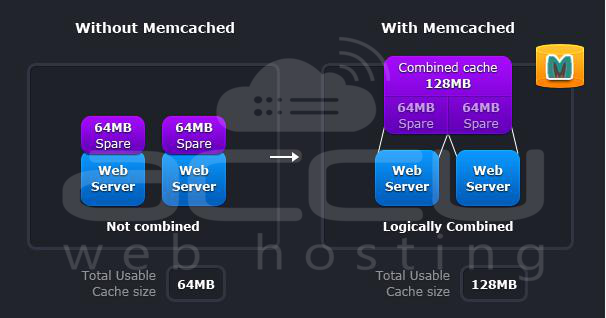
Memcached: It's a type of caching system that stores data in memory to speed up website performance. Instead of fetching data from a database every time a user requests it, Memcached keeps frequently accessed data in memory for quick access. This reduces the load on the database server and speeds up website loading times.
PHP: PHP is a programming language commonly used for web development. It's used to create dynamic web pages and interact with databases.
When you combine Memcached with PHP, you're essentially using Memcached to cache data in memory and PHP to interact with that cached data on your web server.
Here's how it's useful
- Faster Website Loading: By caching frequently accessed data in memory, Memcached with PHP reduces the time it takes to retrieve information from the database. This results in faster website loading times for users.
- Reduced Database Load: Since Memcached stores data in memory, the number of database queries and the load on the database server are reduced. This can improve overall website performance and scalability, especially for websites with high traffic.
- Improved User Experience: With faster loading times, users experience a smoother and more responsive website. This can lead to higher user satisfaction and engagement.
In simple terms, Memcached with PHP helps make websites faster by storing frequently accessed data in memory, reducing the need to fetch it from the database every time a user visits a webpage.
Squid
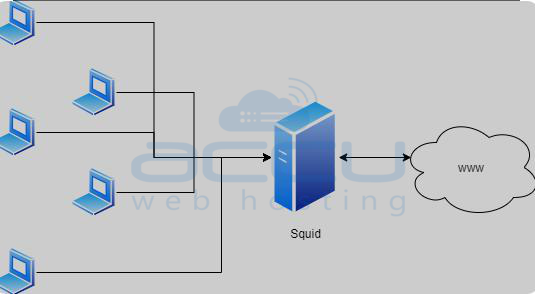
Squid is like a super-smart assistant for internet browsing. Imagine you ask your assistant to fetch a book from the library whenever you want to read it. Squid is like that assistant, but it remembers the books you requested and keeps copies nearby.
Here's how Squid is useful
- Faster Loading: When you visit a website, Squid remembers the parts you've seen before. Instead of returning to the internet library each time, Squid quickly hands you the parts it has stored, making websites load faster.
- Saving Bandwidth: Squid doesn't go to the library whenever someone asks for the same book. It saves a copy in its own space, reducing the need to download the same information repeatedly. This helps save internet data and makes things more efficient.
- Filtering and Security: Squid also acts like a security guard, checking the books (web content) before delivering them to you. It can block unwanted stuff and ensure you only get what you're supposed to.
In simple words, Squid makes the internet faster by remembering and keeping nearby the things you've looked at before, saving time and internet resources. It's like having a clever assistant that knows exactly what you want.
2. Third-Party Caching
For WordPress hosting customers, implementing third-party caching systems is easy. These caching plugins offer additional features to enhance website performance. Some popular ones are:
W3 Total Cache
W3 Total Cache is like a magic spell for websites, making them load faster and perform better. In simple terms, it's a plugin that you can add to your website if you use WordPress.
Here's how W3 Total Cache is useful
- Speeds up Loading: When someone visits your website, W3 Total Cache saves copies of your web pages and images. The next time someone comes by, it doesn't have to rebuild everything from scratch; it can quickly serve up the saved copies. This makes your website load much faster.
- Saves Internet Data: Just like having a handy storage space, W3 Total Cache keeps important parts of your website ready to go. This means visitors don't have to download the same stuff over and over, saving them time and saving you internet data.
- Improves Overall Performance: W3 Total Cache is like a superhero that optimizes your website's performance. It reduces the strain on your server, ensuring your website runs smoothly even when lots of people are trying to visit simultaneously.
In simple words, W3 Total Cache is a helpful tool that makes your website faster and more efficient, ensuring a better experience for your visitors.
WP Super Cache
WP Super Cache is like a handy assistant for WordPress websites, ensuring they load quickly and efficiently. In simple terms, it's a plugin that you can add to your WordPress site.
Here's how WP Super Cache is useful
- Speeds up Website Loading: When someone visits your WordPress site, WP Super Cache creates static copies of your web pages. It can quickly serve these pre-made copies instead of generating the pages from scratch every time. This makes your website load much faster for visitors.
- Saves Server Resources: With these ready-to-go copies, WP Super Cache reduces the workload on your server. It's like having a set of prepared snacks instead of cooking a full meal each time someone is hungry. This efficiency helps your server handle more visitors without slowing down.
- Supports Minification: WP Super Cache can compress and simplify your website's code, which is known as minification. This reduces the amount of data that needs to be transferred, making your site load even faster.
In simple words, WP Super Cache is a helpful tool for WordPress websites, making them load faster, saving server resources, and providing a smoother experience for your visitors.
WP-FFPC
WP-FFPC stands for "WordPress - Fast Full Page Cache," and it's a plugin designed to make WordPress websites faster by implementing a robust caching system. In simpler terms, it's like a speed booster for your WordPress site.
Here's how WP-FFPC is useful
- Fast Full Page Cache: WP-FFPC creates and stores complete copies of your web pages in a special storage area. When someone visits your site, it doesn't need to build the page from scratch; it quickly delivers the pre-made copy. This significantly speeds up the loading time of your WordPress pages.
- Memory Caching Options: WP-FFPC often uses memory (RAM) for caching, which is faster than using disk storage. This ensures that your website loads swiftly, especially for frequently visited pages.
- Customizable Caching Options: WP-FFPC allows you to fine-tune caching settings based on your website's needs. You can choose different memory caching options like PHP memcached or Nginx memcached, providing flexibility for advanced users.
- Efficient Handling of Requests: It efficiently manages and handles requests, reducing the strain on your server. This means your website can handle more visitors without slowing down.
In simple words, WP-FFPC is a plugin that helps your WordPress site load faster by storing ready-to-go copies of your web pages and efficiently managing how they are delivered to visitors. It's like having a well-organized bookshelf where your favorite books are always within reach, making reading (browsing) much quicker and enjoyable.
CDN Hosting service
CDN stands for Content Delivery Network. It is a network of servers distributed geographically to deliver web content, such as text, images, videos, and other resources, to users based on their location.
The primary purpose of a CDN is to enhance the performance, reliability, and speed of content delivery by reducing latency and decreasing the load on the origin server.
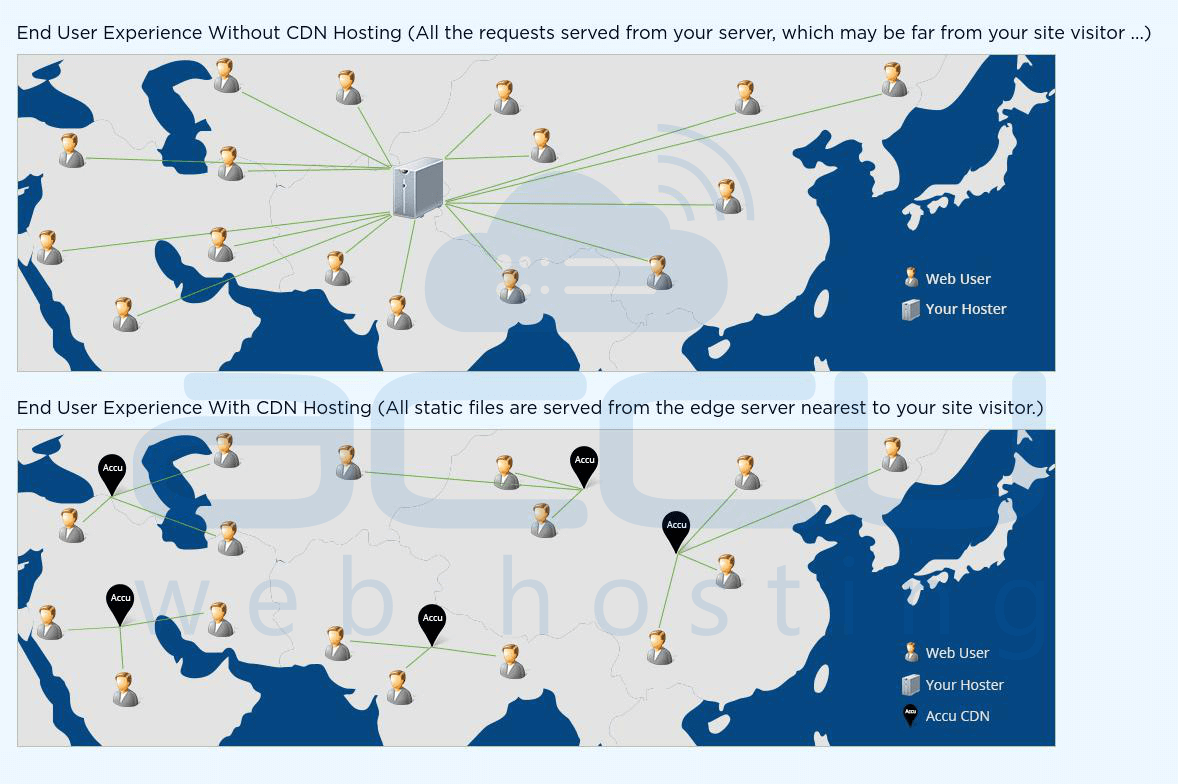
It works by caching copies of website content on these servers. When a user requests a web page, the CDN delivers the content from the server nearest to the user, reducing latency and speeding up the loading time. This distributed approach improves website performance, reliability, and scalability, especially during high-traffic periods.
3. In-Browser Caching
This method reduces server load and speeds up website load times by decreasing the number of hits per page. By setting up headers for commonly accessed webpages, browsers can cache them. When a new request is made for a saved webpage, the caching system quickly loads it. If there's a request for a new page, the caching system saves and loads it to the visitor within seconds.
Website owners need to understand the advantages of these caching methods. Seeking assistance from hosting providers when setting up caching systems is recommended.
Scopehosts believes in providing the best solutions for all hosting services-related issues, offering managed hosting services with free management and basic data backup solutions. Receive complete assistance for installing any software.
Conclusion
In closing, VPS (Virtual Private Server) caching methods are like turbo boosts for your website, ensuring it runs smoothly and loads quickly. Think of them as helpful tools that store frequently used information so that it's readily available whenever someone visits your site.
Whether it's VPS/Server Caching handling busy times, Third-Party Caching plugins adding extra performance features, or In-Browser Caching reducing server strain, these methods all work together to make your website lightning-fast and efficient.
Simply put, caching methods are the secret ingredients for a snappy website that keeps visitors happy and returning for more. They're the key to a seamless online experience that leaves a lasting impression.


