
Internet privacy is a significant issue in today's world. Ensuring security and online privacy helps protect users and devices from malicious actors. This is where private DNS can help. Take a closer look at private DNS and how you can configure it on your device if you are worried about your online privacy and want to improve it.
What is Private DNS?
Private DNS's name hides its meaning; it is private. Private DNS are DNS networks that are separate from public DNS. Think of them as private libraries, where you only have a limited number of books. If you want to read certain books, you won't be able to, but there's a perk to this; nobody will know what you're reading because your library is private.
Private DNS offers a security feature called DoH (DNS over HTTPS) and DoT (DNS over TLS). This added security protocol encrypts your DNS query as it traverses the network.
DoH is a networking protocol that provides an extra layer of security to the DNS queries by hiding them within HTTPS traffic. HTTPS is an abbreviation for Hypertext Transfer Protocol Secure, a secure version of HTTP that ensures your website is secure and private.
On the other hand, DoT is a security protocol that facilitates secure data packet transfer over the network by using Transport Layer Security (TLS). TLS is a protocol that guarantees secure communication between devices over the internet.
Together, DoH and DoT provide:
-> An extra layer of security for private DNS.
-> Making it more difficult for hackers to intercept or manipulate DNS queries.
-> Ensuring your network is more secure.
Having private DNS on board reduces the chances of your system being compromised by malware, man-in-the-middle (MITM) attacks, ransomware attacks, or DDoS attacks. In addition, since there is no tracking and no unnecessary networking node, you are cut off from the public internet.
Using private DNS, you can provide hostname resolution for applications running within and between virtual cloud networks (VCNs) and on-premises or other private networks using your own private DNS domain names.
How does Private DNS work?
Private DNS resolves domain names to IP addresses within a private network or organization. When a user enters a domain name, their device sends a DNS query to a resolver provided by the organization's IT department.
The resolver looks up the domain name in its local cache or forwards the request to an authoritative DNS server for the domain. The authoritative server responds with the IP address associated with the domain name, which the resolver returns to the user's device.
In a private DNS setup, the authoritative DNS server is usually located within the organization's network, and the domain names resolved are internal to the organization. This allows the organization to restrict access to specific domain names or IP addresses and control access to internal resources.
Private DNS establishes a secure and centralized system for resolving domain names within an organization's network, providing greater control and flexibility over network resources.
Advantages of Private DNS
There are several advantages of using a private DNS within an organization, including:
Simplified network management: Private DNS allows organizations to create custom domain names for internal use, allowing users to access internal resources without remembering or entering IP addresses easily. This simplifies network administration and reduces the possibility of user error.
Improved network security: You can control access to internal resources by using private DNS to restrict access to specific domain names or IP addresses. This helps stop unauthorized access to sensitive information and resources.
Reduced network traffic: By resolving domain names internally, private DNS can reduce the amount of traffic that has to traverse external networks, helping improve network performance and reduce costs.
Increased reliability: Private DNS can be configured with redundant servers and load balancing. This ensures that DNS queries are always resolved, even if one or more servers fail.
Customizable and flexible: Private DNS can be customized to meet your organization's specific needs, such as creating custom domain names, implementing security measures, and configuring access controls.
Overall, private DNS gives organizations greater control, security, and flexibility over network resources, resulting in improved network performance, reduced costs, and increased productivity.
How to Enable Private DNS?
Setting up a private DNS is straightforward. You'll need an IP address of a private DNS and a basic understanding of networking. However, the process of setting up a private DNS may vary depending on the device you are using.
How to Set up private DNS on a Windows system/Windows Server?
To set up the Private DNS on Windows 10/11, Windows Server 2016/2019, follow the below-mentioned steps.
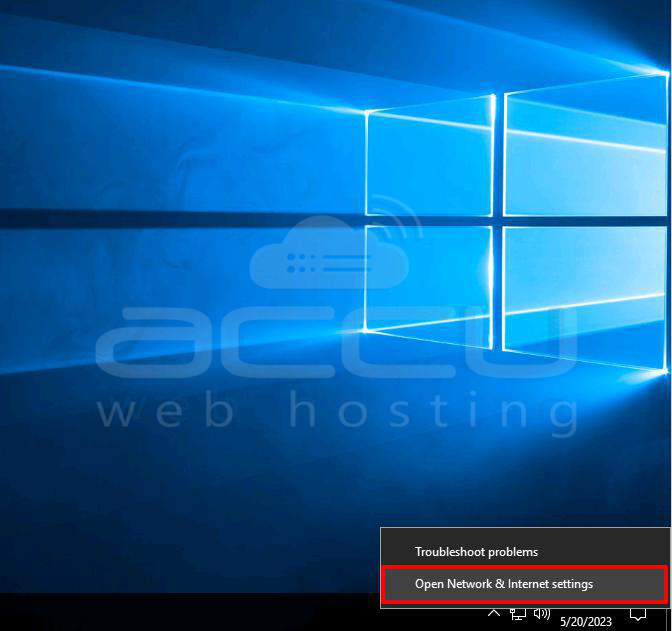
Step 1: Right-click the Network icon on the taskbar and select the Open Network & Internet setting option.
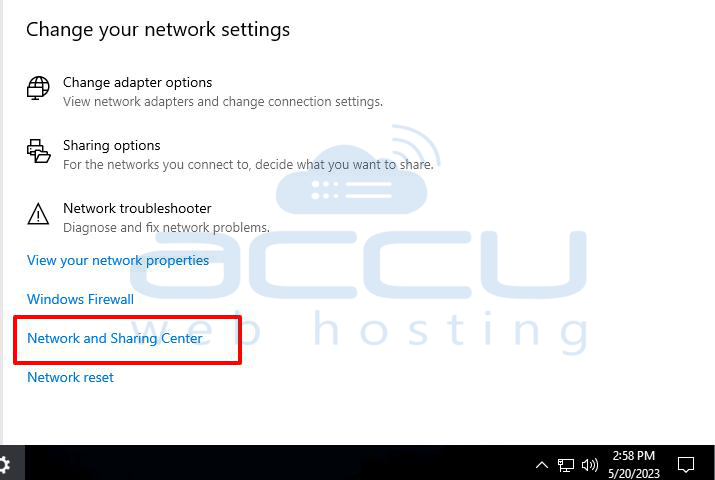
Step 2: Scroll down the screen and click on the Network and Sharing Center option.
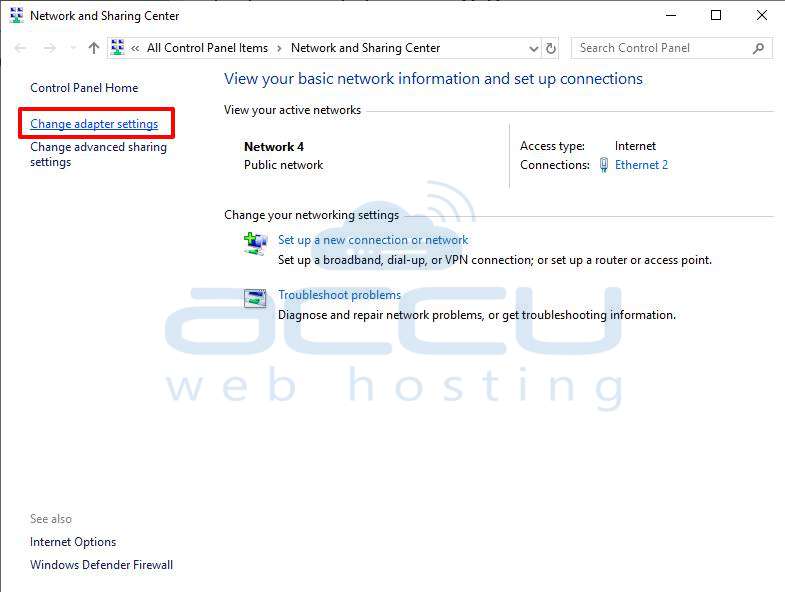
Step 3: In the Network and Sharing Center window, go to the left side of the screen and click on the link Change adapter settings.
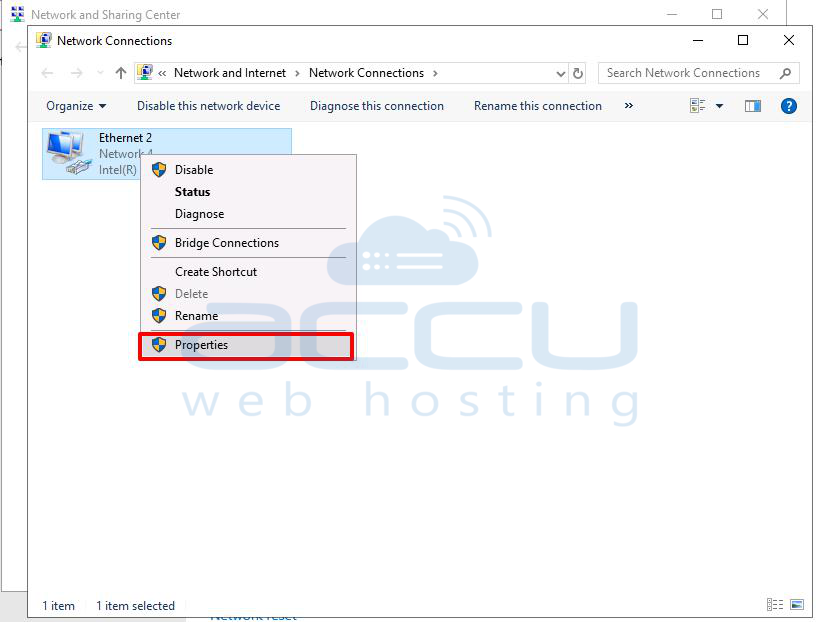
Step 4: In the Network Connections window, select the network you are connected to and right-click on it. Then click on the Properties option.
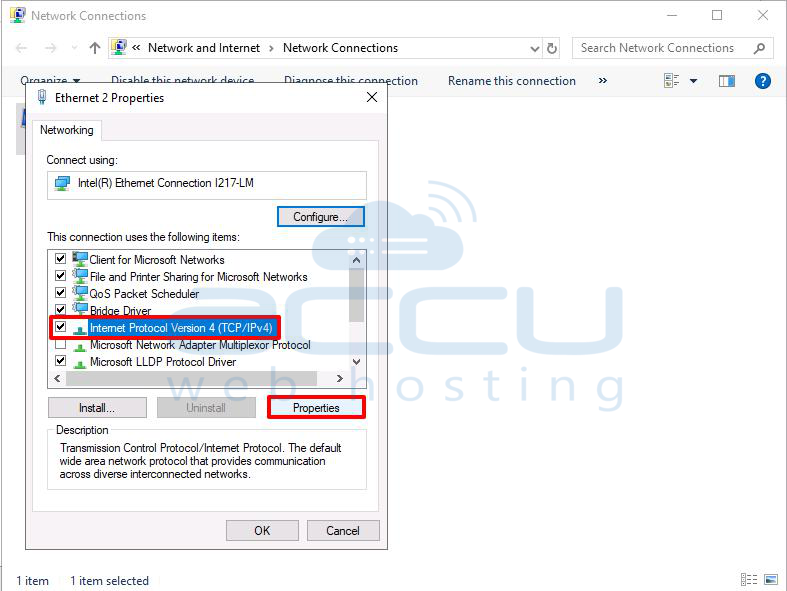
Step 5: In the Ethernet Properties window, select the Networking tab. Click on the Internet Protocol Version 4 (TCP/IPv4) option. After then, click on the Properties button.
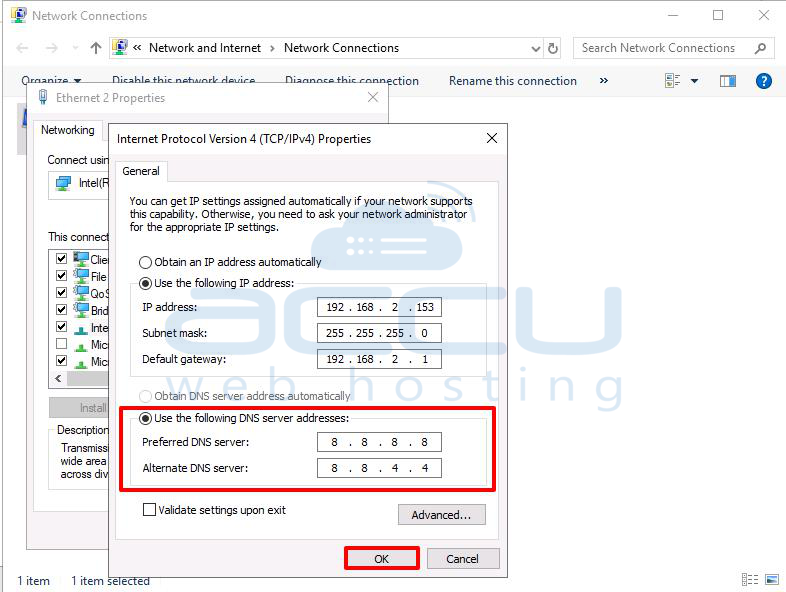
Step 6: In the Internet Protocol Version 4 (TCP/IPv4) Properties window, go to the General tab, and select Use the following DNS Server address.
Enter the preferred DNS address and the alternate address in their respective field. Once you have entered both addresses, click on Ok to save the settings.
Conclusion:
While private DNS may not be the most secure way to browse the internet, it does offer some benefits. For instance, it can potentially increase your internet speed. This is because private DNS often has free bandwidth and a lower ping, resulting in faster and more reliable performance. Another advantage of private DNS is that it can allow you to access blocked websites, expanding your online experience. However, it's essential to remember that using private DNS comes with security risks and should be approached cautiously.


