
What is a vCPU?
A vCPU stands for virtual central processing unit. In simple terms, it is a software version of a CPU that doesn't physically exist in your computer like a real CPU.
Instead, it is created by special software called a hypervisor that manages virtual machines (VMs). Each vCPU is like a pretend CPU core that the operating system inside the VM sees as a real one.

However, vCPUs are not as efficient as real CPUs because they are based on software. That's why it's important to know how many cores your processor has when you're buying a computer (like "quad-core" means four cores).
The same goes for choosing a virtual private server (VPS) or dedicated server hosting plan.
Difference between CPU and vCPU
The primary distinction between CPUs and vCPUs lies in their nature. CPUs are hardware components found within your computer, whereas vCPUs are software constructs.
Unlike CPUs, which physically exist, vCPUs are generated by hypervisors as required. Due to their contrasting implementations, CPUs are significantly more efficient than vCPUs, as they do not carry the overhead associated with software-based operation.
How Does a vCPU Work?
How does a vCPU work? Virtual servers and their resource allocation are managed by a hypervisor, as explained earlier.
The hypervisor utilizes a portion of the physical CPU's computing resources and assigns it to a vCPU, which is then allocated to a specific virtual machine (VM). Some IT experts view vCPUs as a representation of the time allocated to a processor's core.
System administrators can configure different resource allocations using hypervisors, specifying the vCPU capabilities for specific VMs.
How Do You Calculate vCPU?
How do you calculate vCPU? How many vCPUs are in a CPU? What are cores? These questions can be confusing for those unfamiliar with virtualized servers.
Not to worry, we'll delve into the details and provide a clear understanding of how to calculate the number of vCPUs required for your cloud servers. The specific calculations will depend on your individual needs and the manufacturer involved
The Math Behind Calculating vCPU
In the past, people used to say that there were eight vCPUs for each core. Nowadays, the number of vCPUs is determined mostly by the manufacturer.
To calculate the vCPU count, you multiply the number of processing threads per core offered by the chipset with the number of occupied sockets. Here's the formula:
(Threads x Cores) x Physical CPU = Number vCPU
Example Calculation of vCPU & Cores
To understand how to calculate vCPUs and cores, let's use an example. We'll choose the Intel Xeon E-2288G CPU. It has 8 cores, 16 threads, a base clock speed of 3.7GHz, and a turbo boost speed of 5.0GHz, with 16MB of onboard cache.
(16 Threads x 8 Cores) x 1 CPU = 128 vCPU
Related Terms You Should Know
Here are a few virtual server terms and definitions you should know:
Hypervisor:
A hypervisor is like a controller or manager. It's a software that creates and runs virtual machines (VMs), also called a virtual machine monitor (VMM). It allows one computer to support multiple VMs by sharing its resources like memory and processing power. Hypervisors can allocate resources, whether it's just one vCPU or many vCPUs.
Socket:
A socket is a hardware component. It's a set of pins that hold a processor in place and connect it to the motherboard. The number of sockets depends on the motherboard's capacity. Different sockets support different generations of CPUs.
Thread:
A thread is a path of execution within a process. A process can have one or more threads. Threads are sometimes called lightweight processes. Parallelism is achieved by dividing a process into multiple threads. For example, having multiple tabs open in a browser represents different threads. In word processing, there can be threads for formatting text and processing inputs.
Physical Core:
A physical core refers to the processing units within a CPU. A single physical core may correspond to one or more logical cores.
Logical Core:
A logical core allows a single physical core to handle two or more actions simultaneously. Logical cores enable the concept of hyper-threading (HTT). Newer cores are more like full-fledged CPUs and can work on multiple tasks at the same time. However, they are not true CPUs like physical cores.
Determining Your Workload & Utilization
But that's not all. To get started, you need to know about your workload and application profiles. We can help you analyze this.
Some questions to consider are: Do your apps always use 100% of the CPU? Do they have periods of high utilization? Do they have maintenance windows? By understanding your requirements, you can make an informed decision about the hardware you need.
Theoretically, if you have small virtual machines (VMs) that don't use much CPU time, you could have 20-30 VMs on an 8-core server. However, if you have larger workloads, like a database server, you will have fewer VMs on the same 8-core server. It's all about efficiently using and allocating resources.
Next, let's look at different configuration options. Keep in mind that this is just an example, and the vCPU allocation for each VM will depend on your specific workload.
4 vCPUs per VM:
128 vCPUs / 4 vCPUs per VM = 32 VMs
2 vCPUs per VM:
128 vCPUs / 2 vCPUs per VM = 64 VMs
1 vCPU per VM:
128 vCPUs / 1 vCPU per VM = 128 VMs
CPU Exhaustion & Poor Performance
It's important to note that assigning too many vCPUs to a VM can lead to CPU exhaustion and poor performance. Each VM has a limit on the number of virtual cores it can have.
For instance, Windows Server 2008 R2 limits the vCPUs to 4 per VM, while Windows Server 2012 extends that limit to 64.
How to find the number of cores and threads on Windows and Linux systems?
To determine the number of cores and threads on Windows and Linux systems, follow these steps:
For Windows users:
Step 1: Open Task Manager by pressing Ctrl+Shift+Esc.
Step 2: Click on the Performance tab and select the CPU section.
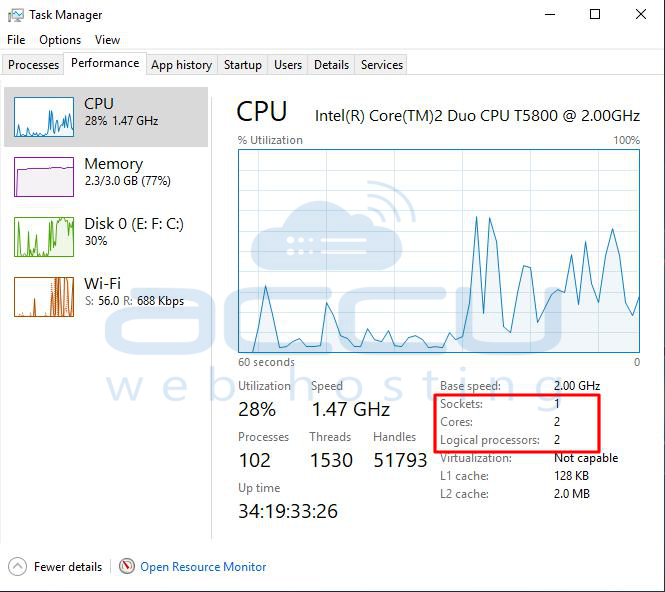
Look for the number of Cores, Logical Processors (Threads), and Sockets (CPU count) at the bottom right.
The maximum number of vCPUs for this machine is:
(2 Cores x 4 Threads) x 1 CPU = 8 vCPUs
For Linux users:
Step 1: Open a terminal window (Ctrl+Alt+T).
Step 2: Run the following command:
# lscpu
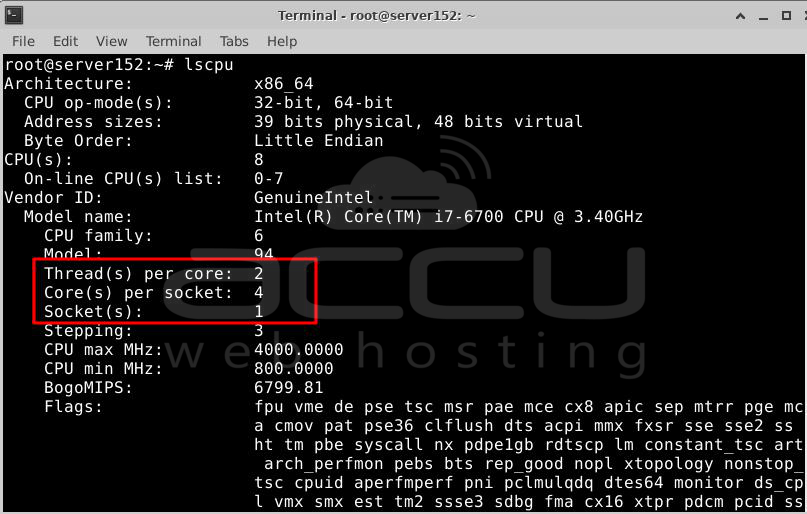
The command output will display CPU details, including the number of physical CPUs, cores, and threads per core.
The maximum number of vCPUs for this machine is:
(4 Cores x 8 Thread) x 1 CPU = 32 vCPUs.
Conclusion
This article explained the concept of virtual CPUs, how they function, and their applications. You also learned how to calculate the maximum number of vCPUs for a single machine or specific workload. Virtualization software is increasingly utilized for servers due to its ability to save resources, time, and money.


