
First, let us understand the meaning of the 777 file permission in Linux. If any files/ folders on your Linux server have the 777 file permission, then everyone can read and write that file. This is not a good security practice as it can harm your server.
In Linux, file permissions determine who can read, write, and execute a file. A 777 permission means:
Owner: Read, write, execute
Group: Read, write, execute
Others: Read, write, execute
This allows anyone to read, modify, or delete the file, which is generally not recommended for security reasons.
However, in some cases (e.g., public download folders), you may need to set 777 permissions temporarily.
Below are methods to find all files or folders with 777 permissions in Linux.
Find All Files and Folders with 777 Permissions in /home
# find /home -perm 777
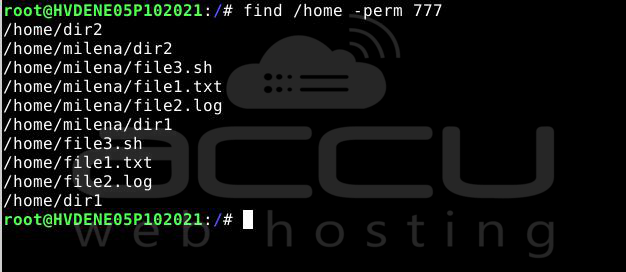
This will list all files and directories under /home with 777 permissions.
You can change the directory in which you need to find the 777 permission. You can also change the file permissions to find the files/ folders.
You can replace /home with any directory you want to scan.
Find All 777 Files and Folders in Your Home Directory
# find $HOME -perm 777

This checks only inside the currently logged-in user's home directory.
Find Only Files with 777 Permissions
# find /home -perm 777 -type f
This will list only files inside /home that have 777 permissions.
Find Only Directories with 777 Permissions
# find /home -perm 777 -type d

This will list only directories inside /home that have 777 permissions.


