
Apache is one of the most widely used web servers, and it offers a variety of features to manage how content is served. One such feature is file and directory indexing, which allows users to see a list of files in a directory when no default file (like index.html or index.php) is present.
By enabling directory indexing, Apache will automatically generate and display an HTML page listing the contents of that directory. This can be useful for sharing files, logs, or resources in a structured and accessible manner—especially in development or download directories.
In this guide, you’ll learn two primary methods to enable file and directory indexing in Apache.
Method 1. Using Apache Configuration File
You can configure indexing directly within Apache's main configuration files, such as httpd.conf or /etc/apache2/apache2.conf.
Step 1: Open the Apache configuration file:
You can edit the global Apache configuration using a command-line text editor.
# vi /etc/apache2/apache2.conf

Step 2: Add the following Directory block:
Insert this code block into the relevant directory path where you want indexing enabled:
<Directory /var/www/example.com/folder>
    Options Indexes FollowSymLinks
</Directory>
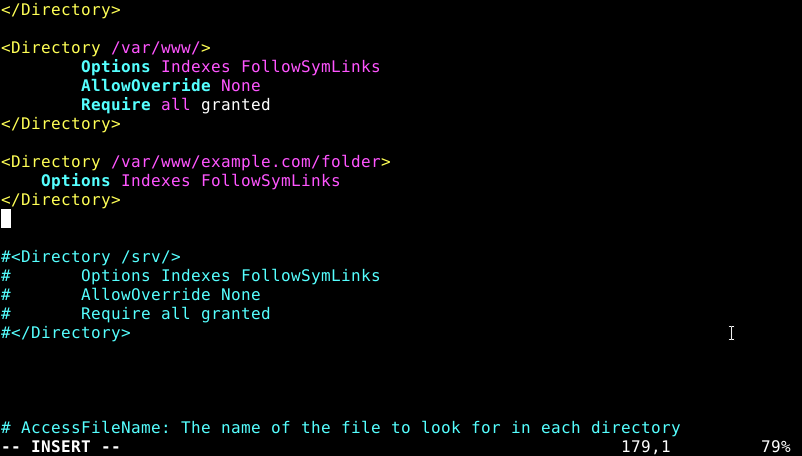
Note: Replace /var/www/example.com/folder with the actual path to your directory.
Step 3: Save and close the file.
Step 4: Restart the Apache HTTP service to apply changes:
# sudo systemctl restart apache2
Method 2: Using .htaccess File
If your Apache server has .htaccess overrides enabled, you can enable indexing without modifying global configuration files.
Step 1: Open or create the .htaccess file in the target directory:
# vi .htaccess
Step 2: Add the following Apache directives:
Options Indexes
DirectoryIndex index.php index.html /example.php
This sets the default directory index files and enables indexing if no index file is found.

Step 3: Save and close the .htaccess file.
Conclusion:
Enabling file and directory indexing in Apache allows visitors to view a list of files and directories when no default document (like index.html) is present. This feature is useful for public file repositories, download directories, or when you want users to browse available content directly.
However, enabling indexing can pose a security risk if sensitive files are exposed. Always review the contents of indexed directories and restrict access where necessary using .htaccess, authentication, or directory-level permissions.


