
If we install the SSL Certificate on a website, it is required to redirect the website from HTTP to HTTPS, or it will still be accessible with insecure HTTP. In order to mitigate that, you can set the URL Rewrite Rule in IIS. This will force the website to redirect to the https. Redirecting the website to the https is useful for Website SEO.
A user will enter http://example.com in the web browser and be redirected to https://example.com, which will help set a secure connection between the user and the website. The following are the steps to set the URL Rewrite Rule.
Step 1: Log in to your server and Open IIS.
Step 2: Select the website and click on URL Rewrite.
Step 3: Click on Add Rule from the Actions tab.
Step 4: In the Add Rule Dialogue Box, click on Blank rule inside Inbound Rules.
Step 5: Set the settings below inside Edit Inbound Rule.
- Name: Add Rule Name.
- Inside Match URL :
(a) Requested URL: Matches the Pattern
(b) Using: Regular Expressions
(c) Pattern : (.*)
(d) Ignore Case should be checked.

Step 6: Expand the Conditions Section >> Logical Grouping >> Match All.
Step 7: Click on the Add Button, and it will open the box to add the condition.
Condition Input: {HTTPS}.
- Check the Input String: Match the Pattern
- Pattern: ^OFF$
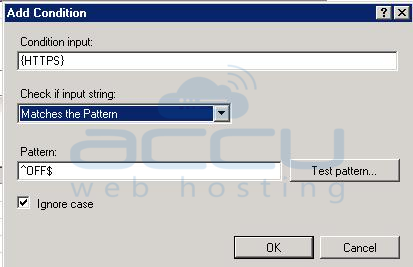
Step 8: Click on the Ok Button.
Step 9: Expand the Action Section.
- Action Type: Redirect
- Action Properties : https://{HTTP_HOST}/{R:1}
- Append Query String: Checked
- Redirect Type: Permanent (301)
- Note: We have selected 301 Permanent Redirection here.
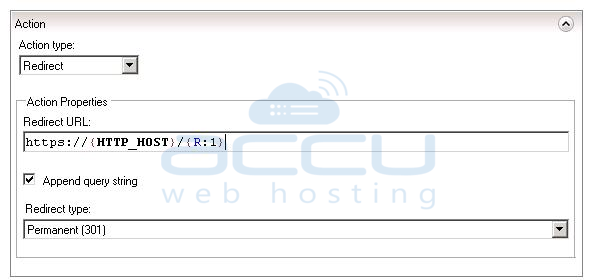
Step 10: Click on the Apply Button from Actions.
Step 11: Now, we will check the added rule in the web.config file of your website. To open these files. Select and Right Click on the Website. >> Explore >> Open the web.config file

There will be the following code inside your web.config file. In case there is no web.config file, you can create and put the code below inside the web.config file and save it to your root directory.
<configuration>
<system.webServer>
<rewrite>
<rules>
<rule name=”HTTPS force”enabled=”true” stopProcessing=”true”>
<match url=”(.*)” />
<conditions>
<add input=”{HTTPS}”pattern=”^OFF$” />
</conditions>
<action type=”Redirect” url=”https://{HTTP_HOST}/{R:1}” redirectType=”Permanent” />
</rule>
</rules>
</rewrite>
</system.webServer>
</configuration>


