
Cron jobs in Linux are used to automate repetitive tasks by scheduling commands to run at specific intervals. They are extremely useful for tasks like backups, log rotation, system monitoring, and time synchronization.
In this guide, we will demonstrate how to sync your Linux VPS time with the WHM server using a cron job and the rdate command. This ensures your system clock stays accurate.
Before that, let us briefly understand the usage of the crone command.
Cron Command:
Every cron command is broken into the following two parts:
[Schedule] [Command to be executed]
For Example: */20 * * * * /command/path
In the above syntax, Command is the command you would like to execute at the scheduled time.
The Schedule is a part that is further broken into five different options as follows:
minute (0 - 59)
hour (0 - 23)
day of the month (1 - 31)
month (1 - 12)
day of the week (Sunday=0 to Saturday=7)
Step 1: Connect to Your Linux VPS via SSH
Use your SSH client to log in as a root or sudo user:
# ssh username@server-ip
Step 2: The Crontab File
Run the following command to create or schedule cron jobs:
# crontab -e
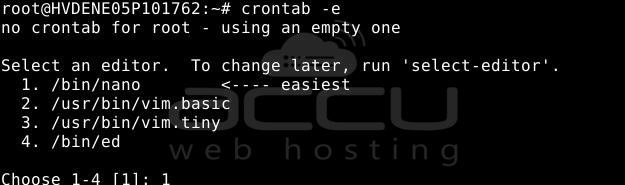
This will open your default text or (usually vi or nano) for scheduling tasks if asked to select, then select 1 to open the default text file.
Step 3: Add the Cron Job for Time Sync
Add the following lines at the bottom of the file:
SHELL=/bin/
HOME=/
MAILTO="mail@domain.com"

# Sync VPS time with the WHM server every hour
*/60 * * * * rdate -s rdate.cpanel.net
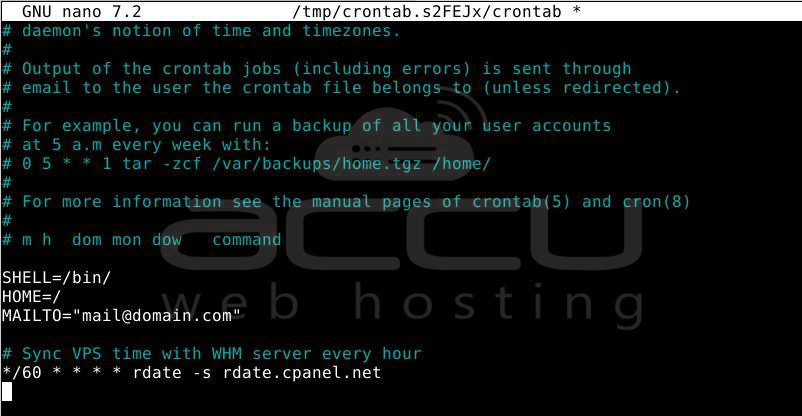
Explanation:
- SHELL=/bin/ → Defines the shell environment for running commands.
- HOME=/ → Sets the working directory.
- MAILTO → Email address where cron output will be sent.
- */60 → Runs every 60 minutes (once an hour).
- rdate -s rdate.cpanel.net → Syncs VPS time with WHM server time.
Step 4: Save and Exit
In nano, press CTRL + O, then Enter to save, and CTRL + X to exit.
In vi, press Esc, then type:wq and press Enter.
Step 5: Verify Your Cron Job
To confirm that your cron job is active, run:
# crontab -l
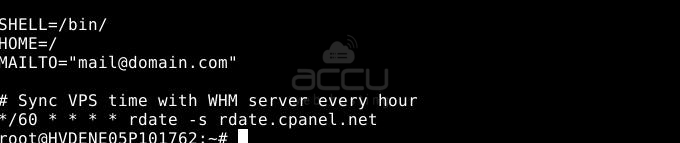
You should see the time sync entry you just added.
Conclusion:
By setting up a cron job with the rdate command, you can automatically sync your VPS time with the WHM server every hour. This prevents issues caused by incorrect system time, such as SSL errors, cron job misfires, and database timestamp mismatches. Cron is a powerful Linux utility that can be used for a wide variety of automation tasks beyond just time synchronization.


