
Learn how to test if an email will bounce before sending. Understand the difference between soft and hard bounces using manual and automated tools, and enhance deliverability.
TL;DR
- Bounces hurt your reputation and email ROI
- You can catch most of them before you send
- Hard bounces = remove. Risky = test or segment
- Check your list regularly—don't set and forget
- For quick single checks: use the AccuWeb Hosting’s Email Checker
- For a large email list, use Bulk Email Verification tools
Why Email Bounces Are Threats?
You are about to send a big campaign, maybe a product launch or Black Friday sale announcement. You have spent hours keeping everything perfect and polished. However, once the campaign is actually out, you start receiving the bounce reports. Not a few bounces, but dozens, hundreds. And bounce rate? Going over 5%.
This might feel annoying, but it’s more than that. It’s dangerous!
Most Email Service Providers (ESPs) monitor your bounce rates. Some popular services flag accounts with a bounce rate over 5%. More to that, if there are too many hard bounces, they can even temporarily suspend or permanently ban your account.
More importantly, high bounce rates also harm your sender reputation, and once that reputation declines, your email placements will also suffer. Your emails will start landing in the spam folder, even for the people who want to hear from you.
The good thing? Most email bounces are entirely avoidable.
So... What Exactly Is an Email Bounce?
Let’s simplify it. A bounce happens when your email can’t reach the recipient’s inbox. It gets rejected, either temporarily or permanently, by the receiving server.
Accordingly, there are two types of bounces:
1. Hard Bounce
These are permanent failures. The email address simply doesn’t exist, or the domain is invalid. No amount of retrying will fix it.
2. Soft Bounce
These are temporary issues. The recipient's inbox might be full. Their mail server could be down. Or maybe your message was too large.
SMTP Error Examples
|
Type |
Code |
Message |
|
Hard Bounce |
550 5.1.1 |
User unknown/email address doesn’t exist |
|
Hard Bounce |
550 5.4.1 |
Domain not found |
|
Soft Bounce |
452 4.2.2 |
Mailbox full |
|
Soft Bounce |
421 4.3.0 |
Temporary system failure – try again later |
These codes are returned by receiving servers when they reject a message. Once you know how to interpret them, you can tell why the email bounced and whether it's worth retrying.
Can You Really Predict If an Email Will Bounce?
Here’s the honest truth: you can’t catch every bounce before it happens. But you can catch most of them, especially the ones that hurt your deliverability the most: hard bounces.
And the better your checking method, the more you prevent bad emails from getting through.
Speaking of better checking methods, our Email Checker Tool is one of them. It’s fast, accurate, and doesn’t require any login or setup. It will give you immediate insight into whether that email is valid or not.
Ways to Check If an Email Will Bounce
You’ve got email addresses, and you want to know which ones are safe to send to. Here are three smart ways to find out:
1. Use AccuWeb Hosting’s Free Email Checker Tool
For one-time checks or even routine email hygiene, this tool does the work for you.
Here’s how you can use the tool:
Step 1. Visit the Email Checker Tool page.
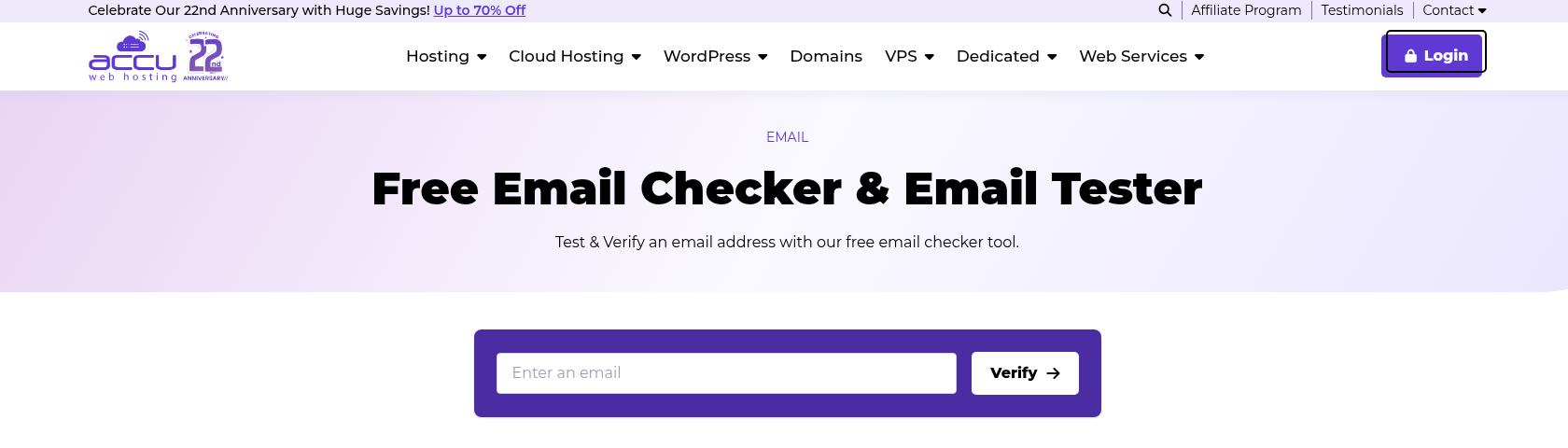
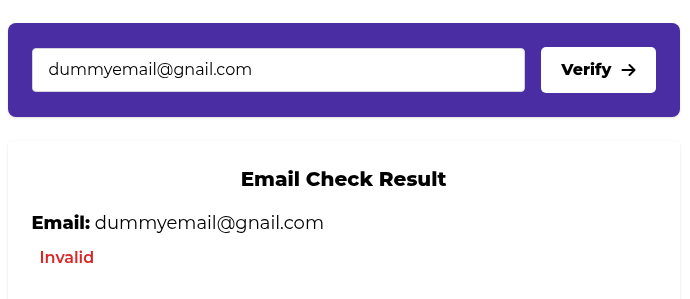
Step 2. Enter the email you want to verify into the search box and click “Verify”.

Step 3. The tool will show the result, whether the email is valid or invalid.
What makes it better?
- No signup required
- Fast and accurate results
- Privacy-respecting (we don’t store your inputs)
- Free to use
It’s ideal for small business owners, marketers, or developers who need a simple tool that just works.
2. Bulk Verification for Full Email Lists
When you’ve got thousands of emails and revenue riding on deliverability, you can’t afford to guess. Bulk Email Verification tools let you upload a complete email list and check:
- Which addresses are valid
- Which ones are risky (accept-all, role-based, disposable, etc)
- Which should be removed immediately
We’ll cover exporting clean lists and how to act on those results in a bit, but for now, know this:
The earlier you check, the safer your campaign will be.
3. Manual Checks (Good for Quick Spot-Checks)
If you only have a few emails, you can do some of this yourself.
Spelling + Formatting
Look out for obvious errors like gnail.com, missing @, or no domain.
MX Record Lookup
Use a free tool like AccuWeb Hosting’s DNS Lookup to see if the domain has valid email servers.
SMTP Test
You can connect to the recipient's mail server using tools like telnet or SMTPDiagTool and run a handshake. Note that some servers block this kind of probing, and it can trigger spam detection.
If you get a 550 or similar error here, it's a dead end.
These techniques are time-consuming and technical, so they don’t scale well, but they're handy when you want to double-check a specific contact.
What Do You Do With Risky or Unknown Emails?
Let’s say you’ve run your list through an email checker, and now you have a list of emails with results marked:
- Deliverable
- Undeliverable
- Risky
- Unknown
Sounds simple - but what now?
|
Result Type |
What It Means |
What You Should Do |
|
Deliverable |
The address is valid and responds to verification requests. |
Keep it. Safe to email. |
|
Undeliverable |
Either the mailbox doesn’t exist, or the domain is invalid. |
Remove it from your list. Will hard bounce. |
|
Risky |
Catch-all domains, role-based addresses (like info@), or temporary email services. It may exist, but with limitations. |
Depends on your campaign. Segment them for testing. |
|
Unknown |
The server didn’t respond, or verification was inconclusive. This can happen with some private or aggressive mail servers. |
Retry later, or move to a test segment. |
Understanding the Subtypes of “Risky”
This is where many tools oversimplify, and it’s also where you can be smarter than your others.
Role-Based (e.g., admin@, support@)
Great for transactional emails, not so much for personal outreach. Keep them only if your content applies to a team, not an individual.
Disposable
Temporary inboxes that are used for signups or spam evasion. These addresses rarely convert and can tank your open rates. Remove them on sight.
Accept-All Domains
The domain accepts mail for any address, whether it exists or not. It could be legit… or it could be a black hole. Segment these for lower-priority or test campaigns.
Free Providers
Gmail, Yahoo, Outlook, etc. It doesn’t mean it’s risky; it just gives you insight into your audience.
How Often Should You Clean Your List?
Even if your list is squeaky clean today, it won’t stay that way. Emails decay—on average, 2% to 3% of email addresses become invalid every month.
If you’re not verifying regularly, your list is quietly rotting.
Here's a healthy flow:
- Every 3–6 months: Minimum for any business that sends email regularly
- Before major campaigns: Like holiday promos, product launches, or reactivation blasts
- After long periods of inactivity: Haven’t emailed in 6+ months? Clean it first
- At the point of capture: Use an API to verify emails at signup
Conclusion: Email Marketing is Not About Taking Chances
You don’t need a thousand-dollar CRM or a deliverability consultant to keep your bounce rate low. You just need a good process and a reliable tool.


