
What is ConfigServer eXploit Scanner (CXS)?
ConfigServer eXploit Scanner (CXS) is a Linux-based security tool that identifies potential server vulnerabilities—developed by ConfigServer Services. It provides of security solutions for Linux-based web hosting servers. CXS scans servers for suspicious files, scripts, and commands that could indicate a security breach. It employs a combination of signature-based detection and heuristics to detect both known and undiscovered threats.
This article will explain how to change the email address for the CXS report mail.
Step 1: Log into the WHM panel via root user.
Step 2: Navigate to Plugin => ConfigServer eXploit Scanner.
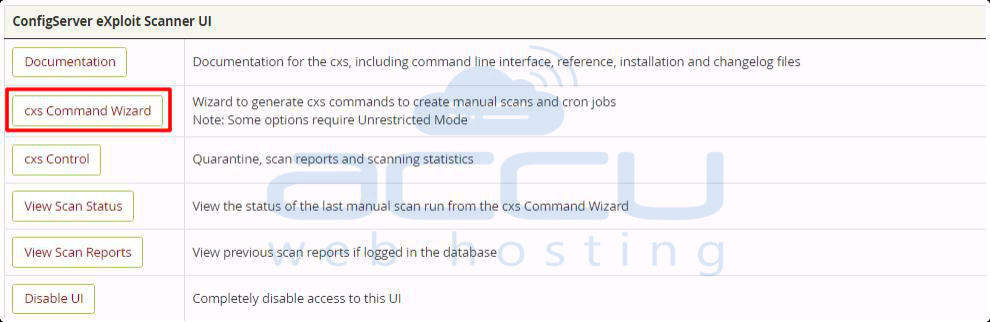
Step 3: Click on the cxs Command Wizard under the ConfigServer eXploit Scanner UI section.
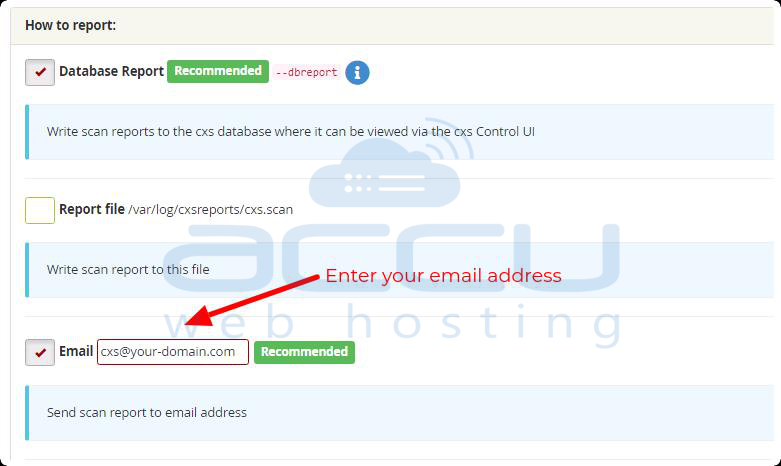
Step 4: Enter the email address where you would like to receive a scan report beside the Email field.
Step 5: Save the changes.

You can also change the mail address for the CXS report mail through the command line.
Step 1: Connect your server via SSH using the root user.
Step 2: Open file named cxscgi.conf via an editor like nano or vim.
/etc/cxs/cxscgi.conf
Stpe 3: Look for the parameter named mail, which is used to specify the email address for report delivery. It typically looks like this:
Step 4: Replace the existing email address with the new one. For example, if the new email address is [email protected], update the line as follows:
Step 5: Save the file.
To apply the changes, restart the CXS service:
sudo systemctl restart cxs
By following these steps, you should be able to change the email address for the CXS report mail via the command line.


