
MySQL and MariaDB are popular database management systems that various applications and websites use to store and manage data. Knowing the port number MySQL or MariaDB uses to access databases remotely and configure applications or websites is important. Although the default port(3306) is commonly used. However, it may have been customized during installation.
This article explains several methods for finding the port number on which MySQL/MariaDB is running on an Ubuntu server.
Method 1: From the MySQL/MariaDB Configuration Files:
MySQL's configuration file, typically named my.cnf or my.ini, stores various settings, including the port number. The configuration file is commonly located in the /etc/mysql/ directory, but the location varies depending on the operating system. If you are unable to find the configuration file, contact your server administrator.
Step 1:Connect your server through SSH using the root user.
Step 2:Open the configuration file using a text editor like Nano or Vim.
Command: nano /etc/mysql/my.cnf
Look for the "port" directive in the configuration file. It specifies the port number on which the MySQL/MariaDB server listens.The value after "port =" is the port number. In the example above, MySQL/MariaDB is running on port 3306.
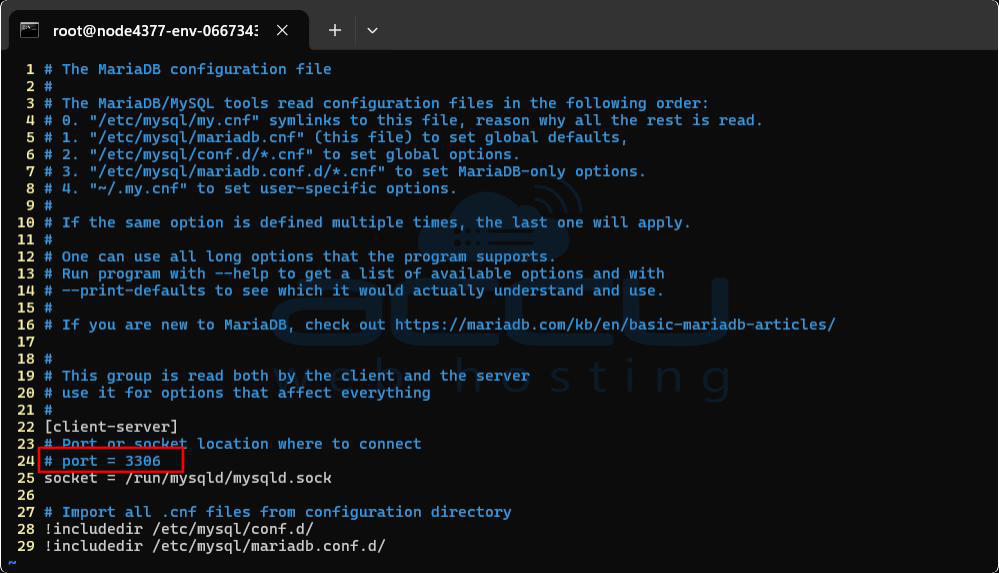
You can also use the grep command to extract the port number from the configuration file.
Command: grep " port " /etc/mysql/my.cnf

Method 2: Using MySQL/MariaDB Client:
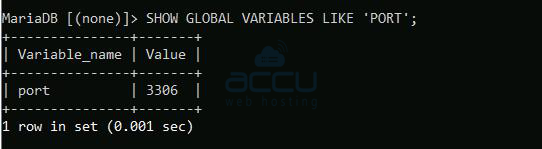
If you can access the MySQL/MariaDB command-line interface, you can connect to the MySQL server and retrieve information about the port. You can extract the port information from the definition of global variables.
ep 1:Connect your Mysql/MariaDB server.
ep 2:Execute the following command in the terminal.
Command: SHOW GLOBAL VARIABLES LIKE 'PORT';
You see the port number in the output.
Output:
+---------------+-------+
| Variable_name | Value |
+---------------+-------+
| port | 3306 |
+---------------+-------+
1 row in set (0.001 sec)
Method 3: Using the netstat Command:
Netstat is a command-line tool that displays network-related information, including active connections and listening ports. The netstat command lists all listening ports and theirassociated processes.
Step 1:Connect your server through the SSH using the root user.
Step 2:Execute the following command ina terminal window.
Command:netstat -tulpn | grep mariadbd

This command will display the MySQL/MariaDB listening port number and the process ID(PID).
Method 4: Using the lsof Command
Like the netstat command, lsof will display the active connections and associated ports.
Command:lsof -i -P -n | grep LISTEN | grep mariadb

In the output, you will see the Mysql/MariaDB port.
Knowing the port on which MySQL/MariaDB is running is essential for managing and troubleshooting database connections. By following the methods mentioned in this article, you can quickly find the port number of the MySQL/MariaDB server on your Ubuntu system. Whether you prefer inspecting configuration files or using command-line utilities like netstat and lsof, these methods offer flexibility in finding the necessary information.
You can contact us through the ticket or chat if you experience any difficulty in finding the Mysql/MariaDB port.


