
What if your conversation with an AI unexpectedly showed up on Google for anyone to see? Recently, some ChatGPT users found that their shared chats were appearing in search results, showing more than they expected. It wasn’t caused by a hack or leak, but by a small and surprising setting. ChatGPT has now removed this feature to make sure it doesn’t happen again.
Thousands of ChatGPT Conversations Visible on Google
In late July 2025, cybersecurity researchers and journalists uncovered a startling reality: thousands of ChatGPT conversations were appearing in public search results via Google, Bing, and other engines. A simple search query like: site:chatgpt.com/share +[keyword]. Revealed over 4,500 indexed shared conversations, some of which contained personal, sensitive, or even confidential information.
The researchers employed “Google dorking,” targeting the specific URL path (chatgpt.com/share) along with keywords, which revealed genuine user conversations spanning personal job searches, mental health discussions, and more.
What Went Wrong?
OpenAI added a feature that lets users share their ChatGPT conversations so they can be found by search engines like Google. But some things didn’t go as planned, causing private chats to become public by mistake:
1. Confusing Options and Labels
The option called “Make this chat discoverable” wasn’t very clear. Many users thought just sharing the link meant only people with the link could see it. They didn’t realize this setting could make their chat show up in Google search results.
2. Search Engines Keep Showing Old Links
Even when users deleted their shared chats, search engines still showed those pages for some time. It took a while for Google and others to remove them, so private info stayed online longer than expected.
3. Users Trusted the AI Too Much
People shared personal details in their chats, thinking these conversations were private. When those chats accidentally became public, it showed that OpenAI needed to be clearer and protect user privacy better.
How ChatGPT’s Sharing Feature Works
Here’s what users had to do to make a ChatGPT conversation public, sometimes without fully realizing it:
1. Start a Chat: Have a conversation with ChatGPT, like asking a question or getting help with something.
2. Click the “Share” Button: At the top or bottom of the chat, users can click the "Share" button to create a shareable link.

3. Click “Create Link”: This generates a URL (e.g., chatgpt.com/share/...) that can be shared with others.
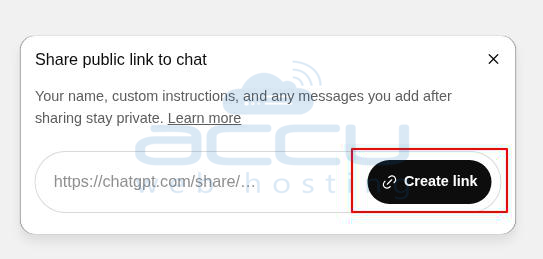
4. Toggle “Make this chat discoverable”: A small checkbox or toggle appeared with this label.
- If turned on, search engines like Google could index the chat.
- If left off, only people with the link could view it, and it wouldn't appear in search results.
5. Share the Link: Once shared, the conversation was publicly accessible if the discoverable option was turned on.
Why This Was a Problem
Many users clicked through quickly, not understanding what "discoverable" meant. Since the feature was easy to miss or misunderstand, people accidentally allowed search engines to list their private chats, some of which included personal info like resumes, job applications, or emotional topics.
Tips to Protect Your Data When Sharing AI-Generated Content
1. Avoid Sharing Sensitive Information: Don’t include personal details like your name, address, phone number, or workplace in AI conversations, especially if you plan to share them. Treat AI chats like public forums—assume anything you type could be seen by others.
2. Use Private Sharing Methods: Instead of sharing a public link, copy and paste the text or take a screenshot to share privately via email or secure messaging apps like Signal or WhatsApp. This keeps your content off the internet.
3. Check for Indexed Chats: Search Google for “site:chatgpt.com/share” followed by your name or unique keywords from your chats to see if they’re publicly visible. For example, search “site:chatgpt.com/share Jane Smith” to check for exposed conversations.
4. Manage Shared Links: In ChatGPT, go to Settings > Data Controls > Shared Links to view and delete any shared conversations. Removing links prevents further access, though it may take time for search engines to update.
5. Understand Platform Settings: Before sharing any AI-generated content, read the platform’s sharing options carefully. Look for terms like “public,” “discoverable,” or “indexed” to avoid accidental exposure.
6. Stay Updated on Privacy Policies: AI platforms often update their features and privacy settings. Check OpenAI’s blog or help center regularly to stay informed about how your data is handled.
The ChatGPT shared link issue shows how easy it is to share more than you meant to. OpenAI has removed the “Make this chat discoverable” option, but it’s still smart to be careful. Always check what you share and understand the settings to keep your information private.


