What is SQL Error 1064?
SQL Error 1064 is a common issue encountered when working with SQL databases. It typically indicates a syntax error in the SQL query you have written. In simpler terms, the database management system is having trouble understanding and interpreting the command you provided.
If you encounter this error, it indicates a problem with your SQL statement that the database engine cannot execute correctly. Error messages usually contain valuable information to help identify the problem. However, it's quite hard to understand especially for those new to SQL
To fix this error, it is important to pay close attention to the syntax conventions of the particular database you are using and carefully review your SQL queries. This includes checking for missing or misplaced punctuation, ensuring that keywords and table/column names are spelled correctly, validating the correct structure of queries, and more.
It's also helpful to break down your query into smaller parts and test them individually to pinpoint the specific section causing the error. By gradually building and executing your query step by step, you can identify the problematic portion and make the necessary adjustments.
Overall, SQL Error 1064 indicates a syntax hiccup in your SQL query, and with some careful examination and adjustment, you can overcome it and successfully execute your desired database operation.
Below, you can see a screenshot of phpMyAdmin producing the error 1064.

In this query, the error is caused by a missing closing quotation mark (') after the date value '2023-06-28. This syntax error will trigger MySQL Error 1064 because the database engine cannot interpret the query correctly.
Why the MySQL 1064 Error Occurs?
MySQL Error 1064 occurs due to syntax errors in the SQL query you`ve written. It happens when the structure or format of your query does not follow to the proper syntax rules defined by MySQL. In simpler terms, the database engine encounters a problem understanding and interpreting the command you provided.
There are several reasons why this error may occur:
1. Missing or misplaced punctuation
Forgetting to include necessary punctuation marks such as commas, parentheses, quotation marks, or semicolons can lead to syntax errors. These marks help MySQL understand the structure of your query and its various components.
2. Misspelled keywords, table names, or column names
If you accidentally misspell a keyword, table name, or column name in your query, MySQL will not recognize it and trigger Error 1064. It's crucial to ensure accurate spelling and proper case sensitivity.
3. Invalid or unsupported statements
MySQL has specific rules regarding the usage of statements and functions. Using unsupported statements or functions in your query can result in Error 1064. Consulting the MySQL documentation will help you identify which statements and functions are valid for your version of MySQL.
4. Incorrect use of quotation marks
Quotation marks are essential for enclosing strings or date values in SQL queries. Forgetting to include opening or closing quotation marks, or using the wrong type of quotation marks (single or double), can cause syntax errors.
5. Improper use of reserved words
MySQL has reserved words that have predefined meanings and cannot be used as identifiers (e.g., table or column names) unless properly escaped. Using reserved words without escaping or using them in an inappropriate context can lead to Error 1064.
How to resolve MySQL error 1064?
1. Check If You Are Using Any Reserved Words:
If you an error message with the code 1064 in MySQL, it is possible that you utilized special wording. These are known as "reserved words," and examples include ALTER, TABLE, SELECT, and so on.
In MySQL, reserved words have specific meanings. They cannot be used as names for tables, columns, or other components of a MySQL database without resulting in errors. The SQL syntax issue produced by using the reserved word alter as a table name is shown below.

To fix this error, check for any reserved words used in queries. See the online MySQL manual for a complete list of these words. If you are using a reserved word, change it to another word.
If you wish to use the reserved word, use backticks ('). These backticks tell MySQL to consider it as a name rather than a reserved term.
I.e.: `select`

2. Carefully examine the error message:
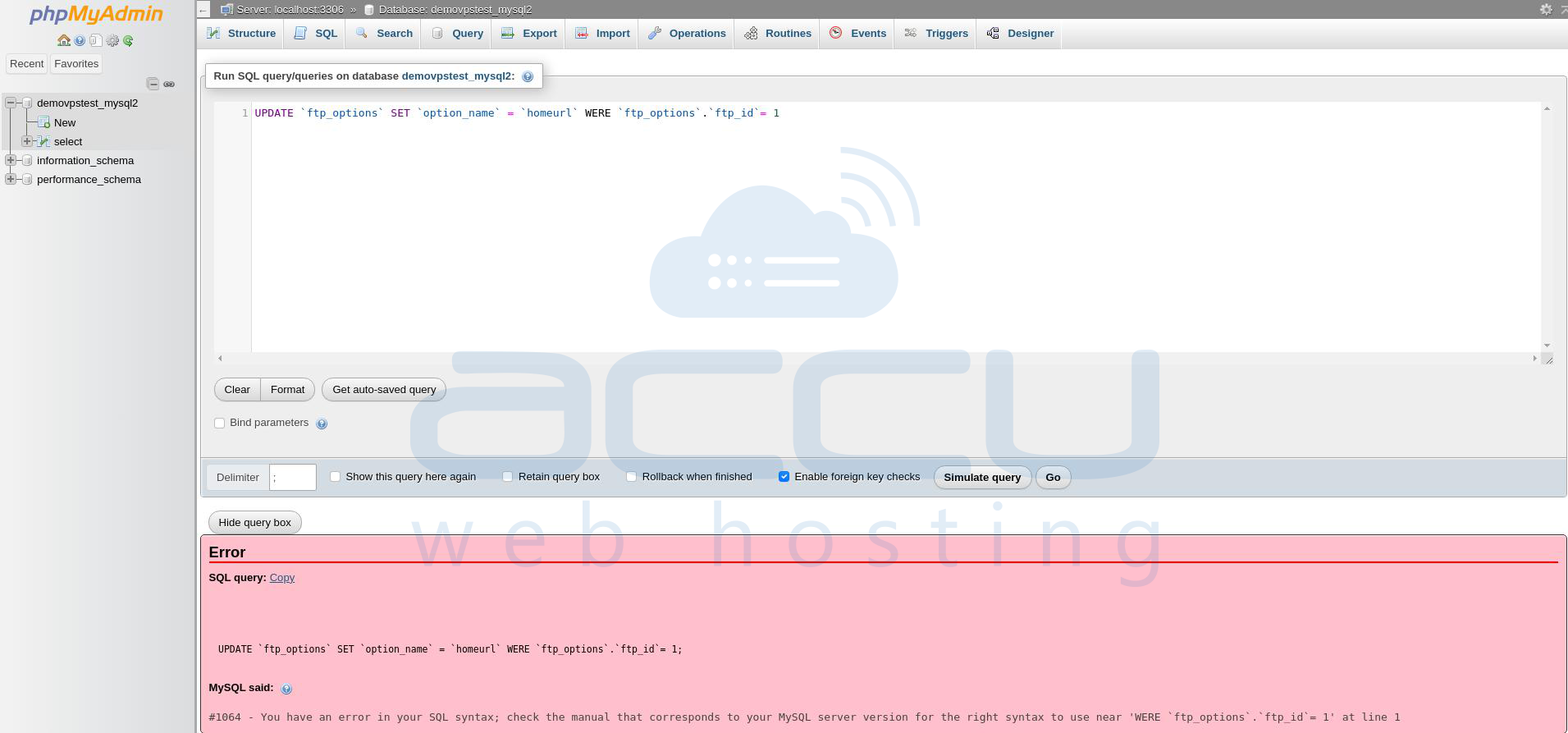
When you encounter Error 1064, MySQL provides an error message that can provide valuable clues about the issue. Take the time to carefully review the error message, as it may indicate to the specific area of the query that is causing the issue.
Below is an example of phpMyAdmin generating the error and highlighting the problematic section.
3. Review the query for syntax errors:
Syntax errors are the primary cause of Error 1064. Look closely at your SQL query for missing or misplaced punctuation such as commas, parentheses, and quotes. Verify that keywords, table names, and column names are spelled correctly. Ensure that the query adheres to the syntax rules defined by MySQL.
The example from the previous step shows that the problematic part of the SQL command is:
'WERE `ftp_options`.`ftp_id`= 1' at line 1
A closer look at this line reveals that the problem is caused by a misspelling of the "WERE" clause. The missing 'H' was the cause of the error as the correct format is 'WHERE'.
Once you made these changes, your SQL query will be executed successfully.
4. Add Missing Data:
Missing data is another typical reason for SQL Error 1064. If you try to insert data into a database with necessary fields but leave certain entries empty, you will receive a SQL Error 1064.
To resolve this problem, confirm that you have entered all of the necessary details. You may have to manually enter the missing data.
5. Replace Obsolete Commands:
Some deprecated commands (that were scheduled for removal but were still allowed for some time) will eventually be deprecated. This means that the command in your SQL statement is no longer valid. One of the most common commands is the TYPE command. This has been deprecated since MySQL 4.1, but has been completely removed since version 5.1, resulting in a syntax error. The TYPE command has been replaced by the ENGINE command. Below is an example of an older version.
CREATE TABLE accu (i INT) TYPE = INNODB;
When we tried to execute the above query in the new version of MySQL, it will have resulted in a 1064 error as below:

This should be replaced with the new command as follows:
CREATE TABLE accu (i INT) ENGINE = INNODB;
Now, we will execute the above query with the newly updated command ENGINE:

6. Seek Assistance from the community:
If you have tried all the above steps and still can’t fix SQL Error 1064, don't hesitate to seek assistance from the MySQL community. Online forums, discussion boards, or even professional support channels can be great sources of help. Explain your issue clearly and provide relevant details, such as the query causing the error and the error message itself.
Conclusion:
SQL Error 1064 is a common error encountered by SQL programmers. Syntax errors, obsolete commands, incorrect data types, missing data, or other mistakes in the SQL code usually cause this error.
By following these steps, you should be able to resolve MySQL Error 1064 and get your queries running smoothly again. Remember to double-check your syntax, consult documentation when needed, and reach out for support if necessary.
